

Job Tracker Helper

Overview
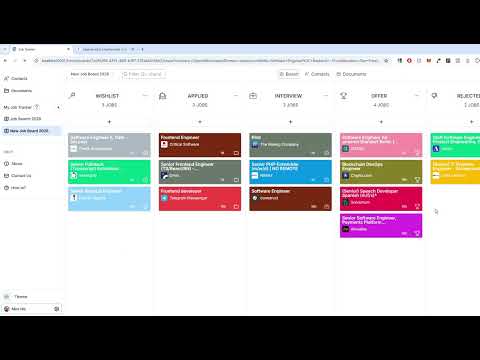
Extract job posts details like title, company, location, salary, and description in to your Job Tracker app.
Detailed Description 1. Opening Hook Tired of copying and pasting job details? Job Tracker Helper automates the entire process with a single click. 2. Main Description **What It Does:** Job Tracker Helper is your intelligent job search companion that eliminates tedious manual data entry. While browsing LinkedIn or Indeed, simply click the extension icon and all job details—title, company, location, salary, and full description—are instantly saved to your Job Tracker application. **Key Features:** ✅ **One-Click Job Capture** No more copying and pasting. Extract complete job details instantly from any LinkedIn or Indeed posting. ✅ **Smart Tab Management** Automatically reuses your existing Job Tracker tabs instead of cluttering your browser with duplicates. ✅ **Intelligent Salary Detection** Captures real compensation data while filtering out promotional text and zero values. Supports multiple formats: $100K/yr, €55K-€65K, "Salary: Up to 70,000 EUR" ✅ **Complete Data Preservation** Never lose information. Full job descriptions up to 10MB are stored securely—no truncation. ✅ **Company Logo Capture** Automatically fetches company logos when available for a more visual job tracking experience. ✅ **Board Selection** Choose which job board to save to, or let it go to your default board automatically. ✅ **Real-Time Sync** Changes appear instantly in your Job Tracker dashboard. No delays, no confusion. **Perfect For:** - Active job seekers tracking multiple applications - Career changers exploring new opportunities - Recruiters managing candidate pipelines - Anyone who wants to spend less time on data entry and more time on actual applications **How It Works:** 1. Browse LinkedIn or Indeed job postings 2. Click the Job Tracker Helper icon 3. Select your target board (optional) 4. Click "Quick Save" 5. Done! View it in your Job Tracker dashboard **Why Job Tracker Helper?** - **Save Time**: Reduce manual data entry by 90% - **Stay Organized**: All jobs in one place with full details - **Never Miss Details**: Complete descriptions and salary information captured - **Secure & Private**: Direct browser-to-app communication, no intermediary servers - **Modern & Fast**: Built with the latest web technologies for speed and reliability **Platform Support:** Currently optimized for LinkedIn and Indeed. Works with most standard job posting formats. More platforms coming soon! **Requirements:** - Free Job Tracker account (sign up at [your-domain]) - Chrome or Edge browser - Active internet connection Transform your job search from tedious to effortless. Install Job Tracker Helper today! ### Version Information **Current Version**: 1.6.7. ### Fixed - **Quick Save Reliability** - Quick Save could occasionally try to open the wrong page instead of your actual Job Tracker app. It now always opens the correct, live Job Tracker site. - **Job Description Not Saving in Some Cases** - When Job Tracker was already open in another tab, Quick Save would sometimes save the job without its description. Descriptions now save correctly every time, whether Job Tracker was already open or not. - **Improved LinkedIn Location Detection** - Some LinkedIn listings (e.g. those showing "Over 100 applicants" instead of "X people clicked") weren't getting their location captured. Location detection has been broadened to catch more listing formats, and is now more accurate when it has to fall back to reading the job description.
0 out of 5No ratings
Details
- Version1.6.7
- UpdatedSeptember 21, 2026
- Offered bychamkoriyski
- Size7.84MiB
- LanguagesEnglish (United States)
- Developer
Email
chamkoriyski@gmail.com - Non-traderThis developer has not identified itself as a trader. For consumers in the European Union, please note that consumer rights do not apply to contracts between you and this developer.
Privacy

Job Tracker Helper has disclosed the following information regarding the collection and usage of your data. More detailed information can be found in the developer's privacy policy.
Job Tracker Helper handles the following:
This developer declares that your data is
- Not being sold to third parties, outside of the approved use cases
- Not being used or transferred for purposes that are unrelated to the item's core functionality
- Not being used or transferred to determine creditworthiness or for lending purposes
Support
For help with questions, suggestions, or problems, please open this page on your desktop browser