


Overview
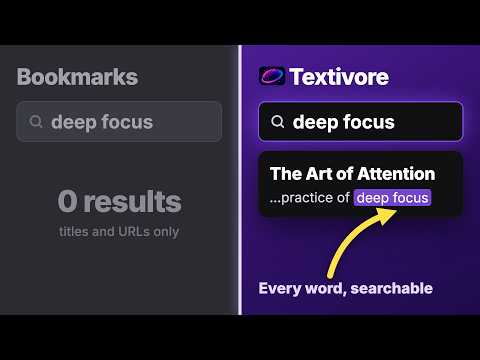
Pocket alternative: save articles to a reading library with full-text search, tags, and JSON export. One-click Pocket import.
Save articles and web pages to a reading library you can actually use. Click the Textivore toolbar icon, choose “Save to Textivore” from the right-click menu, or press Ctrl+Shift+S (Cmd+Shift+S on Mac). Textivore extracts the readable article content only when you ask it to save. In your Textivore library, you can: • Search the full text of saved articles • Organize articles with tags • Read in a clean, focused view • Track read and unread articles • Export your library to JSON anytime Switching from another read-later app? Textivore is a Pocket alternative with one-click import: upload your Pocket export file at textivore.com/import and your articles, tags, archive status, and original save dates come across intact. Former Omnivore users will find the same things Omnivore was loved for: full-text search and data you can always export. Unlike Instapaper, full-text search is included on the free plan. Textivore is designed for articles, blog posts, documentation, tutorials, and long-form web pages. It preserves useful text, images, code blocks, lists, and links when available. Privacy by design: Textivore does not inject extraction scripts passively into every page you visit. The extension accesses the current page only after you explicitly choose to save it. Works with a Textivore account. A free Preview plan is available. Privacy policy: https://textivore.com/privacy
0 out of 5No ratings
Details
- Version1.2.0
- UpdatedOctober 8, 2026
- Size128KiB
- LanguagesEnglish
- DeveloperYevhenii ViktorovWebsite
Nyvska str, 7 apt. 45 Kyiv, місто Київ 01001 UAEmail
hello@gleamr.ioPhone
+380 99 030 1131 - TraderThis developer has identified itself as a trader per the definition from the European Union and committed to only offer products or services that comply with EU laws.
Privacy

Textivore: Save Articles & Read Later has disclosed the following information regarding the collection and usage of your data. More detailed information can be found in the developer's privacy policy.
Textivore: Save Articles & Read Later handles the following:
This developer declares that your data is
- Not being sold to third parties, outside of the approved use cases
- Not being used or transferred for purposes that are unrelated to the item's core functionality
- Not being used or transferred to determine creditworthiness or for lending purposes
Support
For help with questions, suggestions, or problems, visit the developer's support site