

Subword:YouTube 雙語字幕,邊看邊學英文
ExtensionEducation

Overview
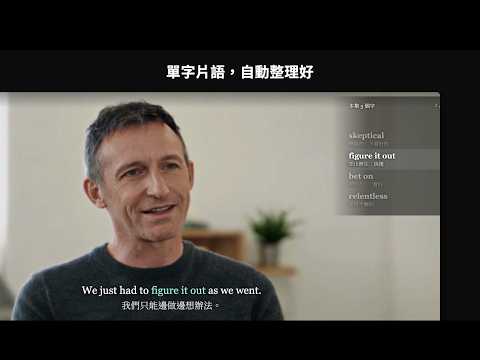
看 YouTube 時顯示中英字幕,自動整理這部片的單字和片語,看完一鍵存進字庫。
看 YouTube 時按播放器右下角的「S」,Subword 即可: - 顯示中英雙語字幕,字級、位置都能調整 - 在影片右側列出這一集的重點單字與片語,跟著影片進度走 - 點字幕上任何一個字就能查意思 - 滑動到字幕自動暫停影片,方便學習 - 看完出「總複習」,可存不熟的單字進 HiShadow App 的字庫 依你的程度(初級、中級、中高級)挑單字,已經會的不會一直出現
0 out of 5No ratings
Details
- Version0.1.3
- UpdatedNovember 5, 2026
- FeaturesOffers in-app purchases
- Offered bymonaworkon@gmail.com
- Size61.49KiB
- Languages中文(台灣)
- Developer黃意庭
松山路 267 號 信義區, 台北市 110044 TWEmail
mamaspeaker1@gmail.comPhone
+886 908 981 023 - TraderThis developer has identified itself as a trader per the definition from the European Union and committed to only offer products or services that comply with EU laws.
Privacy

Manage extensions and learn how they're being used in your organization
Subword:YouTube 雙語字幕,邊看邊學英文 has disclosed the following information regarding the collection and usage of your data. More detailed information can be found in the developer's privacy policy.
Subword:YouTube 雙語字幕,邊看邊學英文 handles the following:
Personally identifiable information
Authentication information
User activity
Website content
This developer declares that your data is
- Not being sold to third parties, outside of the approved use cases
- Not being used or transferred for purposes that are unrelated to the item's core functionality
- Not being used or transferred to determine creditworthiness or for lending purposes
Support
For help with questions, suggestions, or problems, visit the developer's support site