Item logo image for Glass for Google Images

Glass for Google Images

Item media 5 (screenshot) for Glass for Google Images
Item media 1 (screenshot) for Glass for Google Images
Item media 2 (screenshot) for Glass for Google Images
Item media 3 (screenshot) for Glass for Google Images
Item media 4 (screenshot) for Glass for Google Images
Item media 5 (screenshot) for Glass for Google Images
Item media 1 (screenshot) for Glass for Google Images
Item media 2 (screenshot) for Glass for Google Images
Item media 3 (screenshot) for Glass for Google Images
Item media 4 (screenshot) for Glass for Google Images
Item media 5 (screenshot) for Glass for Google Images

Overview

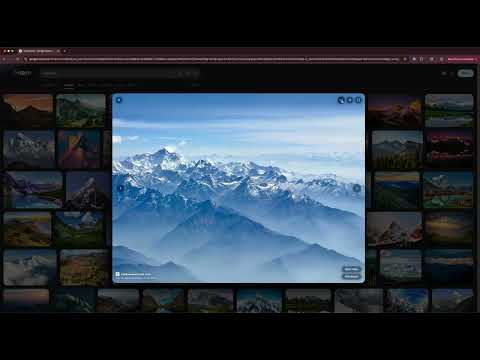
A cleaner Google Images. Uniform card grid and a glass overlay replace Google's default image viewer.

Glass replaces Google Images with a clean card grid and a fullscreen overlay viewer. Source labels, related searches, and sponsored tiles are moved out of the grid so you see only the images. Card Grid: Results are presented as rounded cards in a uniform grid that gently lifts on hover. The grid stays focused on the images and consistent as new results load. Glass Overlay Viewer: Click any image to open it in a centered fullscreen viewer instead of Google's side panel. A glass card sits on a dimmed blurred backdrop with smooth open and close animations. Move through results with the arrow keys without leaving the viewer. Info Panel: Hover the viewer to see more information about the image along with quick actions: open image, visit source, save image, copy image, copy image URL, and search by image. Controls fade out when you move the cursor away. Keyboard Shortcuts: Left arrow: previous image Right arrow: next image F: toggle fullscreen I: pin info panel Esc: close viewer Privacy: No data collection. No tracking. No background requests. The extension makes a network request only when you explicitly choose to copy an image, fetching that specific image so it can be placed on your clipboard. Nothing runs automatically.

Details

  • Version
    1.0.0
  • Updated
    May 6, 2026
  • Size
    53.43KiB
  • Languages
    English (United States)
  • Developer
    Website
    Email
    dev@carlosvilla.xyz
  • Non-trader
    This developer has not identified itself as a trader. For consumers in the European Union, please note that consumer rights do not apply to contracts between you and this developer.

Privacy

Manage extensions and learn how they're being used in your organization
The developer has disclosed that it will not collect or use your data. To learn more, see the developer’s privacy policy.

This developer declares that your data is

  • Not being sold to third parties, outside of the approved use cases
  • Not being used or transferred for purposes that are unrelated to the item's core functionality
  • Not being used or transferred to determine creditworthiness or for lending purposes

Support

Related

GNTD: Glass New Tab Dashboard

4.8

Glass-style new tab dashboard. Search uses Chrome Search API and respects the user's default search engine.

Google Maps QuickClick - Search to Maps

4.9

Instantly open Google Maps from the Search page by clicking on a map image or the Maps tab.

Screen Splitter - Tab Resize - Split Screen

5.0

Split Screen for Google Chrome. Splits your screen into multiple windows. Screen Splitter Multi Monitor support.

OKIO Mirror Image Corrector

3.3

The OKIO Mirror Image Corrector extension allows you to correct the adjusted image that occurs when using Google Meet.

Google Maps Dark Mode Desktop

4.8

Turn on dark mode for Google Maps on desktop. Clean night theme that keeps roads and colors clear.

Old Images Redirect: Disable Google Lens

3.5

Revert Google Images to classic view & disable Lens for a simpler, nostalgic search experience.

Google Search AI Image Hider

4.0

Hides common AI image hosts from Google Image search results

Bing Visual Search

4.0

Search what you see. Instantly identify images, products, places, and more with Bing Visual Search.

Reverse Image Search

3.3

a powerful capturing reverse image search tool built on top of TinEye/Google Images engines

Reverse Image Search Tools

4.2

Instantly search by image using all major reverse image search tools — Google, Bing, Yandex & TinEye.

Screenshot for Street View

3.3

Effortlessly screenshot Google Street View

Search by Image

4.1

A powerful reverse image search tool, with support for various search engines, such as Google, Bing, Yandex, Baidu and TinEye.

GNTD: Glass New Tab Dashboard

4.8

Glass-style new tab dashboard. Search uses Chrome Search API and respects the user's default search engine.

Google Maps QuickClick - Search to Maps

4.9

Instantly open Google Maps from the Search page by clicking on a map image or the Maps tab.

Screen Splitter - Tab Resize - Split Screen

5.0

Split Screen for Google Chrome. Splits your screen into multiple windows. Screen Splitter Multi Monitor support.

OKIO Mirror Image Corrector

3.3

The OKIO Mirror Image Corrector extension allows you to correct the adjusted image that occurs when using Google Meet.

Google Maps Dark Mode Desktop

4.8

Turn on dark mode for Google Maps on desktop. Clean night theme that keeps roads and colors clear.

Old Images Redirect: Disable Google Lens

3.5

Revert Google Images to classic view & disable Lens for a simpler, nostalgic search experience.

Google Search AI Image Hider

4.0

Hides common AI image hosts from Google Image search results

Bing Visual Search

4.0

Search what you see. Instantly identify images, products, places, and more with Bing Visual Search.

Google apps