


Overview
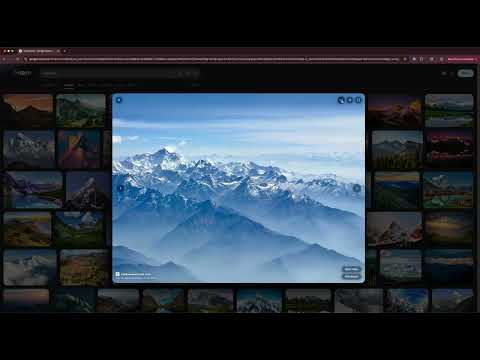
A cleaner Google Images. Uniform card grid and a glass overlay replace Google's default image viewer.
Glass replaces Google Images with a clean card grid and a fullscreen overlay viewer. Source labels, related searches, and sponsored tiles are moved out of the grid so you see only the images. Card Grid: Results are presented as rounded cards in a uniform grid that gently lifts on hover. The grid stays focused on the images and consistent as new results load. Glass Overlay Viewer: Click any image to open it in a centered fullscreen viewer instead of Google's side panel. A glass card sits on a dimmed blurred backdrop with smooth open and close animations. Move through results with the arrow keys without leaving the viewer. Info Panel: Hover the viewer to see more information about the image along with quick actions: open image, visit source, save image, copy image, copy image URL, and search by image. Controls fade out when you move the cursor away. Keyboard Shortcuts: Left arrow: previous image Right arrow: next image F: toggle fullscreen I: pin info panel Esc: close viewer Privacy: No data collection. No tracking. No background requests. The extension makes a network request only when you explicitly choose to copy an image, fetching that specific image so it can be placed on your clipboard. Nothing runs automatically.
0 out of 5No ratings
Details
- Version1.1.1
- UpdatedJuly 11, 2026
- Size69.15KiB
- LanguagesEnglish (United States)
- DeveloperWebsite
Email
dev@carlosvilla.xyz - Non-traderThis developer has not identified itself as a trader. For consumers in the European Union, please note that consumer rights do not apply to contracts between you and this developer.
Privacy

This developer declares that your data is
- Not being sold to third parties, outside of the approved use cases
- Not being used or transferred for purposes that are unrelated to the item's core functionality
- Not being used or transferred to determine creditworthiness or for lending purposes
Support
For help with questions, suggestions, or problems, please open this page on your desktop browser