

World Clock Tab

Overview
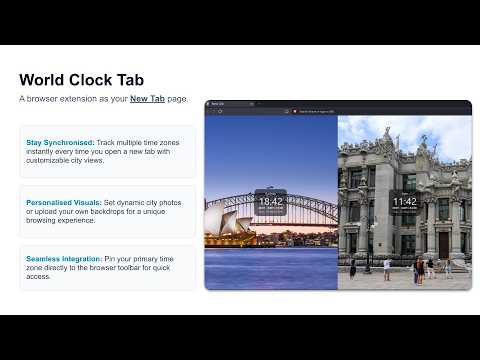
New Tab vertical city columns with photos. Toolbar analog clock for the selected city.
World Clock Tab turns your browser’s New Tab page into a calm, full-screen world clock. Each city appears as a vertical column with a photo backdrop, the city name, local time, zone abbreviation, GMT offset, and date. New Tab home page Open a new tab and see your cities at a glance. The home page is display-only: no settings buttons, no edit controls—just photos and times. Extension panel Click the pinned toolbar icon to manage everything: add or remove cities (up to eight), reorder columns with ‹ and › buttons, change photos, open settings, and choose which city drives the toolbar analog clock. Toolbar analog clock Select any city on the home tab or in the panel. The browser toolbar icon becomes an analog clock for that time zone (no seconds hand on the icon). Clock options 24-hour time is on by default. Seconds are optional and appear on the digital clocks only, not on the toolbar icon. City photos Photos are fetched from Wikipedia and Wikimedia Commons when you add a city, then cached locally. You can upload your own image for any city and restore the Wikipedia photo later. Defaults Sydney, Kyiv, Rome, and London are included on first install. Duplicate time zones (including IANA aliases such as Kyiv/Kiev) are rejected. You cannot delete the last remaining city. Privacy Your city list, settings, photo cache, and optional photo overrides stay in your browser. World Clock Tab does not use analytics and does not send your data to a first-party server. Wikipedia is contacted only to look up city article summaries and images.
0 out of 5No ratings
Details
- Version1.1.13
- UpdatedSeptember 18, 2026
- Offered byOleksii Konashevych
- Size52.78KiB
- LanguagesEnglish
- Developer
Email
oleksiiko.app@gmail.com - Non-traderThis developer has not identified itself as a trader. For consumers in the European Union, please note that consumer rights do not apply to contracts between you and this developer.
Privacy

World Clock Tab has disclosed the following information regarding the collection and usage of your data. More detailed information can be found in the developer's privacy policy.
World Clock Tab handles the following:
This developer declares that your data is
- Not being sold to third parties, outside of the approved use cases
- Not being used or transferred for purposes that are unrelated to the item's core functionality
- Not being used or transferred to determine creditworthiness or for lending purposes
Support
For help with questions, suggestions, or problems, visit the developer's support site