


Overview
Universal AI website guide with a popup, floating assistant, and side panel.
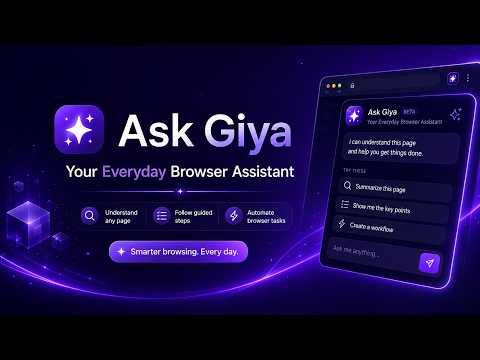
Ask Giya is your everyday AI browser assistant that helps you understand websites, follow guided steps, create reusable workflows, and set reminders without leaving your browser. Most web tasks require switching between tabs, copying information into another AI tool, opening a separate notes app, checking a calendar, or asking someone for help. Ask Giya brings assistance directly into the page you are already using, so you can stay focused and get things done faster. Ask Giya works as a popup, floating assistant, and side panel. It can help you understand the website you are viewing, answer questions about the page, summarize information, guide you through steps, and support browser-based workflows. Whether you are reading documentation, using an internal dashboard, reviewing a tool, filling out forms, checking a website, or following a process, Ask Giya helps you move with more clarity and less friction. What Ask Giya does Understand any page instantly Ask Giya helps you make sense of the page you are currently viewing. You can ask what the page is about, what the important details are, what you should do next, or how something works. Ask questions without switching tabs Instead of copying text into another AI app, you can ask questions directly from the browser. Ask Giya stays close to your work so you can continue browsing while getting help. Summarize long pages Use Ask Giya to summarize articles, documentation, dashboards, instructions, product pages, help pages, or other long web content into easier-to-understand explanations. Follow guided steps Ask Giya can break down tasks into clear steps. This is useful when working with unfamiliar websites, admin consoles, onboarding flows, support tools, account settings, forms, or internal systems. Create workflows for teammates Ask Giya helps turn repeatable browser tasks into reusable workflows. Instead of explaining the same process again and again, you can create a guided workflow that teammates can follow directly inside their browser. This is useful for onboarding, support procedures, QA checks, admin tasks, internal tool walkthroughs, approval processes, documentation steps, and recurring web-based work. Set auto reminders without opening another app Ask Giya lets you create reminders while you are working on a page. You do not need to open a separate calendar, notes app, or task manager. You can stay in the browser and set reminders for follow-ups, unfinished tasks, pages to revisit, or actions you need to complete later. Use it as a popup, floating assistant, or side panel Ask Giya adapts to how you work. Use the popup for quick questions, the floating assistant for lightweight help while browsing, or the side panel for longer page-aware conversations and guided workflows. Why install Ask Giya? Install Ask Giya if you want a faster and easier way to work inside your browser. Ask Giya helps reduce the need to switch apps, copy and paste content, ask teammates for repeated instructions, or lose track of follow-ups. It gives you an assistant that stays with you while you browse. It is designed to help you: Understand confusing websites Summarize pages quickly Get answers about the page you are viewing Follow step-by-step instructions Create reusable workflows for your team Set reminders without opening another app Work faster inside dashboards and web tools Reduce repetitive explanations for teammates Stay focused while completing online tasks Who is Ask Giya for? Ask Giya is useful for professionals, students, developers, founders, freelancers, creators, researchers, support teams, operations teams, and anyone who spends time working inside the browser. It is especially useful for people who often use web apps, dashboards, documentation, admin tools, learning resources, internal systems, or websites with many steps. Everyday examples Use Ask Giya to understand a technical documentation page. Use it to summarize a long article or guide. Use it to ask what a dashboard is showing. Use it to create a repeatable workflow for a teammate. Use it to guide someone through a browser task. Use it to remind yourself to revisit a page later. Use it to ask what action should happen next. Use it to explain unfamiliar buttons, forms, or page content. Important note Ask Giya can make mistakes. Always review important information before making decisions, especially for financial, legal, medical, security, or sensitive tasks. Ask Giya helps you understand websites, follow guided steps, create team workflows, and set reminders, all inside your browser.
0 out of 5No ratings
Details
- Version0.1.0
- UpdatedMay 23, 2026
- Size1.58MiB
- LanguagesEnglish (United States)
- DeveloperRuel Guston NopalWebsite
105 Christ The King Tawiran Extn. Pasig, Metro Manila 1610 PHEmail
rakethost@gmail.comPhone
+63 995 158 9537 - TraderThis developer has identified itself as a trader per the definition from the European Union and committed to only offer products or services that comply with EU laws.
Privacy

Giya has disclosed the following information regarding the collection and usage of your data. More detailed information can be found in the developer's privacy policy.
Giya handles the following:
This developer declares that your data is
- Not being sold to third parties, outside of the approved use cases
- Not being used or transferred for purposes that are unrelated to the item's core functionality
- Not being used or transferred to determine creditworthiness or for lending purposes
Support
For help with questions, suggestions, or problems, please open this page on your desktop browser