


Overview
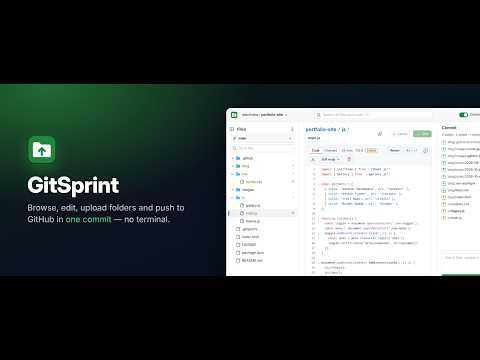
Skip the terminal: browse repos like a file explorer, edit code, bulk-upload folders, restore old versions and push in one commit.
✦ GitSprint turns your browser into a file manager and code editor for GitHub. Clone any repository into the extension, browse it like a file explorer, edit code, drag in whole folders, rename and move files, restore old versions, and push everything back as ONE clean commit. No terminal, no git install, no desktop app. ✦ Why Install GitSprint? GitHub's website is great for reading code but painful for real work on files: - You can't upload a folder with its structure intact. - Every file you edit is its own commit. - Moving or renaming many files means many clicks and many commits. - Hidden files like .env.example, .gitignore and .github/workflows are easy to lose on upload. - Restoring an old version of a folder needs git on the command line. GitSprint fixes all of that. Make as many changes as you like across the whole repository, review them in one list, then commit them together in a single push, exactly like a desktop git client, right in your browser. ✦ WHAT YOU CAN DO 📁 Browse repositories like a file explorer - Home page lists every repository your account can see (personal and organizations), plus everything you've cloned. - GitHub-style file tree with expand/collapse-all, a branch picker, and "Go to file". - Search file names and text inside files across the whole repository. - Looks and feels like github.com, in light or dark mode (follows your system, or pick one). ⚡ Clone once, work fast - The whole branch downloads once into the extension's local storage, and every file is verified against its git ID. - Switching branches only downloads the files you don't already have. - Pull the latest changes from GitHub at any time. Your local edits are kept. - Create new branches and new repositories without leaving the extension. ✏️ Edit code with a real editor - Built-in code editor (CodeMirror 6) with syntax highlighting. - Ctrl+F search, undo/redo, line wrap, copy and download. - Code / Changes / Preview tabs: see a side-by-side diff of your edits, or preview Markdown as it will look on GitHub. - Rename or move a file by editing its path, just like on GitHub (type "/" to create folders). - Save with Ctrl+S. GitSprint warns you before you leave a file with unsaved edits. 📤 Upload whole folders, the right way - Drag and drop files and folders, or use Choose files / Choose folder. - Folder structure is kept, and hidden files (.env.example, .gitignore, .github/…) are included. - Review everything as a tree under the destination path before it's added. Untick anything you don't want. - Files that will overwrite an existing file are clearly tagged "replaces". Problems are tagged "conflict". - The .git folder is always skipped. Add your own skip list (for example .DS_Store) in settings. 🗂️ Manage files and folders - Drag rows onto folders, the tree or the breadcrumbs to move them. - "Move to…" with a folder picker, search, and create-folder. - Right-click menu: open, rename, move, copy path, download, download folder as ZIP, open on GitHub, delete. ♻️ Trash and History - Deleted files and folders stay restorable from the Trash for 30 days, even after you commit. - History on any file: compare with an older version or restore it. - Restore a whole folder, or the entire repository, to any earlier commit. The restore shows up as normal, reviewable changes before you commit. ✅ Commit everything in one push - The Commits sidebar lists every change (edits, uploads, moves, renames, deletes) in explorer order. - Undo any single change with one click. - Write one commit message and push everything together as a single git commit. - Uncommitted changes are saved locally and survive browser restarts. - Before pushing, GitSprint checks the branch hasn't moved on GitHub, so you never overwrite someone else's work. 📦 Large files with Git LFS - Files over 100 MB (up to 2 GB) go to Git LFS automatically when you commit. No setup needed. 🔗 Works with github.com - A small "GitSprint" button appears on GitHub repository pages. Click it to open that repository (and folder) in GitSprint. - Several tabs on the same repository stay in sync. ✦ Who Is It For? - Developers on any computer without git installed. - Designers, writers and students who want to update a website, docs or a portfolio without learning the command line. - Anyone who needs to upload a full project folder to GitHub, reorganize a repository, or make many small edits in one commit. - Teams that want quick fixes without cloning a repository to disk. ✦ Privacy and Security - No GitSprint server. The extension talks only to GitHub. Your code, files and sign-in never pass through any third party. - Sign in with GitHub's official device sign-in. GitSprint never sees your GitHub password. - Your sign-in token and your cloned repositories are stored only in your browser profile, on your computer. - No analytics, no tracking, no ads. - Removing the extension deletes its clones and settings. ✦ How To Start 1. Click the GitSprint icon in the toolbar. 2. Create OAuth App Client ID (Click create button and paste the client id) 3. Click Sign in with GitHub > Enter login Code > approve access on GitHub. 4. Pick a repository and click Clone (or click the GitSprint button on any GitHub repository page). 5. Edit, upload, move and delete. Then open the Commits sidebar and push everything in one commit. ⚠️ Note: This extension is not officially affiliated with or endorsed by GitHub. We are not associated with GitHub in any way. This is an independent extension designed to help users make more efficient use of their GitHub. GitHub is a trademark of GitHub, Inc.
0 out of 5No ratings
Details
- Version1.0.1
- UpdatedOctober 30, 2026
- Size522KiB
- LanguagesEnglish
- DeveloperWebsite
Email
support@wargxp.com - Non-traderThis developer has not identified itself as a trader. For consumers in the European Union, please note that consumer rights do not apply to contracts between you and this developer.
Privacy

GitSprint - Upload Folders, Edit Code & Commit to GitHub has disclosed the following information regarding the collection and usage of your data. More detailed information can be found in the developer's privacy policy.
GitSprint - Upload Folders, Edit Code & Commit to GitHub handles the following:
This developer declares that your data is
- Not being sold to third parties, outside of the approved use cases
- Not being used or transferred for purposes that are unrelated to the item's core functionality
- Not being used or transferred to determine creditworthiness or for lending purposes