

GitHub Markdown Helper
6 ratings
)
Overview
Quickly format text in GitHub using right-click options. This extension helps in formatting plain text to markdown syntax
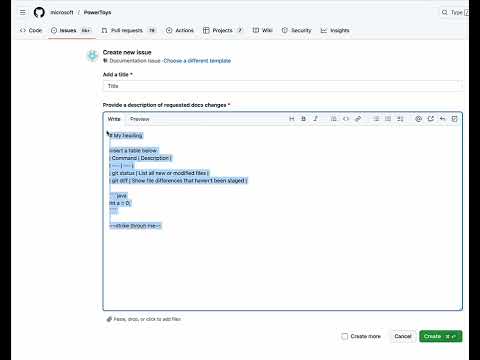
Enhance Your GitHub Experience with One-Click Formatting! Tired of manually typing Markdown syntax while writing GitHub issue, comments or Wiki ? -GitHub Markdown Helper makes formatting your content effortless with a simple right-click menu. 🚀 Key Features ✅ One-Click Markdown Formatting – Easily format text as headings, alerts, code blocks, tables, and more. ✅ Multi Select Formatting – Easily format multiple line of text as headings, styling and more. ✅ Context-Aware Options – Automatically detects selected text and provides relevant formatting options. ✅ Code Snippets with Syntax Highlighting – Quickly format code in Java, Python, C++, Bash, and more. ✅ Insert Table , Footnotes & Collapsed Sections – Add table , footnotes or expandable sections with a single click. ✅ Time-Saving & Easy to Use – No need to memorize Markdown syntax—just select text, right-click, and choose a formatting option. 🛠 How It Works -Write a comment in GitHub’s text area. -Select the text you want to format. -Right-click to access the GitHub Markdown Helper menu. -Choose from various formatting options like bold, headings, alerts, code blocks, or tables. The selected text is instantly formatted using Markdown syntax. 🎯 Why Install? 🔹 Boost productivity – Spend less time formatting and more time coding. 🔹 Eliminate syntax errors – No need to remember complex Markdown rules. 🔹 Perfect for developers, writers, and technical teams using GitHub for collaboration. Download GitHub Markdown Helper today and enhance your GitHub commenting workflow! 🚀
5 out of 56 ratings
Details
- Version1.0.1.0
- UpdatedJanuary 30, 2026
- Offered byAkash Verma
- Size14.01KiB
- LanguagesEnglish
- Developer
Email
akashv789@gmail.com - Non-traderThis developer has not identified itself as a trader. For consumers in the European Union, please note that consumer rights do not apply to contracts between you and this developer.
Privacy

This developer declares that your data is
- Not being sold to third parties, outside of the approved use cases
- Not being used or transferred for purposes that are unrelated to the item's core functionality
- Not being used or transferred to determine creditworthiness or for lending purposes