


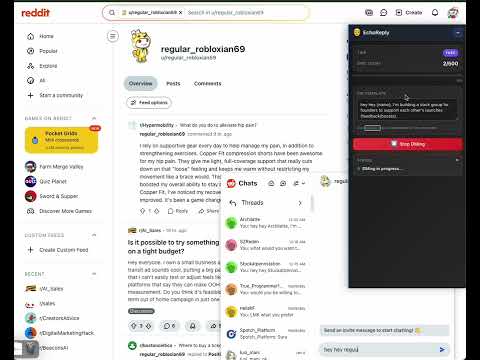
Overview
EchoReply- Reddit Outreach/DM Chrome Extension
Workflow 1. Go to a Subreddit - Navigate to any Reddit subreddit (e.g., `reddit.com/r/buildinpublic`) - Make sure you're on the subreddit's main feed page 2. Open Extension Popup - Click the EchoReply icon in your Chrome toolbar 3. Set Your DM Template - In the popup, find the "DM Template" text area - Enter your message template - Use `{name}` as a placeholder for the username - Example: `Hi {name}, I'm building a growth hack tool most solo founders miss, personal branding on X/LinkedIn and outreach on Reddit.` - The template is automatically saved 4. Click "Start DMing" - The extension will automatically: - Find new posts on the subreddit - Extract post authors and commenters - Send DMs to each user using your template - Track progress in real-time 5. Monitor Progress - Watch the sidebar overlay on Reddit pages for: - Current user being messaged - Progress (X of Y users) - Status updates - DM count 6. Stop Anytime - Click "Stop DMing" button to pause/stop the process
0 out of 5No ratings
Details
- Version1.1.0
- UpdatedJanuary 12, 2026
- Size367KiB
- LanguagesEnglish (United States)
- DeveloperWebsite
Email
kchamal.work@gmail.com - Non-traderThis developer has not identified itself as a trader. For consumers in the European Union, please note that consumer rights do not apply to contracts between you and this developer.
Privacy

EchoReply- Reddit Outreach/DM has disclosed the following information regarding the collection and usage of your data. More detailed information can be found in the developer's privacy policy.
EchoReply- Reddit Outreach/DM handles the following:
This developer declares that your data is
- Not being sold to third parties, outside of the approved use cases
- Not being used or transferred for purposes that are unrelated to the item's core functionality
- Not being used or transferred to determine creditworthiness or for lending purposes
Support
For help with questions, suggestions, or problems, please open this page on your desktop browser