


Overview
Open and read EPUB books offline. Includes a bookshelf, themes, Listen and PRO features.
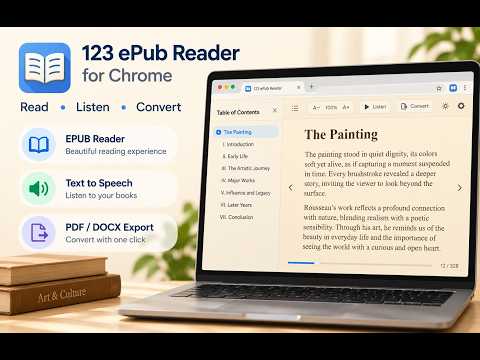
123 ePub Reader for Chrome is a fast, easy-to-use browser extension that lets you open, read, listen to, and manage EPUB eBooks directly in Chrome. Enjoy a comfortable reading experience with customizable layouts, beautiful reading themes, text-to-speech, bookmarks, and advanced export tools. Whether you're reading novels, educational books, technical manuals, or digital publications, 123 ePub Reader provides everything you need in one convenient extension. No additional software or account required! ## MAIN FEATURES **📖 Open and Read EPUB Files** - Open EPUB eBooks directly from your computer. - Support for EPUB 2 and EPUB 3 documents. - Drag and drop EPUB files into the reader. - Read books offline without an internet connection. - Automatically remember your last reading position. - Navigate chapters using an interactive table of contents. **📚 Comfortable Reading Experience** - Single-page and double-page reading modes. - Vertical scrolling mode. - Full-screen reading experience with page-turning effects. - Adjustable font size, line spacing, and zoom. - Multiple reading themes: Light, Sepia, Dark, and OLED Black. - Hide or show the chapter sidebar to maximize reading space. - Easily navigate between pages and chapters. - Automatically highlight the current chapter in the table of contents. **🔊 Text-to-Speech – Listen to Your eBooks** Turn your EPUB books into an audio reading experience! - Listen to your books using text-to-speech technology. - Automatically detect the language of your eBook. - Choose from available system voices. - Adjust reading speed, pitch, and pauses. - Start listening from your current reading position. - Highlight text while listening with Listen & Follow. - Automatically advance through pages. - Control playback using the integrated mini audio player. - Set a sleep timer to stop reading automatically. Voice availability and quality depend on your browser and operating system. **🔖 Bookmarks, Highlights & Notes** - Save bookmarks for your favorite passages. - Highlight important text. - Create notes while reading. - Quickly return to saved reading positions. - Export your notes for future reference. **📄 Export EPUB to Other Formats** Convert your eBooks into convenient document formats: - EPUB to PDF - EPUB to Word (DOCX) - EPUB to TXT Keep headings, paragraphs, and basic text formatting when exporting supported EPUB documents. PDF exports are available in the free version with a watermark. Upgrade to PRO to export without watermarks. **📚 Personal eBook Library** - Save and organize EPUB books in your browser. - Quickly reopen previously imported books. - Automatically remember your reading progress. - Avoid duplicate books in your library. - Keep your books locally on your device. **🌍 Multilingual Interface** Available in 7 languages: English, Italian, Spanish, French, German, Portuguese, and Japanese. The extension automatically detects your browser language. You can also select your preferred interface language manually. ## FREE VERSION Enjoy these features without purchasing a license: - Open and read EPUB books. - Customize fonts, themes, layouts, and zoom. - Single-page and double-page reading. - Full-screen mode with occasional upgrade reminders. - Save up to 5 books in your library. - Listen to up to 5 pages per book. - Export EPUB to TXT and DOCX. - Export EPUB to PDF with a watermark. - Use bookmarks and chapter navigation. Ordinary eBook reading remains available without a page limit. ## UPGRADE TO PRO Unlock additional features with a one-time purchase: ✓ Unlimited books in your library ✓ Unlimited text-to-speech reading ✓ PDF export without watermarks ✓ Advanced highlights and notes ✓ Export saved notes ✓ Library backup and restore ✓ Full-screen reading without upgrade reminders ✓ No PRO reminders during normal reading No monthly subscription required. ## PRIVACY & OFFLINE READING 123 ePub Reader is designed for local reading. Your EPUB books are processed and stored locally in your browser. You don't need to upload your books to external servers or create an account. Internet access is not required for ordinary EPUB reading. **Note:** DRM-protected eBooks are not supported. Some complex EPUB layouts and advanced formatting may not be reproduced exactly. ## HOW TO USE 1. Install 123 ePub Reader for Chrome. 2. Click the extension icon. 3. Open the EPUB Reader. 4. Select an EPUB file from your computer or drag and drop a book. 5. Customize your reading experience and start reading! **Enjoy your favorite EPUB books directly in Google Chrome with 123 ePub Reader!**
0 out of 5No ratings
Details
- Version1.5.8
- UpdatedOctober 26, 2026
- FeaturesOffers in-app purchases
- Size50.61KiB
- Languages6 languages
- DeveloperWebsite
Email
tuttoemailsoft@gmail.com - Non-traderThis developer has not identified itself as a trader. For consumers in the European Union, please note that consumer rights do not apply to contracts between you and this developer.
Privacy

This developer declares that your data is
- Not being sold to third parties, outside of the approved use cases
- Not being used or transferred for purposes that are unrelated to the item's core functionality
- Not being used or transferred to determine creditworthiness or for lending purposes
Support
For help with questions, suggestions, or problems, please open this page on your desktop browser