Item logo image for GhostOnTheSearchBar

GhostOnTheSearchBar

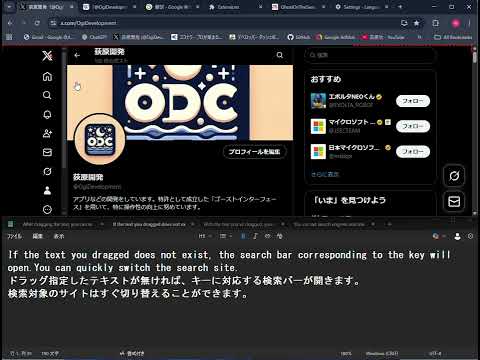
Item media 2 (screenshot) for GhostOnTheSearchBar
Item media 1 (screenshot) for GhostOnTheSearchBar
Item media 2 (screenshot) for GhostOnTheSearchBar
Item media 1 (screenshot) for GhostOnTheSearchBar
Item media 2 (screenshot) for GhostOnTheSearchBar

Overview

Drag to specify text for quick search. Switch between Google, Bing, Yahoo!, Ecosia instantly. Works with multiple words too.

When you enable this extension, a rectangular GUI called the "Ghost Interface" appears in the top-left corner of the page, with dashed lines along its left and top sides. (Note: it may not be available on some pages.) The Ghost Interface is divided horizontally into four sections, giving you access to Google, Bing, Yahoo!, and Ecosia search engines from left to right.  When you mouse over the ghost interface and press the Shift key, the search engine will switch from left to right: DuckDuckGo, Baidu, Yandex, and Naver. For clarity, we will refer to any text you select on a webpage as "selected text," and the search bar provided by this extension as the "Ghost Search Bar." Using the Ghost Interface 1.If there is no "selected text" and the "Ghost Search Bar" is hidden: If you scroll the mouse wheel up or down while the cursor is over the Ghost Interface, a "Ghost Search Bar" will appear with an empty input field. The search bar that appears will correspond to the search engine section you're in (e.g., Google's section opens a Google search bar).  By the way, it's said that Ecosia plants a tree for every 45 searches you make.  DuckDuckGo is a search engine that prioritizes user privacy, and its key feature is that it does not collect or store personal information. 2.If there is "selected text": If you have "selected text" and scroll the mouse wheel over the Ghost Interface: Scrolling down immediately performs an internet search using the "selected text" and the corresponding search engine. Scrolling up opens the "Ghost Search Bar" with the "selected text" already populated in the input field. 3.If the Ghost Search Bar is visible: When the Ghost Search Bar is visible, the selected text is instantly added to it, and you can begin typing immediately. At the same time, the text selection on the webpage is cleared. You can switch between different search engines by simply hovering your mouse over their respective sections on the Ghost Interface. New Features Predictive Text in the Search Bar The Ghost Search Bar now includes a predictive text feature. When you hover over a suggested word, it will be highlighted with a yellow dashed border. From this state, you can: 1.Scroll up to add the suggested word to the search bar. 2.Scroll down to perform a search using the current search bar content plus the suggested word. 3.Click to perform a search for just the suggested word. Switching Modes You can switch modes by hovering over the Ghost Interface and pressing the Ctrl key. Normal Mode: The default state, with a dashed red border. Hide Mode: Pressing Ctrl once removes the red border; the border only reappears when you hover over it. Sleep Mode: Pressing Ctrl again enters a complete dormant state. Pressing Ctrl one more time returns you to Normal Mode. This extension uses a GUI called "Ghost Interface," which has been granted a patent by the Japan Patent Office.

Details

  • Version
    2.0.7
  • Updated
    September 24, 2025
  • Offered by
    ogiharadevelopment
  • Size
    74.92KiB
  • Languages
    2 languages
  • Developer
    荻原功
    中根2416-1 コーポ G&Y A 棟 202号室 ひたちなか市, 茨城県 312-0011 JP
    Email
    isaoogihara@ogiharadevelopment.net
    Phone
    +81 80-8461-4570
  • Trader
    This developer has identified itself as a trader per the definition from the European Union and committed to only offer products or services that comply with EU laws.

Privacy

GhostOnTheSearchBar has disclosed the following information regarding the collection and usage of your data. More detailed information can be found in the developer's privacy policy.

GhostOnTheSearchBar handles the following:

User activity
Website content

This developer declares that your data is

  • Not being sold to third parties, outside of the approved use cases
  • Not being used or transferred for purposes that are unrelated to the item's core functionality
  • Not being used or transferred to determine creditworthiness or for lending purposes

Support

For help with questions, suggestions, or problems, visit the developer's support site

Related

Feeling Lucky

3.6

Instant search selected text with "I'm feeling lucky" by Google.

搜索拐杖

4.4

在Google,百度,必应等等搜索引擎间进行快捷切换,搜索关键词无需重输!

Selection Search

4.7

Search for the selected text in search engines

isear

4.1

複数ワードに対応したページ内検索ツール

All in one web searcher

4.5

Search anything on the internet easily by typing into ONE unified search box

Ctrl-F Plus: Ctrl + F Search Across All Tabs

3.9

Find words and phrases across ALL your open tabs! 🔍

Highlighty: Search, Find, Multi Highlight

4.0

Searching and Multi Highlighting made effortless! It's the most efficient way to find and highlight any text on the web.

Search It All

4.1

Search across multiple search engines with one click - no retyping needed

Change Default Search

5.0

Switch your Chrome default search engine to Google, Bing, Yandex, DuckDuckGo, or Yahoo in one click.

MultiLine Text Selection

3.6

Make, copy, and search multiple concurrent text selections.

Multi Find: Search and Highlight

4.1

Find and highlight multiple words on webpages. Count occurrences, scroll to the results and locate words with scrollbar marks.

Overload Search - Advanced Google Search

4.4

Overload Search! Fast advanced Google Search

Feeling Lucky

3.6

Instant search selected text with "I'm feeling lucky" by Google.

搜索拐杖

4.4

在Google,百度,必应等等搜索引擎间进行快捷切换,搜索关键词无需重输!

Selection Search

4.7

Search for the selected text in search engines

isear

4.1

複数ワードに対応したページ内検索ツール

All in one web searcher

4.5

Search anything on the internet easily by typing into ONE unified search box

Ctrl-F Plus: Ctrl + F Search Across All Tabs

3.9

Find words and phrases across ALL your open tabs! 🔍

Highlighty: Search, Find, Multi Highlight

4.0

Searching and Multi Highlighting made effortless! It's the most efficient way to find and highlight any text on the web.

Search It All

4.1

Search across multiple search engines with one click - no retyping needed

Google apps