


Overview
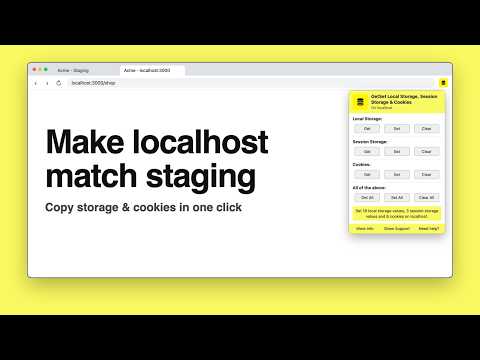
Copy local storage, session storage and cookies from one site to another, e.g. from staging to localhost. Also clear them.
Copy local storage, session storage and cookies from one website and paste them into another in one click. Make your localhost look exactly like staging or production: same logged-in user, same feature flags, same app state. No more logging in again or copying values by hand in DevTools. HOW IT WORKS 1. Open the source site (for example your staging or production app) and click Get All. 2. Open the target site (for example http://localhost:3000) and click Set All. 3. Reload. Your local app now has the same session and data. WHAT YOU CAN COPY - Local storage (localStorage): every key and value of the current site - Session storage (sessionStorage) - Cookies, including HttpOnly and Secure cookies - All of the above together with Get All, Set All and Clear All Each button tells you exactly what happened, for example "Set 12 local storage values and 4 cookies on localhost", including anything skipped and why. GREAT FOR - Reproducing a staging or production bug on localhost with the same user and data - Skipping the login flow on your local dev server by reusing a real session - Moving auth tokens, feature flags, A/B test buckets or onboarding state between environments - QA and testing across dev, staging and production domains - Clearing a site's storage and cookies to start fresh SMART COOKIE HANDLING - Works across domains and subdomains, and with localhost on any port - Keeps cookie paths and expiry dates - Secure cookies stay secure: they are never downgraded onto plain http sites - Supports partitioned (CHIPS) cookies - Incognito windows use their own cookies, never your regular ones PRIVATE BY DESIGN - Everything stays in your browser. No servers, no accounts, no analytics, no tracking. - Cookie access is asked once per site, only when you use cookies. Local and session storage work without any extra permission. - Copied cookies are kept in memory only and disappear when you close the browser. - Open source (MIT): https://github.com/distractinglife/GetSet-Local-Storage-chrome-extension Tip: copied values can include real login tokens. Use test accounts where you can, and use Clear All on localhost when you are done. Made for web developers, frontend engineers and QA testers working with React, Next.js, Vue, Angular or any web app.
4.6 out of 510 ratings
Details
- Version0.3.0
- UpdatedOctober 19, 2026
- Offered byvinay.dasari.dev
- Size19.12KiB
- LanguagesEnglish (United States)
- Developer
Email
vinay.dasari.dev@gmail.com - Non-traderThis developer has not identified itself as a trader. For consumers in the European Union, please note that consumer rights do not apply to contracts between you and this developer.
Privacy

This developer declares that your data is
- Not being sold to third parties, outside of the approved use cases
- Not being used or transferred for purposes that are unrelated to the item's core functionality
- Not being used or transferred to determine creditworthiness or for lending purposes
Support
For help with questions, suggestions, or problems, visit the developer's support site