

GetMyPassword - Password Generator

Overview
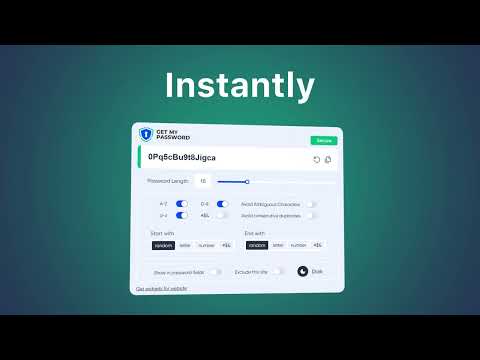
Fast and simple Chrome extension with an on-page widget for generating strong, random passwords directly in website forms
Generate passwords locally with the official GetMyPassword.com extension. Open the toolbar popup to create and copy a random password, or click the shield beside a password field on an ordinary website to generate and insert a password into that selected field. No account or sign-in is required. Features: - Adjustable password length, uppercase and lowercase letters, digits and symbols. - Options to avoid ambiguous characters and consecutive duplicates, and choose the first or last character type. - Web Crypto-based random generation with unbiased sampling. - A widget that works in single-password forms and leaves unrelated inputs unchanged. - Site exclusions, optional inline widgets, and light/dark appearance. - Localized interface. Passwords are generated on your device. There is no password history, analytics or transmission of generated passwords. Only interface and site preferences are stored in the extension local storage. The clipboard is managed by your browser and operating system. This is a password generator, not a password manager. Save passwords in a trusted password manager. Strength labels are estimates, not a guarantee of account security. Browser-internal pages and extension marketplaces restrict inline widgets; the toolbar popup remains available. Official website: https://getmypassword.com/ Extension guide: https://getmypassword.com/browser-extension/ Support: https://getmypassword.com/contacts/
5 out of 51 rating
Details
- Version1.0.4
- UpdatedSeptember 9, 2026
- Size530KiB
- Languages33 languages
- DeveloperWebsite
Email
info@getmypassword.com - Non-traderThis developer has not identified itself as a trader. For consumers in the European Union, please note that consumer rights do not apply to contracts between you and this developer.
Privacy

This developer declares that your data is
- Not being sold to third parties, outside of the approved use cases
- Not being used or transferred for purposes that are unrelated to the item's core functionality
- Not being used or transferred to determine creditworthiness or for lending purposes
Support
For help with questions, suggestions, or problems, please open this page on your desktop browser