


Overview
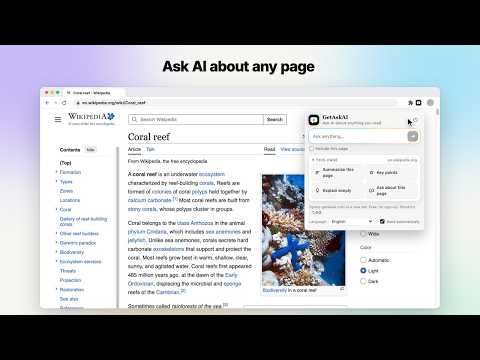
Ask AI free about any page, YouTube video or text: summarize, explain, translate or fact-check in one click. No sign up, no login.
Ask AI free about any page, YouTube video, post on X or text you select. GetAskAI shows the answer on getaskai.com in seconds, with no sign up and no login. What you can do • Summarize this page, get its key points, or have it explained simply. • Select any text, right-click it, and choose Explain this, Summarize this, Translate or Fact-check with sources. • On YouTube: Summarize video, Key takeaways, or type your own question, right under the video title. • On X: explain, fact-check or translate a post from its action bar. • Ask anything from the toolbar button, or type "ga" and a space in the address bar. • Shortcuts: Alt+Shift+G opens GetAskAI, Alt+Shift+S summarizes the current page. How it works Each action opens getaskai.com in a new tab with your question already typed in and sends it for you. You can turn this off with "Send automatically". When a question needs current information, the answer shows numbered web sources. For page actions the extension also passes the main text of the page you are on, so pages that block automated readers can still be summarized. Free and without an account. Available in 14 languages. GetAskAI is supported by ads on getaskai.com. Privacy Nothing is sent until you click an action. The extension sends only what that action needs: the selected text, the post, or the page title, address and main text. It does not read pages in email, document, chat or social media apps. Your settings and your last 12 questions stay on your device. Privacy policy: https://getaskai.com/privacy
0 out of 5No ratings
Details
- Version0.3.3
- UpdatedOctober 15, 2026
- Size53.66KiB
- Languages14 languages
- DeveloperWebsite
Email
info@getaskai.com - Non-traderThis developer has not identified itself as a trader. For consumers in the European Union, please note that consumer rights do not apply to contracts between you and this developer.
Privacy

GetAskAI: Ask AI Free - No Sign Up, No Login, Instant Answers has disclosed the following information regarding the collection and usage of your data. More detailed information can be found in the developer's privacy policy.
GetAskAI: Ask AI Free - No Sign Up, No Login, Instant Answers handles the following:
This developer declares that your data is
- Not being sold to third parties, outside of the approved use cases
- Not being used or transferred for purposes that are unrelated to the item's core functionality
- Not being used or transferred to determine creditworthiness or for lending purposes