Item logo image for GestureSlide

GestureSlide

5.0(

1 rating

)
Item media 2 (screenshot) for GestureSlide
Item video thumbnail
Item media 2 (screenshot) for GestureSlide
Item video thumbnail
Item media 2 (screenshot) for GestureSlide

Overview

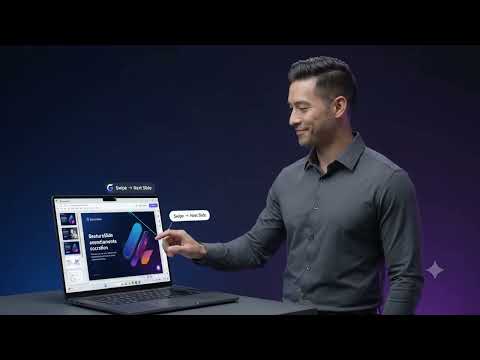
Control presentations and annotate slides with hand gestures from your webcam. Everything is processed locally.

GestureSlide lets you run a presentation without reaching for the keyboard or mouse. Swipe your hand to change slides, and draw on the slide with your finger, using nothing but your webcam. Everything happens on your device. Camera frames are analysed locally and never leave your computer. NAVIGATION • Swipe right for the next slide, swipe left for the previous one. • Adjustable sensitivity and cooldown, so one swipe moves one slide. • A brief on-screen confirmation shows when a gesture is recognised. ANNOTATION • Pen, laser pointer and eraser, with undo, clear, five colours and three brush sizes. • Draw with your index finger, or with the mouse. • The laser leaves a glowing trace that fades once you release. • The toolbar sits on the page itself, so it stays visible to your audience while you share your screen. • Annotations clear automatically when the slide changes. USE IT WITHOUT A CAMERA The camera is optional. Switch hand tracking off and GestureSlide becomes a mouse-driven annotation tool. No camera is opened and no camera permission is requested. PRIVACY • Camera frames are processed locally, inside your browser. • Nothing is uploaded, recorded or sent anywhere. • No accounts, no tracking, no analytics. • The camera runs only while hand tracking is switched on, and stops as soon as you switch it off. WHERE IT WORKS • Google Slides, including presentation mode. • Web slide viewers that have their own Next and Previous controls. GestureSlide finds those controls and uses them. • Pages that respond to the arrow keys, including local HTML decks. If a site needs it, you can choose how commands are delivered in Settings. PERMISSIONS • Camera: only while hand tracking is on, to detect your hand. • Storage: to remember your settings. • Active tab and scripting: to add the annotation toolbar and change slides on the tab you choose. • Offscreen: to keep hand detection running while you look at your slides rather than at the extension.

Details

  • Version
    0.6.1
  • Updated
    September 13, 2026
  • Size
    12.28MiB
  • Languages
    English
  • Developer
    Email
    momengharib22@hotmail.com
  • Non-trader
    This developer has not identified itself as a trader. For consumers in the European Union, please note that consumer rights do not apply to contracts between you and this developer.

Privacy

Manage extensions and learn how they're being used in your organization
The developer has disclosed that it will not collect or use your data. To learn more, see the developer’s privacy policy.

This developer declares that your data is

  • Not being sold to third parties, outside of the approved use cases
  • Not being used or transferred for purposes that are unrelated to the item's core functionality
  • Not being used or transferred to determine creditworthiness or for lending purposes

Related

Smooth Capture by R—K

5.0

An easy to use scroll capture tool for showcasing and recording websites with fine grained control and motion.

hands.hinow.ai — hand gesture navigation

0.0

Browse any website with your hands, through the webcam. Scroll, pick links and click without touching mouse or keyboard.

Privacy Shield

5.0

Cover your screen with a customizable tint, blur and dim overlay to keep prying eyes away. Optional local webcam gaze mode.

Flip, Rotate and Mirror Ultimate: Video, Image, Page

4.2

Rotate or flip any video, image or whole page in one click. Mirror your webcam, fix sideways videos, zoom into any element.

Eye Contact for Google Meet

5.0

Put your Google Meet self view right under your webcam: see yourself while looking at the camera. Movable and see-through.

OKIOCAM Live

0.0

The perfect app for live presentations. Display your camera's image on a larger screen or share it through conferencing software.

EyeLock – Privacy Screen Guard

5.0

EyeLock monitors attention locally via webcam and reacts when you look away.

HumDocs: Speaker Notes & Class Timer for Google Slides™

4.8

Speaker notes only you see, a class timer on your slides, and a clicker that builds each slide. Free plan; Pro is one-time.

Countdown Timers for Google Slides™

0.0

Put countdown timers for google slides on any slide: count up and live clock with sound. Presentation timer for classrooms & talks.

PresenterX

0.0

Control Chrome-based presentations with hand gestures.

Gesture Presenter - Remote for Slides

5.0

Control Slides with just hand gestures!

SnapVisio – Virtual Webcam for Snapchat Web

4.7

Replace webcam input on Snapchat Web with images or videos. Mirror controls, snap download, watermark removal.

Smooth Capture by R—K

5.0

An easy to use scroll capture tool for showcasing and recording websites with fine grained control and motion.

hands.hinow.ai — hand gesture navigation

0.0

Browse any website with your hands, through the webcam. Scroll, pick links and click without touching mouse or keyboard.

Privacy Shield

5.0

Cover your screen with a customizable tint, blur and dim overlay to keep prying eyes away. Optional local webcam gaze mode.

Flip, Rotate and Mirror Ultimate: Video, Image, Page

4.2

Rotate or flip any video, image or whole page in one click. Mirror your webcam, fix sideways videos, zoom into any element.

Eye Contact for Google Meet

5.0

Put your Google Meet self view right under your webcam: see yourself while looking at the camera. Movable and see-through.

OKIOCAM Live

0.0

The perfect app for live presentations. Display your camera's image on a larger screen or share it through conferencing software.

EyeLock – Privacy Screen Guard

5.0

EyeLock monitors attention locally via webcam and reacts when you look away.

HumDocs: Speaker Notes & Class Timer for Google Slides™

4.8

Speaker notes only you see, a class timer on your slides, and a clicker that builds each slide. Free plan; Pro is one-time.

Search
Clear search
Close search
Google apps
Main menu