

Genspark to Obsidian markdown file

Overview
Save Genspark conversations to Obsidian markdown file with one click. Batch export Genspark conversations
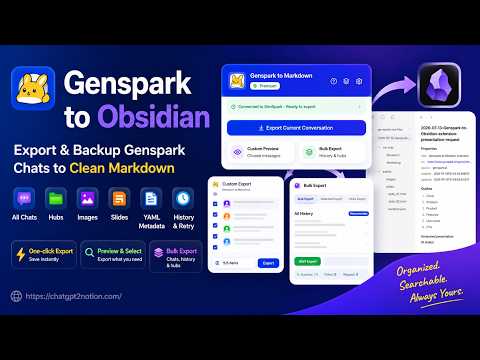
Genspark to Obsidian – Export Conversations as Markdown Save your Genspark work as clean, portable Markdown files for Obsidian and other Markdown-compatible tools. You can export the current conversation, selected conversations, opened Genspark tabs, Hubs, or your available conversation history. The extension keeps the conversation structure and downloads related assets when they are present in the source data. By default, each note contains your prompts and Genspark's final answers. Intermediate assistant progress and tool calls are optional, so you can choose between a concise archive and a more complete record of the working process. Key Features 1. Current Conversation Export Export the Genspark conversation in the active tab to a Markdown file. The popup shows the page status, destination folder, and available export actions. 2. Custom Markdown Preview Review the rendered Markdown before downloading, including common formatting such as headings, tables, lists, links, code blocks, Mermaid diagrams, frontmatter, and detected images. The preview also lets you include or exclude individual prompts, final responses, intermediate Bot messages, and tool calls. 3. Flexible Export Workflows Choose from bulk export, selective export, Hubs export, or opened-tabs export, depending on how you want to organize your archive. 4. Active and Archived Hubs Browse active and archived Hubs. Archived items are clearly marked and can be included in exports. 5. Readable Speaker Names Exported notes use You for user prompts, Genspark for final responses, and Bot for intermediate assistant progress. 6. Optional Process Details Use the shared settings in the popup, Options page, and Custom Preview to include intermediate Bot progress or tool calls when needed. 7. Related Images and Generated Files When a conversation contains downloadable images or generated files, the extension saves them in a conversation-specific asset folder and inserts links beside the related content. 8. Presentation Support For supported presentation responses, the extension saves the available presentation assets and adds links to them from the exported Markdown. 9. Support for Multiple Conversation Structures Genspark responses can use different structures depending on the agent and content type. The extension supports multiple known conversation formats, including standard chats, rich content, image generation, presentations, and other supported project types. Content that is not present in the source conversation is not added to the export. 10. Markdown and Optional YAML Frontmatter The generated notes preserve common Markdown elements such as headings, lists, tables, links, quotes, fenced code, and Mermaid diagrams. Optional YAML frontmatter can include the conversation title, source URL, conversation ID, and export time. 11. Organized Downloads Choose a folder under Chrome Downloads. Each conversation is saved as a Markdown file, with related assets grouped in a matching folder so relative links remain portable. 12. Export Overview and History View exported, failed, conversation, and page totals. Full conversation totals can be refreshed and cached locally. Export history supports failure review, retry, report download, and skipping records that were already exported. Privacy & Data Handling The extension reads Genspark page data when you request an export or preview. Conversation parsing, Markdown generation, preview rendering, and download preparation run inside the browser. Exported files are saved through Chrome's Downloads system. Account or subscription checks may communicate with the service used to provide licensed features. Conversation content is not stored by the developer for export processing. Privacy Policy: https://chatgpt2notion.com/privacy-policy/ Recent Updates 2026.07.13 • Added a rendered Custom Markdown Preview with per-message selection. • Added conversation and page totals with local caching. 2026.07.12 • Redesigned the popup and added quick settings. • Added cleaner default output focused on prompts and final answers. • Expanded support for generated assets, presentations, and additional response structures. • Added bulk, selective, opened-tabs, active-Hub, and archived-Hub export workflows. Resources & Support Documentation: https://chatgpt2notion.com/docs/genspark-to-obsidian/overview/ Contact Support: chatgpt2notion@gmail.com Report an Issue: https://github.com/joysey/chatgpt-to-notion/issues
5 out of 53 ratings
Details
- Version2.0.0
- UpdatedJuly 15, 2026
- Size626KiB
- Languages16 languages
- DeveloperWebsite
Email
aluoapps@gmail.com - Non-traderThis developer has not identified itself as a trader. For consumers in the European Union, please note that consumer rights do not apply to contracts between you and this developer.
Privacy

Genspark to Obsidian markdown file has disclosed the following information regarding the collection and usage of your data. More detailed information can be found in the developer's privacy policy.
Genspark to Obsidian markdown file handles the following:
This developer declares that your data is
- Not being sold to third parties, outside of the approved use cases
- Not being used or transferred for purposes that are unrelated to the item's core functionality
- Not being used or transferred to determine creditworthiness or for lending purposes
Support
For help with questions, suggestions, or problems, visit the developer's support site