
![Item logo image for GenFlow — Veo & Banana Automation with Characters [4K]](https://lh3.googleusercontent.com/qtB85Atp9kfECRFMQi0dMizgbkTVb3GVU6jhwEP5c3sPXOQQ1WsSm80MtstHW7Z4PAiaxHm7Q0XWwBiGm4Dpl2MIKQ=s60)
GenFlow — Veo & Banana Automation with Characters [4K]
9 ratings
)![Item media 4 (screenshot) for GenFlow — Veo & Banana Automation with Characters [4K]](data:image/gif;base64,R0lGODlhAQABAIAAAP///////yH5BAEKAAEALAAAAAABAAEAAAICTAEAOw==)
Overview
Automate image and video generation with Veo 3 and Banana - 4K, references, batch queue
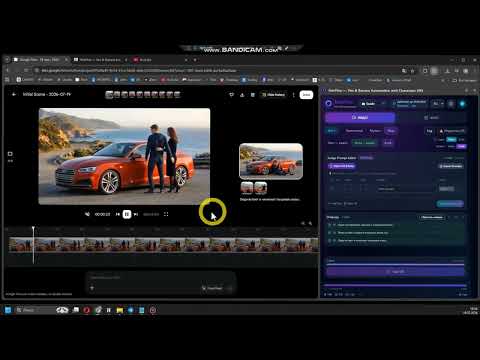
Keep characters, objects & locations consistent across every prompt. Build seamless long-form video in Film mode — faster, up to 4K. GenFlow — automation for Google Flow, where a character keeps their face from shot to shot and long-form films come together on a stream. A familiar pain: you generate a hero — and on the next prompt they already have a different face, a different look, a different world. Any story falls apart because of it. GenFlow was built to put an end to that. 🎭 Characters, objects, and locations that stay consistent Define your heroes, an object, or a location once — a name and a photo — and in every prompt where that name appears, GenFlow drops in the right reference automatically. Generate video and photos with them across any number of prompts: context and appearance hold across the entire queue. One hero — hundreds of scenes, and it's the same one everywhere. 🎬 Flow mode — long-form cinema, many times faster No more manually carrying a frame from one video into another and dragging the continuation through a single thread by hand. GenFlow chains the clips into one continuous scene itself — seamless generation on a stream. A big story comes together without the hassle. 🎬 Video modes Single — prompt = video Image to Video — photo + prompt = video Multi — several photos (1–2, 3–4) + prompt = video Flow — a chain of frames (1–2, 2–3) + prompt = seamless generation 🖼 Photo modes Single — prompt = photo Film — each prompt continues the previous one, building its own storytelling Reference — set a character's name and photo: in every prompt with that name, your reference is applied 🔌 API for integration Embed GenFlow into your own software via API — photos and videos download straight to wherever you need them. ⚙️ A pipeline that runs itself Queue up hundreds of prompts — GenFlow feeds them in, generates across several threads, and downloads the results on its own. Photos in 1K / 2K / 4K, video up to 4K. No clicking, no babysitting. 📥 Clean downloads The "download all" button grabs only your generations — references and source files never end up in the folder. Tidy filenames, no duplicates, progress visible in real time. 📊 Control from the side panel Live status for every prompt, an error list, and one-click retry of failed tasks. Plus smart rate-limit protection so your account doesn't get blocked on large batches. 🌐 Interface in 17 languages. ✅ Who it's for Storytellers and YouTube creators, Reels / Shorts / TikTok content makers, studios, and anyone producing character-driven content in series rather than one frame at a time. GenFlow is an independent tool and is not an official Google product.
5 out of 59 ratings
Details
- Version1.23
- UpdatedOctober 5, 2026
- FeaturesOffers in-app purchases
- Offered byXcon
- Size992KiB
- LanguagesEnglish
- Developer
Email
kexaflow@gmail.com - Non-traderThis developer has not identified itself as a trader. For consumers in the European Union, please note that consumer rights do not apply to contracts between you and this developer.
Privacy

GenFlow — Veo & Banana Automation with Characters [4K] has disclosed the following information regarding the collection and usage of your data. More detailed information can be found in the developer's privacy policy.
GenFlow — Veo & Banana Automation with Characters [4K] handles the following:
This developer declares that your data is
- Not being sold to third parties, outside of the approved use cases
- Not being used or transferred for purposes that are unrelated to the item's core functionality
- Not being used or transferred to determine creditworthiness or for lending purposes