


Overview
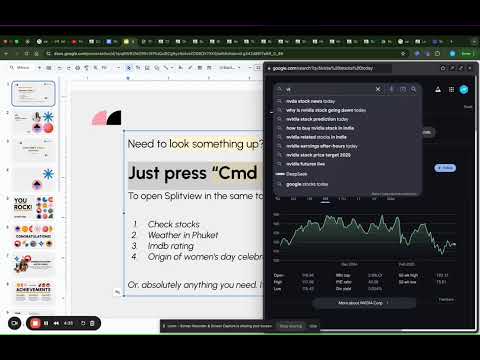
Looking to try Gemini in Chrome? Try SplitView: Unlimited FREE AI chat with Gemini without leaving the tab.
Use AI in your daily research, travel planning and study with Gemini. SplitView brings the entire web - and the world’s smartest AI - directly into your current window. 🚀 WHY CHOOSE SPLITVIEW OVER OTHERS? Most AI extensions limit your daily queries and demand expensive subscriptions. SplitView offers Unlimited FREE AI Chat without the paywall. But it’s more than just a chatbot—it’s a mini-browser that lives inside your tab. ✨ CORE FEATURES: FREE Unlimited AI Assistant: Research, draft emails, and code with Gemini-powered AI on any webpage. No limits. No logins. Same-Tab Popup (Tab-in-Tab): Click any link to open it in a sleek popup window. Read articles, check documentation, or view sources without leaving your main page. Google Search & Maps Integration: Need a fact or a location? Open a Google Search or Maps popup instantly. YouTube Floating Player: Watch tutorials or background videos in a focused popup while you work. Google Search "Split-Button": See the SplitView icon directly next to Google Search results to preview links instantly. 🎯 PERFECT FOR: Developers: View Stack Overflow or MDN docs while coding in your web IDE. Marketers: Perform competitor research and keyword analysis in a single view. Students: Fact-check and summarize sources without losing your place in a lecture. Travelers: Check weather and maps while booking flights on Expedia or Airbnb. Try Splitview today - no login or payment - now or ever.
4.3 out of 56 ratings
Details
- Version1.6.1
- UpdatedMarch 24, 2026
- Offered byCurious Mind
- Size151KiB
- LanguagesEnglish
- Developer
Email
hi@getquickmark.com - Non-traderThis developer has not identified itself as a trader. For consumers in the European Union, please note that consumer rights do not apply to contracts between you and this developer.
Privacy

This developer declares that your data is
- Not being sold to third parties, outside of the approved use cases
- Not being used or transferred for purposes that are unrelated to the item's core functionality
- Not being used or transferred to determine creditworthiness or for lending purposes
Support
For help with questions, suggestions, or problems, please open this page on your desktop browser