

Gemini Folders

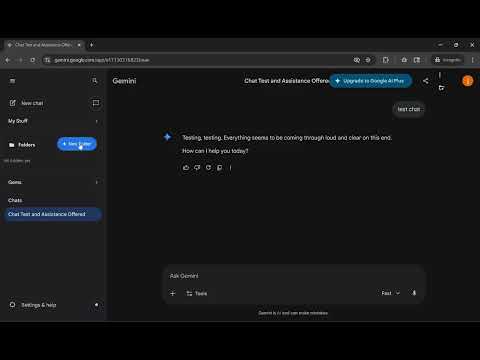
Overview
Adds a folder organizer to the Gemini sidebar.
The Gemini Folders Extension is a professional-grade organization tool designed to enhance the Google Gemini web interface by adding a native-feeling folder hierarchy to the sidebar. It specifically addresses the needs of power users—such as researchers and educators—who manage large volumes of conversations and require structured categorization that the default interface does not provide. Core Capabilities Hierarchical Organization: Users can create top-level folders and nested sub-folders with infinite depth, allowing for complex categorization of research topics, teaching materials, or personal projects. Multi-Labeling System: A robust data structure allows a single chat thread to exist in multiple folders simultaneously, functioning as a versatile tagging system for cross-disciplinary work. Hybrid Navigation Engine: Engineered to handle 2,000+ chats, the extension uses "soft navigation" to instantly switch between visible chats while providing reliable "hard" reloads for older, archived conversations. Account-Aware Privacy: Data is isolated per Google account; folder structures are bound to a specific login and will not appear if a different user logs in on the same machine. Non-Destructive Integration: The UI is anchored to stable "neutral zones" in the Gemini sidebar to prevent interference with Google's dynamic updates and single-page application logic. Data Portability: Features built-in export and import functionality via a dedicated browser popup, allowing for full JSON backups and cross-device synchronization. Technical Architecture The extension is modularized into specialized JavaScript components to ensure maintainability and security for public release: Utilities (utils.js): Core detection for unique user identifiers and chat context. Storage (storage.js): Manages account-based local storage, data normalization, and state persistence. UI Components (ui-components.js): Handles all DOM rendering for the folder tree, sub-items, and icons. Navigation (navigation.js): Controls chat selection, URL extraction, and interaction with native Gemini links. Main Orchestrator (main.js): Manages the startup sequence, mutation observers, and global event listeners.
0 out of 5No ratings
Details
- Version1.0.1
- UpdatedApril 18, 2026
- Offered byJaya Keshava Chandra Kotha
- Size4.65MiB
- LanguagesEnglish (United States)
- Developer
Email
jayakeshav.work@gmail.com - Non-traderThis developer has not identified itself as a trader. For consumers in the European Union, please note that consumer rights do not apply to contracts between you and this developer.
Privacy

This developer declares that your data is
- Not being sold to third parties, outside of the approved use cases
- Not being used or transferred for purposes that are unrelated to the item's core functionality
- Not being used or transferred to determine creditworthiness or for lending purposes
Support
For help with questions, suggestions, or problems, visit the developer's support site