

Gemini Folders, Bookmarks & Search - Gemfolders: Chat Organizer

Overview
A chrome extension to organize your Gemini chats
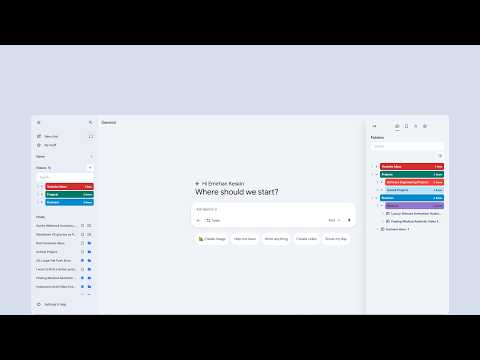
Declutter your Google Gemini sidebar and find important conversations faster with Gemfolders. Gemfolders adds folders, bookmarks, search, and quick chat actions directly to Gemini. Organize conversations by project, topic, client, or anything else, without disrupting Gemini's familiar look and feel. 🎉 WHAT'S NEW IN 2.0.3 All features are now free for everyone. No sign-in, no limits. • Unlimited folders. • Unlimited bookmarks. • Unlimited subfolder nesting. • A responsive, vertically centered welcome screen that works in both small and large windows. • Reliability and performance improvements. 🗂️ ORGANIZE YOUR GEMINI CHATS • Create custom folders for projects, research, clients, classes, writing, and more. • Build nested folders to keep complex workflows structured. • Drag and drop items to reorganize your workspace quickly. • Rename and color-code folders for easier recognition. • Add multiple conversations to a folder using the chat picker. • Access folders directly inside Gemini's sidebar or through the separate Gemfolders organizer. 🔍 SEARCH AND BOOKMARKS • Find organized conversations quickly by title. • Search folders and bookmarks without endlessly scrolling. • Bookmark important chats for fast access. • Add chats to folders or bookmarks directly from Gemini's sidebar. ⚙️ CUSTOMIZE YOUR WORKSPACE • Choose between integrated and extension-only modes. • Show or hide folder and bookmark actions in Gemini's chat list. • Place the Gemfolders button at the top or bottom of the sidebar. • Use light mode, dark mode, or automatically follow Gemini's theme. • Export your folders, bookmarks, and cached chat information as a JSON file. 🔒 PRIVACY Your folders and bookmarks are stored locally in your browser. Use the export option anya JSON file. Whether you're organizing development work, academic research, client conversations, or creative projects, Gemfolders turns Gemini into a cleaner and more productive workspace. Install Gemfolders and take control of your Gemini conversations today. Gemfolders is an independent extension and is not affiliated with Google or Gemini.
5 out of 56 ratings
Details
- Version2.0.3
- UpdatedOctober 12, 2026
- FeaturesOffers in-app purchases
- Size792KiB
- LanguagesEnglish
- DeveloperWebsite
Email
emirhankeskindev@gmail.com - Non-traderThis developer has not identified itself as a trader. For consumers in the European Union, please note that consumer rights do not apply to contracts between you and this developer.
Privacy

Gemini Folders, Bookmarks & Search - Gemfolders: Chat Organizer has disclosed the following information regarding the collection and usage of your data. More detailed information can be found in the developer's privacy policy.
Gemini Folders, Bookmarks & Search - Gemfolders: Chat Organizer handles the following:
This developer declares that your data is
- Not being sold to third parties, outside of the approved use cases
- Not being used or transferred for purposes that are unrelated to the item's core functionality
- Not being used or transferred to determine creditworthiness or for lending purposes
Support
For help with questions, suggestions, or problems, visit the developer's support site