


Overview
A new tab page of large tiles for your sites, with a clock, weather, notes and headlines. Build each part the way you want it.
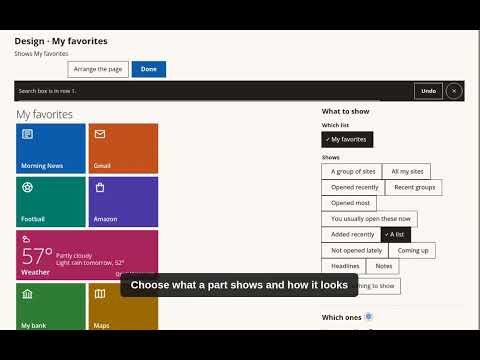
Comfy Home Private turns Chrome's new tab into a home page of large tiles for the sites you visit. Start with the ready-made page. Every part of it can be changed, and new parts can be added: choose what a part shows, which items, and how it looks. What a part can show - Sites: favorites, a group, a list of your own, the most opened, the recently added, or the ones usually opened at this hour. - A clock with the date, and the days left until a date you choose. - The weather for any city, now or for the coming days. - Coming up: events, birthdays and holidays from calendars you add. - Headlines from a news site, such as ynet or the BBC, or from a feed address. - Notes: one note or all of them. - A search box for your sites, or for Google, DuckDuckGo, ChatGPT, Claude or Gemini. - One site with its details, and a tip of the day. How a part can look - Large coloured tiles, a list, round faces, or one big value. - Each look has its own choices, such as what to show on each item. Designing the page - A gallery shows each part with your own sites and data before it is added. - The page stays in view while a part is changed, and each choice shows at once. - Every change says what it did, and Undo waits at the bottom of the page. - One button puts a page back the way it came. Pages - Each group opens as a full page, with a trail of buttons back to where you came from. - Any part can open on a page of its own. - Every person in a group shown as faces has a page with their WhatsApp, e-mail and video call. Reading and typing - Three text sizes, light or dark, and a soft evening look after dark. - Read it to me: the page read aloud with a voice on this computer, or with a network voice you choose, which sends the words to Google. - Speak instead of type: a Speak button by text boxes; Chrome sends what you say to Google to turn it into words. Both are off until turned on in Settings. Your bookmarks stay Chrome's bookmarks, so sync, your other devices and Chrome's own export keep working as before. Privacy: the page designs and notes are kept in Chrome and travel with Chrome sync if it is on; photos and recent history stay on this computer. Four things use the internet, and only when they are turned on: calendars you add, fetched about once a day; headlines for the Headlines parts you add, fetched about every 30 minutes; the weather for the cities you pick, from Open-Meteo; and Chrome's speech service at Google, for Speak instead of type and for a network voice. Weather data by Open-Meteo.com, city names from GeoNames, both under CC BY 4.0. Full policy: https://comfyux.cc/comfy-home/privacy Questions: support@comfyux.cc
0 out of 5No ratings
Details
- Version2.0.0
- UpdatedNovember 15, 2026
- Size373KiB
- Languages2 languages
- DeveloperWebsite
Email
contact@eyallapid.me - Non-traderThis developer has not identified itself as a trader. For consumers in the European Union, please note that consumer rights do not apply to contracts between you and this developer.
Privacy

Comfy Home Private: New Tab Page has disclosed the following information regarding the collection and usage of your data. More detailed information can be found in the developer's privacy policy.
Comfy Home Private: New Tab Page handles the following:
This developer declares that your data is
- Not being sold to third parties, outside of the approved use cases
- Not being used or transferred for purposes that are unrelated to the item's core functionality
- Not being used or transferred to determine creditworthiness or for lending purposes