

GDrive Sidebar Pinner

Overview
Pin Google Drive folders to your sidebar with native styling, automatic color sync, and multi-account support.
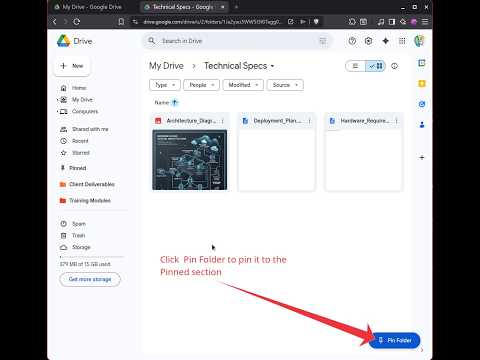
ELEVATE YOUR GOOGLE DRIVE WORKFLOW WITH THE NATIVE-FEELING PINNED SECTION. GDrive Sidebar Pinner seamlessly integrates a "Pinned" category into your Google Drive sidebar, placing your most critical folders exactly where they belong: right below Starred. Stop digging through deep folder hierarchies and start navigating with a single click. PREMIUM FEATURES - Native Integration: Looks and feels like a built-in Google Drive feature. No clunky overlays or distracting UI. - Smart Color Sync: Your folder colors are automatically detected and preserved. If a folder is Blue in Drive, it stays Blue in your Pinned list. - Multi-Account Support: (NEW) Perfectly handles multiple Google accounts in the same browser profile. Your work pins stay at work, and your personal pins stay personal. - Instant Access: A floating "Pin Folder" button appears only when you need it, letting you bookmark any folder in a split second. - Cloud Sync: Your pinned folders are synced across all your Chrome browsers via your Google account. - Privacy First: Lightweight Manifest V3 implementation. No tracking, no analytics, and no remote code. Your data stays between you and Google. HOW TO USE 1. Open any folder in Google Drive. 2. Click the floating "Pin Folder" button in the bottom-right. 3. Your folder is now instantly accessible from the "Pinned" section in the left sidebar. 4. To remove, simply click "Unpin" while inside that folder. BUILT FOR POWER USERS Whether you are managing complex client projects or just want to keep your tax receipts handy, GDrive Sidebar Pinner turns Google Drive into a high-efficiency workspace.
0 out of 5No ratings
Details
- Version1.1.2
- UpdatedMay 21, 2026
- Offered byOleksii Konashevych
- Size19.61KiB
- LanguagesEnglish
- Developer
Email
oleksiiko.app@gmail.com - Non-traderThis developer has not identified itself as a trader. For consumers in the European Union, please note that consumer rights do not apply to contracts between you and this developer.
Privacy

This developer declares that your data is
- Not being sold to third parties, outside of the approved use cases
- Not being used or transferred for purposes that are unrelated to the item's core functionality
- Not being used or transferred to determine creditworthiness or for lending purposes