


Overview
Add unlimited custom colors to Google Drive folders. No OAuth, no setup, just a cleaner Drive.
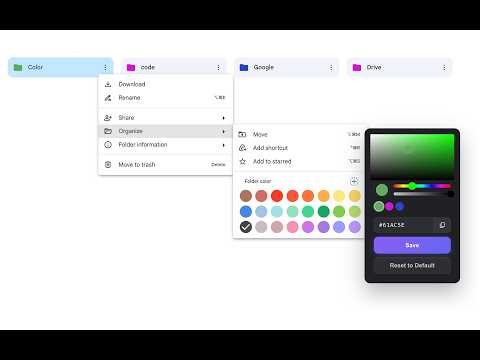
GDrive Pro lets you add custom colors to Google Drive folders so your Drive is easier to scan, organize, and manage. Google Drive includes a small default folder color palette, but many users need more flexibility. GDrive Pro adds a custom color picker directly inside Google Drive’s folder color menu, allowing you to choose any custom color, enter a HEX color code, and create a clearer visual system for your folders. Use custom folder colors to organize work projects, client files, school folders, personal documents, shared folders, invoices, archives, team folders, and any other files you manage in Google Drive. WHAT GDRIVE PRO DOES GDrive Pro adds a custom “+” color option to the Google Drive folder color menu. When you click it, you can choose a custom color from a color picker or type a precise HEX color code. This gives you more control than the default Google Drive folder colors. With GDrive Pro, you can: - Add custom colors to Google Drive folders - Use any HEX color for folders - Go beyond Google Drive’s default folder color palette - Save custom colors for repeated use - Quickly reuse previously saved colors - Reset folders back to Google’s default folder color - Keep your Google Drive visually organized - Make important folders easier to find - Use custom colors without OAuth or complicated setup HOW TO USE 1. Open Google Drive in your browser. 2. Click the three-dot menu on any folder. 3. Hover over Organize to reveal the folder color options. 4. Click the custom “+” button added by GDrive Pro. 5. Choose a color from the picker or enter a custom HEX code. 6. Save the color. 7. Use Reset to Default if you want to return to Google’s original folder color. WHY CUSTOM GOOGLE DRIVE FOLDER COLORS HELP If you use Google Drive every day, folder organization matters. Default folder colors can be useful, but they are limited. GDrive Pro gives you more visual control so you can create a color system that matches the way you work. You can use custom colors for: - Client folders - Work projects - School subjects - Personal files - Finance and invoice folders - Urgent folders - Archive folders - Shared team folders - Department folders - Content folders - Design assets - Legal documents - Marketing projects - Research folders - Priority folders Instead of scanning through folder names only, you can identify important folders visually. PRIVACY FIRST GDrive Pro is built to be simple and privacy-conscious. The extension does not require Google OAuth. It does not need access to your Google account through an OAuth flow. It works directly in the browser by enhancing the Google Drive interface. Your custom folder color settings are stored using browser extension storage. No complicated setup. No account connection. No OAuth permission screen. FREE AND PRO GDrive Pro includes a free tier with 4 custom colors. Upgrade to Pro for unlimited custom colors. The Pro version is a one-time lifetime purchase, not a monthly subscription. FEATURES Custom Google Drive folder colors Add colors that are not available in Google Drive’s default palette. HEX color support Enter exact HEX color values for precise folder colors. Built into Google Drive’s folder color menu The custom color option appears where you already change folder colors. Recently used colors Reuse colors you have already saved. Reset to Default Remove a custom folder color and return to Google’s default folder color. No OAuth setup Start using custom folder colors without connecting your Google account through OAuth. Privacy-conscious design The extension focuses only on adding custom folder colors inside the browser. Lightweight workflow No dashboards, no complicated settings, no unnecessary setup. WHO THIS EXTENSION IS FOR GDrive Pro is useful for anyone who wants better Google Drive organization. It is especially helpful for: - Students organizing class folders - Teachers managing course materials - Freelancers managing client folders - Agencies organizing project files - Small business owners managing documents - Designers organizing assets - Marketers managing campaigns - Accountants organizing invoices and reports - Teams using shared Drive folders - Anyone with a crowded Google Drive COMMON USE CASES Create a folder color system for clients Assign each client a unique custom folder color so client work is easier to recognize. Organize school folders Use different folder colors for each class, semester, or subject. Highlight urgent folders Give high-priority folders a bold color so they stand out immediately. Separate personal and work folders Use distinct colors for personal documents, business files, and shared folders. Match brand colors Use custom HEX codes to match your company, client, or project branding. Organize shared folders Make shared folders easier to identify when working across teams. HOW GDRIVE PRO IS DIFFERENT Many Google Drive organization workflows rely on folder names alone. GDrive Pro adds visual structure with custom folder colors. Instead of being limited to Google’s default color palette, you can choose colors that actually match your system. GDrive Pro is designed to feel like part of Google Drive. The custom color option appears inside the existing folder color workflow, so you do not need to learn a new interface. IMPORTANT NOTE GDrive Pro is a browser extension. Custom folder color changes are applied in your browser. Google Drive’s mobile app will continue to show Google’s default folder colors. This extension is designed for organizing Google Drive in the browser. KEY BENEFITS - Better Google Drive organization - Faster folder recognition - Custom folder colors - Unlimited Pro colors - HEX color picker - No OAuth required - Simple browser-based setup - Works inside Google Drive’s existing folder menu - Helps make large Drives easier to scan
5 out of 52 ratings
Details
- Version1.0.0
- UpdatedJune 10, 2026
- FeaturesOffers in-app purchases
- Offered byyep.az
- Size112KiB
- LanguagesEnglish
- Developer
Email
info@yep.az - Non-traderThis developer has not identified itself as a trader. For consumers in the European Union, please note that consumer rights do not apply to contracts between you and this developer.
Privacy

This developer declares that your data is
- Not being sold to third parties, outside of the approved use cases
- Not being used or transferred for purposes that are unrelated to the item's core functionality
- Not being used or transferred to determine creditworthiness or for lending purposes