


Overview
Shazam for AI images and videos. Click any AI creation on the web to see the tool, the prompt and every step behind it.
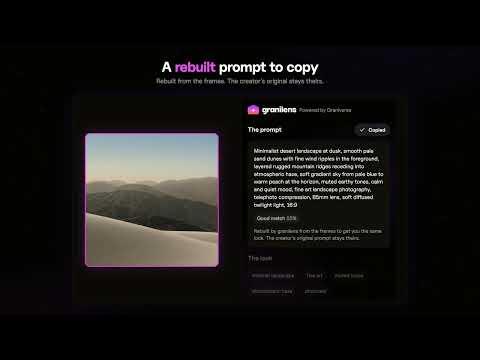
Granilens is Shazam for AI images and videos. See an AI image or video you love on Pinterest, X, Instagram, YouTube or anywhere else? Click it with granilens, and in about 30 seconds Grani AI tells you how it was made: • Made with: the tool it was most likely made with, plus a match score so you know how sure it is • The prompt: a detailed prompt rebuilt from what's actually in the frames, ready to copy • The look: style, colour palette with hex codes, lighting, camera and motion • How to recreate it: numbered steps, each with its own copy button • Videos, frame by frame: granilens watches every frame, finds every cut and gives you each shot with its exact timing • Screens and UIs: the design system and components it's built on, plus runnable code • Pass to: one click hands the whole read to your AI tool or to Claude How it works: 1. Click the granilens icon, or press Option + L (Alt + L on Windows), to turn on the lens. 2. A loupe follows your cursor. Images and videos light up as you hover. 3. Click one, or drag over just the part you want with Region. 4. Grani AI reads it in about 15 to 30 seconds. Press Esc any time to turn the lens off. Honest by design: granilens doesn't pull a creator's private prompt out of a file, and nobody honestly can. It rebuilds one from what it sees and shows how confident it is. When the file carries its own creation details (prompt, model, seed, Content Credentials), granilens reads them and marks them Verified. Your first 3 reads are free, no card needed. granilens Pro is $20/month for unlimited reads. Works in Chrome, Edge, Brave, Arc and Opera. Sign in with Google, and every read is saved to your account so you can come back to it. Privacy: granilens only sees the tab you use it on, and only when you click. It reads the image you picked (from its own file, or a screenshot of it), or watches the video you picked right in your browser to find its shots and key frames. Only those frames and the page's title, address and caption are sent to be read. Nothing records in the background.
5 out of 52 ratings
Details
- Version0.1.26
- UpdatedNovember 20, 2026
- Size633KiB
- LanguagesEnglish
- DeveloperWebsite
Email
granttheemperor0007@gmail.com - Non-traderThis developer has not identified itself as a trader. For consumers in the European Union, please note that consumer rights do not apply to contracts between you and this developer.
Privacy

granilens has disclosed the following information regarding the collection and usage of your data. More detailed information can be found in the developer's privacy policy.
granilens handles the following:
This developer declares that your data is
- Not being sold to third parties, outside of the approved use cases
- Not being used or transferred for purposes that are unrelated to the item's core functionality
- Not being used or transferred to determine creditworthiness or for lending purposes
Support
For help with questions, suggestions, or problems, visit the developer's support site