

LinkPreview: Meta Tag Checker & Open Graph Preview

Overview
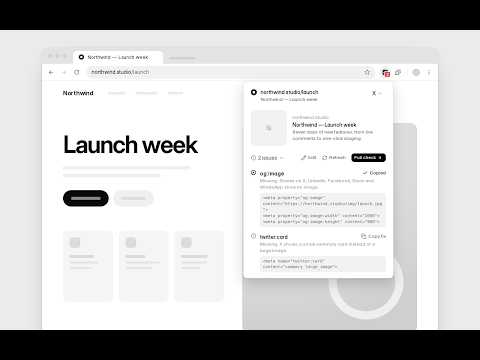
See how the page you're on will look when its link is shared, and fix missing or broken meta and Open Graph tags.
LinkPreview shows you how the page you're on will look when someone shares it, before you post the link anywhere. As you browse, the LinkPreview icon shows a red count when the page has missing or broken meta tags, so you spot problems without opening anything. Click the icon for a live preview of the page's search result and social share cards. It reads the page's real meta tags right in your browser, so it works on staging sites, localhost and pages behind a login too. META TAG CHECKER Every page gets a quick check of the tags that decide how a link preview looks: • Title and meta description length, with warnings when Google will cut them off • og:title, og:description and og:image • og:image size and aspect ratio, so you know if an image is too small or will be cropped (1200×630 is the sweet spot) • twitter:card type • Canonical URL and og:url • Favicon Each issue tells you what goes wrong, with a ready-to-paste fix you can copy in one click. "Copy all tags" gives you a complete, escaped set of head tags for the page. You can also open the full list of meta tags, Open Graph tags and Twitter Card tags found on the page. TRY CHANGES BEFORE YOU SHIP THEM Open Edit to try a different title, description or image and watch the preview update live. Nothing on the page is changed. OPEN GRAPH PREVIEW FOR EVERY PLATFORM Pick a platform from the dropdown to see the card the way that platform draws it, including fallbacks like a missing description or a small summary card. FULL CHECK AND CACHE REFRESH • Full check: opens the free meta tag checker on linkpreview.app with the page already filled in. • Refresh: still seeing an old image or title after fixing your tags? Open the LinkPreview refresh guide to clear a cached preview. PRIVATE BY DESIGN All checks run locally in your browser. To show the issue count, LinkPreview reads the meta tags of each page you open and checks them on your device. Nothing is sent to LinkPreview or anyone else: no data collection, no analytics, no account. The only network request it makes is loading the page's own preview image from the site that hosts it, to measure its size. Made for marketers, SEO specialists, developers, founders and anyone who shares links. Works on any website.
0 out of 5No ratings
Details
- Version1.3.0
- UpdatedNovember 8, 2026
- Offered byjurrehoutkamp@gmail.com
- Size134KiB
- LanguagesEnglish
- Developer
Email
jurrehoutkamp@gmail.com - Non-traderThis developer has not identified itself as a trader. For consumers in the European Union, please note that consumer rights do not apply to contracts between you and this developer.
Privacy

This developer declares that your data is
- Not being sold to third parties, outside of the approved use cases
- Not being used or transferred for purposes that are unrelated to the item's core functionality
- Not being used or transferred to determine creditworthiness or for lending purposes
Support
For help with questions, suggestions, or problems, visit the developer's support site