

Leonardo AI: interface translator — English and 133 languages
5 ratings
)
Overview
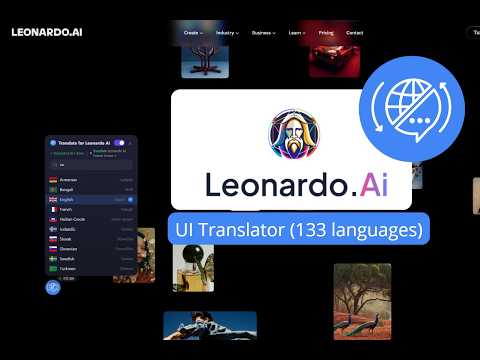
Translate Leonardo AI interface into 133 languages. Google Translate API. Not affiliated with Leonardo AI.
Leonardo AI Translate is a powerful Chrome extension that translates the entire Leonardo AI user interface into 133 languages using Google Translate API. No more struggling with English-only menus, tooltips, and panels — work in Leonardo AI in your own language. ✨ KEY FEATURES • 133 Languages — Full support for all Google Translate languages • Real-Time Translation — Translates the interface as you browse, including dynamically loaded content (SPA) • Floating Widget — A sleek, draggable widget on top of Leonardo AI. Pick your language, toggle translation on/off with one click • Smart Caching — Translations cached locally for 30 days. Previously translated pages load instantly, even offline • Glossary System — Built-in glossary ensures critical UI terms are translated accurately • Offline Mode — Cached translations are served automatically when offline • Zero Performance Impact — Background translation with rate-limiting 🔍 HOW IT WORKS 1. Install the extension 2. Navigate to leonardo.ai 3. Click the floating globe icon (bottom-left corner) 4. Select your preferred language from the list 5. The entire Leonardo AI interface translates instantly You can drag the widget anywhere on screen, search for languages, and toggle translation on/off at any time. 💰 PRICING • 7-Day Free Trial — try all features free • Annual License — €17/year for unlimited access after trial • Visit lingoflow.pro for details 🌍 SUPPORTED LANGUAGES (133) Afrikaans, Albanian, Amharic, Arabic, Armenian, Azerbaijani, Bambara, Basque, Belarusian, Bengali, Bosnian, Bulgarian, Catalan, Cebuano, Chinese (Simplified), Chinese (Traditional), Corsican, Croatian, Czech, Danish, Dhivehi, Dogri, Dutch, English, Esperanto, Estonian, Ewe, Filipino, Finnish, French, Frisian, Galician, Georgian, German, Greek, Guarani, Gujarati, Haitian Creole, Hausa, Hawaiian, Hebrew, Hindi, Hmong, Hungarian, Icelandic, Igbo, Ilocano, Indonesian, Irish, Italian, Japanese, Javanese, Kannada, Kazakh, Khmer, Kinyarwanda, Konkani, Korean, Krio, Kurdish (Kurmanji), Kurdish (Sorani), Kyrgyz, Lao, Latin, Latvian, Lingala, Lithuanian, Luganda, Luxembourgish, Macedonian, Maithili, Malagasy, Malay, Malayalam, Maltese, Maori, Marathi, Meiteilon (Manipuri), Mizo, Mongolian, Myanmar (Burmese), Nepali, Norwegian, Nyanja (Chichewa), Odia (Oriya), Oromo, Pashto, Persian, Polish, Portuguese, Punjabi, Quechua, Romanian, Russian, Samoan, Sanskrit, Scots Gaelic, Sepedi, Serbian, Sesotho, Shona, Sindhi, Sinhala, Slovak, Slovenian, Somali, Spanish, Sundanese, Swahili, Swedish, Tajik, Tamil, Tatar, Telugu, Thai, Tigrinya, Tsonga, Turkish, Turkmen, Twi, Ukrainian, Urdu, Uyghur, Uzbek, Vietnamese, Welsh, Xhosa, Yiddish, Yoruba, Zulu. 🔒 PRIVACY & SECURITY • No user data collected — we only translate visible text on the page • API key secured in service worker (never exposed to web pages) • Translations cached locally on your device • Only connects to translation.googleapis.com (Google Translate) and lingoflow.pro (license validation) • Privacy Policy: https://lingoflow.pro/privacy-policy 💡 PERFECT FOR • Artists and designers who prefer working with AI image tools in their native language • International teams using Leonardo AI for image generation • Content creators, illustrators, and game developers • Anyone who wants Leonardo AI translated into their language 📋 PERMISSIONS EXPLAINED • Storage — saves your language preference and cached translations locally • Host permissions (leonardo.ai) — needed to inject the translation widget into Leonardo AI pages ⚠️ DISCLAIMER This extension is not affiliated with, endorsed by, or officially connected to Leonardo.ai. "Leonardo AI" is a trademark of Leonardo.ai. This is an independent third-party translation tool by LingoFlow. --- Translate Leonardo AI today — 7-day free trial! 🌐
4.6 out of 55 ratings
Details
- Version1.0.1
- UpdatedMarch 21, 2026
- Offered byappsheetcommunity
- Size136KiB
- Languages54 languages
- Developer
Email
appsheetcommunity@gmail.com - Non-traderThis developer has not identified itself as a trader. For consumers in the European Union, please note that consumer rights do not apply to contracts between you and this developer.
Privacy

This developer declares that your data is
- Not being sold to third parties, outside of the approved use cases
- Not being used or transferred for purposes that are unrelated to the item's core functionality
- Not being used or transferred to determine creditworthiness or for lending purposes
Support
For help with questions, suggestions, or problems, please open this page on your desktop browser