

Gblock — Block email tracking in Gmail

Overview
Protect Gmail Privacy: Block Email Tracking, Spy Pixels, Read Receipts & Tracking Links
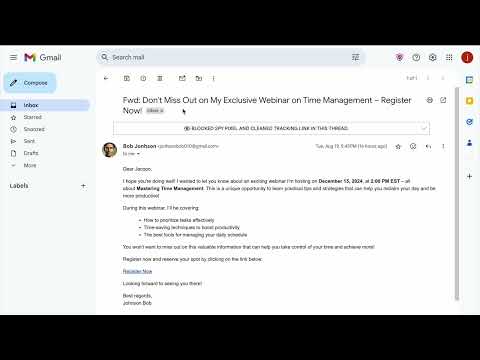
Gblock is the easiest way to block email tracking in Gmail. It stops senders from knowing when, where, or if you open a message — shielding you from spy pixels, tracking links, and every email read receipt sent without your consent. Gblock also hides your IP address and anonymizes your activity through a secure proxy. With automated tracker detection, it stays updated to block the latest email tracking techniques, so your inbox stays private and protected. ✔️ SPY PIXEL PROTECTION Spy pixel tracking is a sneaky technique based on adding an invisible 1x1 image, known as a "tracking pixel," to an email. When you open the email, this pixel sends information back to the sender, revealing details like when you opened it, where you were, and what device you used — effectively an invisible email read receipt you never agreed to. All of this is done without your knowledge or consent, making it a serious privacy concern. Gblock detects and blocks tracking pixels, providing complete protection against spy pixel tracking. ✔️ TRACKING LINK PROTECTION Link tracking involves adding custom tracking parameters to URLs, such as "?utm_source=newsletter", or embedding unique tracking codes. Some email marketing tools take this a step further by using URL shorteners to obscure the final destination, making it impossible to remove tracking parameters. Similar to spy pixels, tracking links can expose your location, device details, and other personal information. Gblock blocks this form of email tracking in two ways: stripping all known tracking parameters from URLs, and using our proxy server to follow email links, masking your IP address and fully anonymizing your activity. Our proxy also caches responses, so if a tracking link is shared among multiple users, we already know the final destination and can serve it directly without accessing the tracking link. We are confident this would cover you for 99% of the cases. ✔️ AUTOMATED TRACKER DETECTION Traditional tracker blocking relies on static lists that need constant manual updates, but trackers evolve rapidly, making this approach outdated. Gblock takes a smarter approach with automated tracker detection. Instead of relying on predefined lists, our advanced logic dynamically identifies and reports new trackers in real-time. When Gblock detects a previously unseen tracker, it instantly analyzes its behavior and reports it to our server. This ensures that future emails containing the same tracker are automatically blocked — keeping you a step ahead in the fight to block email tracking. _________________________________________________________ USE CASES Gblock is built for anyone who wants to block email tracking and take control over how they're monitored via email. Whether you're a regular Gmail user, a professional handling sensitive information, or a privacy-conscious power user, Gblock fits right into your workflow. ✔️ PERSONAL PRIVACY PROTECTION • Protect your inbox from surveillance and regain control over your personal data. • Block email tracking (know when, where, and if you open emails) • Hide your IP address and location from senders • Avoid every invisible email read receipt ✔️ PROFESSIONAL & BUSINESS USE • Maintain confidentiality and professionalism in sensitive communications. • Journalists & lawyers: protect confidentiality with sources or clients • Recruiters & HR: review applications without sending an email read receipt or engagement signal • Corporate employees: block email tracking in newsletters and outreach emails ✔️ MARKETING & COMPETITIVE INTELLIGENCE • Safely explore how others communicate — without being tracked back. • Safely analyze competitor newsletters • Test how email marketing tools embed and behave with trackers ✔️ TECH-SAVVY & SECURITY-CONSCIOUS USERS • Go beyond basic browser privacy — shield your Gmail from hidden threats. • Strengthen Gmail privacy alongside VPNs and ad blockers • Investigate and study tracking techniques ✔️ FREELANCERS & CONSULTANTS • Don't give away leverage in negotiations. • Keep your email reading habits private when negotiating rates or deliverables ✔️ REGULATORY & COMPLIANCE-FOCUSED USERS • Help your organization meet privacy standards and reduce tracking exposure. • Help companies reduce third-party tracking exposure • Support GDPR and privacy best practices _________________________________________________________ 30 DAYS FREE TRIAL, NO CREDIT CARD REQUIRED Gblock comes with a 30-day trial, after which a paid subscription is required. See our pricing page: https://www.gblock.app/pricing. _________________________________________________________ IS IT SAFE? You should always be careful about which extensions or apps you use with your email. ✔️ The code for Gblock is entirely stored on your computer (no remote code) and is for the sole purpose of enhancing Gmail's privacy and security. ✔️ Gblock uses a privacy-safe proxy to block email tracking. It never stores personal data and can be disabled in your settings if preferred. ✖️ Gblock does NOT request access to your email. ✖️ None of your personal data is collected, stored, or sent to Gblock. ✖️ Gblock does not track any of your activity. ✖️ Gblock have no ads. _________________________________________________________ PRIVACY POLICY You can find Gblock Privacy Policy here: https://www.gblock.app/privacy _________________________________________________________ ANY QUESTIONS? Drop us a line at: https://www.gblock.app/support
4.6 out of 510 ratings
Details
- Version0.4.0
- UpdatedJune 5, 2026
- FeaturesOffers in-app purchases
- Size73.07KiB
- Languages6 languages
- DeveloperJacopo BeschiWebsite
Via Don Lino Bonomelli, 24 Montichiari, BS 25018 ITEmail
beschi.jacopo@gmail.comPhone
+39 340 619 2148 - TraderThis developer has identified itself as a trader per the definition from the European Union and committed to only offer products or services that comply with EU laws.
Privacy

Gblock — Block email tracking in Gmail has disclosed the following information regarding the collection and usage of your data. More detailed information can be found in the developer's privacy policy.
Gblock — Block email tracking in Gmail handles the following:
This developer declares that your data is
- Not being sold to third parties, outside of the approved use cases
- Not being used or transferred for purposes that are unrelated to the item's core functionality
- Not being used or transferred to determine creditworthiness or for lending purposes
Support
For help with questions, suggestions, or problems, please open this page on your desktop browser