

Watch Later Tidy for Netflix: IMDb Ratings & Hidden Categories

Overview
Bring back Netflix's My List page, with IMDb ratings, filters, custom playlists, hidden genres and bulk remove.
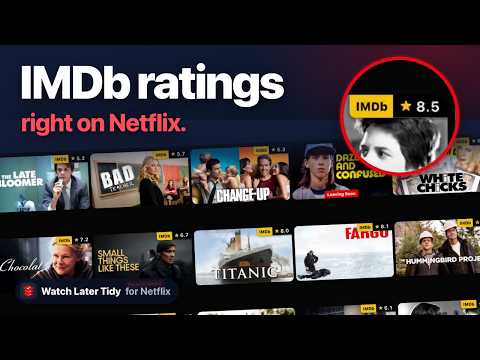
📋 Netflix gives you one list. Everything you ever meant to watch, in an order you did not choose, with no folders, no search inside it, and no way to remove more than one thing at a time. So it grows. And on the night you actually want to watch something, you scroll it and give up. Watch Later Tidy for Netflix rebuilds Netflix's original My List page, puts a real dashboard over that list, puts IMDb ratings on Netflix itself, and, with Pro, picks something for tonight. Open Netflix, press Alt+L. 🛠️ WHAT YOU GET, FREE 📃 Netflix's original My List page, rebuilt. Since September 2026 Netflix shows My List as one sideways row inside My Netflix. This extension does not stretch that row into a grid; it rebuilds the page Netflix took away. A "My List" link beside My Netflix, in Netflix's own menu, opens the whole list as a page of cards, in Netflix's order. Rest the pointer on a card and Netflix's own preview opens — play it, remove it from My List, rate it. Click a card to open the title. ⭐ IMDb ratings on Netflix's own pages. On the home page, in search and in every category, each title's art carries its IMDb rating in the top-right corner. Click the rating to open the title on IMDb. A title with fewer than 100 votes on IMDb gets none, because a thin rating misleads more than it helps. ⚙️ Ratings are optional. The toolbar popup lets you switch off the IMDb ratings on Netflix's title cards, either everywhere or only on My Netflix and My List. 🎬 Every title as a card that carries the IMDb rating, the runtime, the year, the genre and the maturity rating — the things you need in order to choose, which Netflix will not show you until you have clicked in. ⏳ Leaving soon. Sync marks every title in My List that Netflix is about to remove, with Netflix's own sentence under it, such as "Last day to watch on Netflix: October 5". Filter to show only them, and see them from the toolbar button, whose red number counts the ones that started leaving since you last looked. With Pro, the dashboard tells you when one starts leaving, and Tonight gives it a nudge. 🎚️ One Filter menu on every tab. Narrow My List by genre, type, IMDb rating, runtime, availability, and by whether you have already watched it — for films and for shows. It stays open while you choose, so you can set type and rating in one go. Sort by IMDb rating, runtime, year, title or type. 📊 A breakdown of your list by genre, biggest first. Click one to see only those. 📁 Custom playlists. Weekend. Under 90 minutes. With the kids. Netflix has never offered these. Five playlists free, up to 50 per profile with Pro, and 500 titles in each. Move titles into one straight from My List, and filter a playlist the same way you filter My List. 🔍 Search Netflix by title, actor or director without leaving the dashboard, and browse more than a hundred categories Netflix keeps out of its own genre menu — Mockumentaries, Satanic Stories, and a great many more. Every search and every category now comes with each title's year, runtime, seasons, age rating and IMDb rating, read in behind a progress bar you can stop, so you can filter and sort those too. Add anything you find to My List, or straight into a playlist without touching My List at all. 👀 Rest the pointer on a title's picture in the dashboard and Netflix's own preview opens over it — play, add or remove, rate — with the synopsis, the cast, the director and the genres added underneath. 🗑️ Bulk remove: tick as many titles as you like, review the exact list, and clear them in one run, with a receipt when it is done. 💾 Export the whole list, or just what you filtered down to, as CSV or JSON. Export your playlists to a file and import them in another browser. 💎 WHAT PRO ADDS — A LIST YOU'D ACTUALLY PICK FROM Everything above is free and stays free. Pro is for what a browser cannot do by hand: doing it for you, remembering it, or undoing it. 🍿 Tonight. Say who's watching — just you, a partner, friends or family — how long you have, and what you are in the mood for, in three taps, or tap a night you have saved, and it deals one pick and two backups from My List, each with its reason: the IMDb rating, the runtime, the genre that fits. With family, it leaves out anything rated above your youngest viewer. Your answers hold for the evening, and "Just like last time" repeats them in one key. Re-roll for three more. "Not tonight" hides a pick for a week, and a title you keep putting off is flagged in My List so you can finally let it go. Unless you switch surprises off, it also adds titles from outside My List that fit your mood, each marked as a surprise, and never one you have already watched or given a thumbs down. Watching later? "Later, on my phone" keeps the pick at the top of the TidyWL phone app until 5 am. Press Alt+T on any Netflix page. ↩️ Undo. Everything you remove from My List is kept for 90 days on this device, and a removal's summary has an Undo. 📌 Pin. Pin a title and nothing removes it — no rule, no Move, and no bulk remove you run yourself. Unpinning never needs Pro, and a pin you already made keeps protecting its title whatever your plan. 🧹 Clean-up rules. Archive what you have watched into a playlist, and move what has sat unstarted for six months into a "Someday" playlist. You see the list before anything moves. 📈 Stats. Hours of film still waiting, and what you add against what you watch, month by month. 🗂️ Up to 50 playlists per profile. Free makes five. 📱 Mobile sync. Your playlists in step across every browser you use — Chrome, Brave, another Google account, another computer — and on your phone. Pair a phone once and tidywl.com/netflix/app shows the playlists of every profile you have synced, box art and all. Tap a title and it opens in the Netflix app. Read-only: playlists are edited on your computer. 💬 Feature requests and support answered first. 🎁 Pro starts with 7 days free, card required: cancel before day 8 and you pay nothing. Then $3.99 a month or $29.99 a year, in US dollars before tax. Founding offer, while it lasts: $2.99 for your first month, or $19.99 for your first year — your first charge, after the trial. Every charge has a 14-day full refund, no questions asked. 🔑 Start the trial from the dashboard and checkout opens on tidywl.com, handled by Paddle. When it is done, Pro switches itself on in that browser — no key to copy or paste. One key works on up to three browsers; About → Pro shows which, lets you free one up, and is where you cancel, change your card or see invoices. Pro is a key, not an account: no password, and we never learn your email. 🧭 THREE TABS 1. My List — sync, sort, filter, the genre breakdown, bulk remove, export. 2. Search and browse — Netflix's catalogue, including the hidden categories, with details and ratings on every result. 3. Playlists — the folders Netflix never built. 🚀 GETTING STARTED 1. Add it to Chrome. It is free and there is no account to make. 2. Open Netflix and press Alt+L, from any browse page, on any profile. The toolbar button does the same thing. 3. Press Sync, once. It reads your list, your watch state and what is about to leave Netflix, and keeps them. Every time you open the dashboard after that it opens instantly and asks Netflix for nothing. 4. With Pro, press Alt+T for Tonight. ✨ NEW IN 1.3.0 📃 Netflix's original My List page, rebuilt: a "My List" link beside My Netflix opens your whole list as a page of cards, the way it was before Netflix folded it into one row. Free. 👀 In the dashboard, a title's picture opens Netflix's own preview, with the synopsis, cast and genres added. Free. 🔒 PRIVACY There is no account and no sign-in. Your list, your watch state, your searches, your removal history and your stats stay in your browser. So, with Pro, do your Netflix viewing history and thumbs, which keep what you have seen or disliked out of the suggestions. Your playlists do too — unless you have Pro and switch on "Sync playlists to your phone and other browsers". Then that profile's playlists, with each title's name, year and picture link, and the profile's name, go to tidywl.com so your other browsers and your phone can show them. Only from browsers where you switched it on; never from a free install. Your Pro key goes to tidywl.com to be checked, and never reaches your phone. Paddle takes the payment: your card and your email never reach us. Since version 0.2.0 the extension sends tidywl.com a usage report: a random install id and lifetime counts — titles removed and added, searches run, days the dashboard was opened, the size of your My List, and the like. Never a title, a search term, a category or a profile. It is sent only when a count has changed, and records untouched for 12 months are deleted. Five other requests leave your browser, and none of them says anything about you: - A public settings file from tidywl.com. Every install receives the same one. - IMDb's public daily ratings file, which is kept in your browser for twelve hours at a time. - Netflix's numeric title ids, sent to Wikidata to find the matching IMDb id — and, for a title its id cannot find, the title's name, to search for it instead. No account, no identifier of any kind, and nothing that says which requests came from the same person. - For a title its id cannot match, usually a recent release, its name, sent to IMDb's search. No cookies and no identifier go with it. - For the rating badges: Netflix's numeric ids of the titles on your screen, sent to our ratings table on tidywl.com, which answers with their IMDb ratings. Ids only, with nothing that identifies you. The badges ask Netflix nothing: each id is in its card's link. When you remove the extension, Chrome opens a one-question page on tidywl.com asking what made you remove it. Its address carries your install id, how long you had the extension, the version, your browser's language, how many days you opened the dashboard, how many titles you removed with it and whether you had Pro. The full policy lists every request, every stored key, and why each permission is asked for: https://tidywl.com/netflix/privacy/ 🚫 WHAT IT IS NOT It does not download, record or decrypt video. Netflix playback is never touched anywhere in it. It does not ask for a Netflix password, an API key, or a sign-in of any kind. It works through the Netflix session you are already signed in with, on your own account. It runs on netflix.com, and on the one tidywl.com page you land on after checkout, to switch Pro on. Nowhere else. 💡 GOOD TO KNOW - The dashboard is Chrome on a computer: no Chrome extension can run on Chrome for Android. With Pro, your playlists can be read on your phone. - Your list, playlists, pins and history are kept per Netflix profile. The kids profile never sees your playlists and neither can overwrite the other. The five free playlists count across all the profiles in this browser. - Playlists travel to your other signed-in Chrome browsers through Chrome's own sync — through Google, not through us. Without Pro sync we have no copy. - To move playlists or My List anywhere Chrome sync does not reach without Pro — another browser, another account — export them to a file and import it on the other side. The file stays on your computer. - Details on searches and categories cost one request to Netflix per title, so they are paced, never asked twice in a session, and paused for a while if Netflix starts refusing. - The My List page and the dashboard's preview use Netflix's own preview, so resting on a title asks Netflix about it, just as it does on Netflix's own rows. - Leaving soon is as of your last Sync. Netflix changes its list daily, so Sync again every few days to keep it current. - Uninstalling removes everything it stored in that browser. - Removing a title from My List here removes it from Netflix, everywhere, because it is the same list on Netflix's side. Watch Later Tidy for Netflix is an independent extension. It is not affiliated with, endorsed by or sponsored by Netflix, Inc. or IMDb.com, Inc. Netflix is a trademark of Netflix, Inc. IMDb is a trademark of IMDb.com, Inc. Also by the same developer: Watch Later Tidy for YouTube, a separate Chrome extension for YouTube — search, bulk-delete and organise your Watch Later, Liked videos and playlists, and get past YouTube's 5,000-video limit. More at tidywl.com.
4.8 out of 512 ratings
Details
- Version1.6.1
- UpdatedNovember 2, 2026
- FeaturesOffers in-app purchases
- Size641KiB
- Languages7 languages
- DeveloperWebsite
Email
dominic.lamth@gmail.com - Non-traderThis developer has not identified itself as a trader. For consumers in the European Union, please note that consumer rights do not apply to contracts between you and this developer.
Privacy

Watch Later Tidy for Netflix: IMDb Ratings & Hidden Categories has disclosed the following information regarding the collection and usage of your data. More detailed information can be found in the developer's privacy policy.
Watch Later Tidy for Netflix: IMDb Ratings & Hidden Categories handles the following:
This developer declares that your data is
- Not being sold to third parties, outside of the approved use cases
- Not being used or transferred for purposes that are unrelated to the item's core functionality
- Not being used or transferred to determine creditworthiness or for lending purposes
Support
For help with questions, suggestions, or problems, visit the developer's support site