
![“Keyboard shortcuts for HBO Max [QVI]”的产品徽标图片](https://lh3.googleusercontent.com/GoisRIDWPmgeGjM87q24m9SAgK-rXEu5a_UXFcKc5rz37GZ-pVsf9sxtXILwidz5bMmJw8XlSqOtP_o5RIq90cEFJi8=s60)
Keyboard shortcuts for HBO Max [QVI]
6 个评分
)![Keyboard shortcuts for HBO Max [QVI]的项目媒体 2(屏幕截图)](data:image/gif;base64,R0lGODlhAQABAIAAAP///////yH5BAEKAAEALAAAAAABAAEAAAICTAEAOw==)
概述
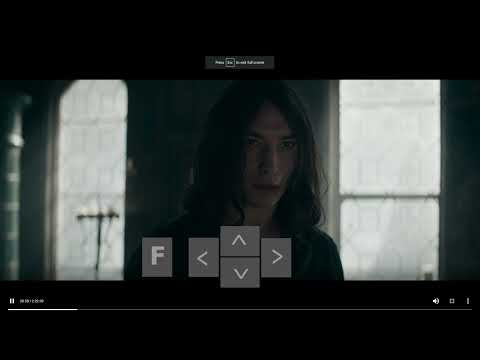
Extension allows using customizable keyboard shortcuts on HBO Max.
Say goodbye to mouse clicking: use your keyboard as a remote and control the HBO Max player. How does it work? It’s simple- use keyboard shortcuts: - Rewind 10 seconds (left arrow) - Fast forward 10 seconds (right arrow) - Increase volume (up arrow) - Decrease volume (down arrow) - Go full screen (F) All you need to do is add the HBO Max Hotkeys extension to your browser, enable the keyboard shortcuts using a built-in toggle and control the HBO Max player without any clicks. It's as simple as that! This extension is part of the Quality Viewership Initiative, a collaborative effort to enhance the understanding of audience engagement. It collects anonymous, aggregated viewing insights to support creators and studios in improving the quality of their content. You can stop sharing your information at any time by switching the toggle on the options page. Disclaimer: HBO is a trademark of Home Box Office, Inc. This website & extension hold no association or affiliation with HBO Max or any third-party companies.
4.7 星(5 星制)6 个评分
详情
- 版本1.5.37
- 上次更新日期2026年4月2日
- 提供方TheBestChromeExtensions
- 大小159KiB
- 语言8 种语言
- 开发者HideApp LLC
1021 East Lincolnway Cheyenne, WY 82001 US邮箱
disneypictureinpicture@gmail.com电话
+1 802-284-5301 - 交易者此开发者已根据欧盟的定义将自己标识为交易者,并承诺仅提供符合欧盟法律要求的产品或服务。
- D-U-N-S132615120
隐私权

“Keyboard shortcuts for HBO Max [QVI]”已就收集和使用用户数据披露了以下信息。 如需了解详情,请查看开发者的privacy policy。
Keyboard shortcuts for HBO Max [QVI]会处理以下数据:
该开发者已声明,您的数据:
- 不会因未获批准的用途出售给第三方
- 不会为实现与产品核心功能无关的目的而使用或转移
- 不会为确定信用度或放贷目的而使用或转移
支持
若有任何疑问、建议或问题,请在桌面浏览器中打开此页面