

Gavana · Style Capture

Overview
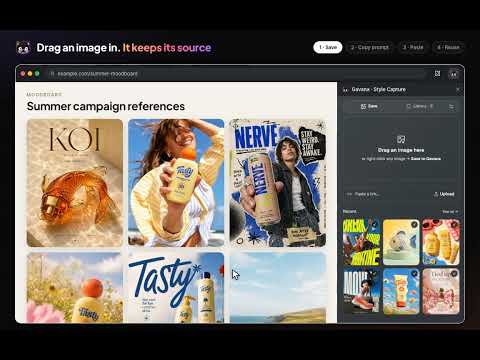
Save image inspiration and turn its visual ingredients into reusable Gavana styles.
Gavana Style Capture keeps the images that inspire you, along with where they came from, and turns them into prompts you can reuse. Save in one move • Drag any image into the Gavana side panel, or right-click it and choose "Save to Gavana" • Paste a post link or an image link, or upload a file • Every save keeps a link back to the page or post it came from Turn an image into a prompt • One click describes the image's camera angle, composition, lighting, color, texture and mood • Keep only the ingredients you want, add your own subject, and copy the prompt • Send the image and its style to your Gavana account to use on your canvas Private by default • Your library stays on this device • Images are sent for analysis only when you click "Turn into prompt", and saved to Gavana only when you choose to
0 out of 5No ratings
Details
- Version0.3.0
- UpdatedNovember 10, 2026
- Offered bydylan
- Size2.63MiB
- LanguagesEnglish
- Developer
Email
support@gavana.ai - Non-traderThis developer has not identified itself as a trader. For consumers in the European Union, please note that consumer rights do not apply to contracts between you and this developer.
Privacy

Gavana · Style Capture has disclosed the following information regarding the collection and usage of your data. More detailed information can be found in the developer's privacy policy.
Gavana · Style Capture handles the following:
This developer declares that your data is
- Not being sold to third parties, outside of the approved use cases
- Not being used or transferred for purposes that are unrelated to the item's core functionality
- Not being used or transferred to determine creditworthiness or for lending purposes
Support
For help with questions, suggestions, or problems, visit the developer's support site