


Overview
Instantly see if you are gated, ungated, or restricted directly from Keepa Deals, Product Finder, or Product Viewer pages.
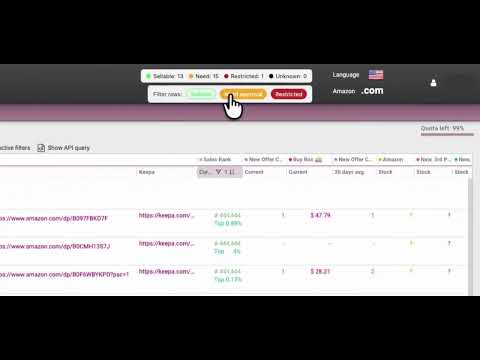
GateKeep adds powerful seller tools directly into Keepa.com so you can check Amazon eligibility faster than ever. Whether you’re sourcing from Keepa Product Finder, Keepa Deals, Keepa Product Viewer or a Keepa product page, GateKeep overlays real-time “sellable / need approval / restricted” dots beside each ASIN, plus instant summaries, filters, and history tracking. ✅ Now with auto ungating! Key features ✅ Eligibility dots & summary bar – See instantly which ASINs you can sell, which need approval, and which are restricted. ✅ Automatically identifies any listing with a Generic brand. ✅ Click the pencil icon to apply to sell an ASIN. ✅ Smart Filter Bar (Pro) – Hide or show rows by status directly inside Keepa. ✅ Export filtered results from Product Finder and Deals pages. ✅ Per-search Summary – Counts reflect only the current Finder/Deals results for clear accuracy. ✅ Auto-check Badge – Runs eligibility checks automatically on new ASINs as you scroll. ✅ Full History & Analytics (Pro) – Review all ASINs you’ve checked with category/brand insights. ✅ Bulk Mode (Pro) – Paste or import lists of ASINs for batch gate checking, brand detection, and CSV export with filtering. ✅ Cache & Refresh Control – Choose how often cached results refresh (24 h – 30 d). ✅ Free vs Pro Tier – Free users can auto-check 50 ASINs/day; Pro users get unlimited checks and all Pro features. GateKeep runs entirely inside your browser using your own Seller Central session—no credentials are ever shared. 🔒 Privacy practice summary Data collected: GateKeep stores your license key and ASIN history locally in Chrome storage. Your license key is sent to a GateKeep license server for validation. No names, emails, passwords, or Amazon account credentials are collected or transmitted by GateKeep. No data is sent to any other third party, and no Amazon account information is stored or transmitted by GateKeep. 🆕 Changelog / version notes v2.2.12 (2026-09) - GateKeep now labels its automated Amazon requests with Agent/GateKeep to address Amazon's agent identification requirement v2.2.11 (2026-09) - Improved Scan all handling for large Keepa result sets so recycled rows stay matched to the correct ASIN and unfinished checks can recover cleanly v2.2.10 (2026-09) - Fixed an issue where some active Pro users could still see an upgrade prompt when opening Bulk Mode, even though Pro filters were already working in Keepa v2.2.9 (2026-07) - GateKeep Keepa filters now let you choose whether excluded rows disappear or stay visible in a dimmed state for easier comparison v2.2.8 (2026-06) - GateKeep now runs on Keepa seller storefront pages, so storefront product tables can use the same eligibility dots and workflow tools as other Keepa pages v2.2.7 (2026-06) - Added UPC and EAN to Keepa Product Finder exports, with clearer guidance when visible grid columns have not been fully captured v2.2.6 (2026-06) - Added onboarding source question v2.2.5 (2026-05) - History now shows auto-ungated ASINs with their own status pill instead of grouping them into regular sellable results - Scan all and Auto-ungate now show a bottom-right status badge while GateKeep is scanning, gate checking, or auto-ungating, and completion stays visible until dismissed v2.2.4 (2026-05) - Keepa Scan all now shows a persistent bottom-right badge while GateKeep is still collecting rows or gate checking ASINs - CSV export now warns when Scan all is still running so users can wait for complete gate-check results before exporting v2.2.3 (2026-05) - Subscribers can now add or remove paid extra browser installs from GateKeep Options, with license limits updated automatically after the subscription change v2.2.2 (2026-05) - Improved license install limit messaging and made Reset GateKeep sign-in disconnect the current browser from the license. v2.2.1 (2026-05) - Added stronger brand cleanup so History and CSV exports no longer save Keepa navigation links, ASINs, or Brand Analytics text as brand names v2.2.0 (2026-05) - Added account-side install tracking so GateKeep can show when a license is using all available browser installs - Improved the license refresh and support reset path so moving GateKeep between browsers is easier to diagnose v2.1.8 (2026-05) - Made a few minor UI changes and implemented an OOI v2.1.7 (2026-04) - Added Auto ungate attempt button for all ASIN's in Keepa results - Brand Hunter now remembers your opportunity settings v2.1.6 (2026-04) - Updated Bulk runs to make them more stable - Improved Traditional auto-ungate invoice detection on low memory or slower devices - Added protection against bad brand values in bulk results v2.1.5 (2026-04) - Added new Reset GateKeep sign-in button - Added Keepa Link Builder copy confirmation - Fixed a Keepa export issue v2.1.4 (2026-04) - Added Bulk Mode Errors/Unknown filter - Moved Color Accessibility settings - Fixed an issue where Keepa overlays could incorrectly show Free status even while the account was validated as Pro in the extension options v2.1.3 (2026-04) - Added Keepa Link Builder - Courtesy of Official Olsons - Refined Bulk Mode with a more usable Approved Brand Hunter - Improved History storage - Added initial Amazon France marketplace support - Added onboarding tool tips v2.1.2 (2026-04) - Added onboarding tool tips v2.1.1 (2026-04) - Added initial Amazon India marketplace support v2.1.0 (2026-04) - Added Traditional bulk Auto Ungating with minimum invoice unit requirement - Added follow up Alternate Auto Ungating pass option to Traditional method - Added the option to attempt an Auto Ungate per ASIN by clicking pencil v2.0 (2026-04) - Auto Ungating has arrived! - Added a new affiliate program v1.3.77 (2026-03) - Fixed UK showing Green for used condition v1.3.76 (2026-03) - Added draggable floating UI - Updated Seller Central login detection for improved Spanish language handling - Added a dismiss button to the Seller Central warning banner in Keepa - Fixed a parsing bug where GateKeep could mark an ASIN as SELLABLE when Seller Central only approved non-New conditions v1.3.75 (2026-03) - Redesigned options, bulk, and history pages v1.3.74 (2026-03) - Added proper UK Seller Central routing and permissions so UK checks use the correct marketplace - Added a new Pause/Resume control to Bulk Mode so batch checks can be paused without losing progress v1.3.73 (2026-03) - Added Spanish Seller Central support and improved approval parsing so sellable ASINs are classified more accurately in both English and Spanish. - Added English and Spanish support for the GateKeep Options, Bulk Mode, and History pages, including a language selector and translated page controls, labels, progress text, and insights. v1.3.72 (2026-03) - Added marketplace support for Mexico (MX) across GateKeep routing logic. - Added marketplace support for United Kingdom (UK) across GateKeep routing logic. - Fixed ASIN parsing corruption for non-standard/book ASIN's. - Added a ne Color Accessibility setting in Options that lets users customize GateKeep status colors (Sellable, Need Approval, Restricted, Unknown), enable optional symbol mode (√, !, X) v1.3.71 (2026-03) - Added marketplace support for Canada (CA) across GateKeep routing logic. v1.3.70 (2026-03) - Added customizable CSV exports across GateKeep. Keepa filtered results, Bulk Checker, and History now support column selection, drag-to-reorder column order, saved export preferences, and one-click restore to default order. Also added new Keepa filtered export fields for Product Title, Amazon URL, and Current Sales Rank. v1.3.69 (2026-02) - Added a new Scan All Results workflow for Keepa Product Finder/Deals. When you have a lot of results you can now click Scan All and GateKeep will auto scroll and check all ASIN's in the results page without any need for you to scroll manually. - Added a new GateKeep-only export workflow for Keepa Product Finder/Deals. You can now click Export filtered CSV in the GateKeep filter bar to export only the ASINs currently included by your GateKeep status filters (instead of Keepa’s full export). The export includes ASIN, Category, Brand, GateKeep Status, GateKeep Message, Keepa Link, and Exported At. - Added clickable column sorting on both History and Bulk Mode pages, including Brand/Category/status/date sorting with ascending/descending toggles. v1.3.68 (2026-02) - Added an on‑page banner that alerts you when auto‑check is off. v1.3.67 (2026-01) - Replaced the settings gear with a clearer Options action inside the status badge, removed the restricted checkbox, and made the GateKeep Icon open the Options page. v1.3.66 (2026-01) - Changed wording after requesting license key emailed v1.3.65 (2026-01) - Updated the Options page Purchase Pro button styling for better visibility. - Enlarged the in‑page badge gear icon for easier access to settings. - User Guide button now opens the hosted PDF instead of the bundled file. - Post‑purchase activation instructions now adapt to legacy vs new activation flow. - Email activation instructions updated to match the selected activation flow. - Added automatic brand extraction to Bulk upload. - Added filters to Bulk upload results. - Added filters to History results. v1.3.63 (2025-12) - Added local backup/restore for license info to reduce “Free” state if sync data is cleared. v1.3.62 (2025-12) - Eligibility: Green “Sellable” dots now only appear when Seller Central explicitly shows “New” as an approved condition. Listings that are only approved for Used/other conditions are shown as “Need approval” instead. v1.3.61 (2025-12) - Added links to GateKeep user guide in options page and welcome email. v1.3.60 (2025-12) - Stabilized licensing to avoid Pro licenses reverting to Free. - Fixed Bulk Import (Pro) so quotations will not cause empty imports. - Made GateKeep Pro available in all countries. v1.3.5 (2025-11) - Improved performance on large Product Finder scans and overall stability. - Licensing buttons and subscription status now update reliably. - Cleaner handling of Seller Central login states. - History & Intelligence refinements and minor UI polish. v1.3.4 (2025-11) - Options page now correctly shows either “Purchase license” or “Manage license” based on your current status. - Improved behavior when logged out of Seller Central (fewer noisy errors; clearer handling). - Under-the-hood stability and performance tweaks. All core overlay features unchanged. v1.3.3 (2025-11) - Summary Bar now shows counts for only ASINs in the current Finder/Deals search. - Counts accumulate as you scroll instead of resetting per viewport. - All other features unchanged and stable. Disclaimer: GateKeep is an independent browser extension created to enhance workflow efficiency for Amazon sellers. It is not affiliated with, endorsed by, sponsored by, or in any way officially connected with Amazon.com, Inc., Keepa GmbH, or any of their subsidiaries or affiliates. All product names, trademarks, and registered trademarks are the property of their respective owners.
5 out of 51 rating
Details
- Version2.2.12
- UpdatedSeptember 27, 2026
- FeaturesOffers in-app purchases
- Size212KiB
- LanguagesEnglish (United States)
- Developer
- Non-traderThis developer has not identified itself as a trader. For consumers in the European Union, please note that consumer rights do not apply to contracts between you and this developer.
Privacy

This developer declares that your data is
- Not being sold to third parties, outside of the approved use cases
- Not being used or transferred for purposes that are unrelated to the item's core functionality
- Not being used or transferred to determine creditworthiness or for lending purposes
Support
For help with questions, suggestions, or problems, visit the developer's support site