


概述
GarageBand for windows PC extensions, comes with Pro-Grade Recording and Audio Playback
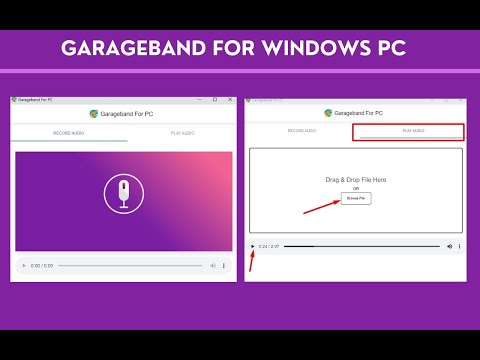
Do you dream of unleashing your inner musician on your PC? Look no further! "GarageBand for PC" is the Chrome extension you've been waiting for. This musical marvel allows you to record sound and play back your audio creations effortlessly. 🌟 Exciting Features: GarageBand for windows PC 🌟 Professional-Grade Recording: GarageBand for PC transforms your computer into a high-quality recording studio. Capture your musical brilliance with crystal-clear sound, whether you're singing, playing instruments, or crafting electronic beats. 🔊 Instant Audio Playback: Take your creations to the next level by uploading your audio files and enjoying instant playback. This feature allows you to refine your tracks, explore intricate details, and immerse yourself in your musical landscapes with ease. 🎧 💻 User-Friendly Interface: No musical degree required! We've designed GarageBand for PC with simplicity in mind, making it effortless to navigate through your musical journey. 🔊 Easy Installation for GarageBand for PC Extension in Just a Few Steps 🔊 Getting GarageBand for PC on your Chrome browser Follow these simple steps: 1. Open Google Chrome: If you don't already have Google Chrome, you can download it for free at https://www.google.com/chrome/. 2. Visit the Chrome Web Store: Once Chrome is up and running, go to the Chrome Web Store by typing "Chrome Web Store" into your search bar or clicking the Apps icon in your bookmarks bar and selecting "Web Store." 3. Search for "GarageBand for PC": In the Chrome Web Store's search bar, type "GarageBand for PC" and press Enter. 4. Locate the Extension: Scroll through the search results to find the "GarageBand for PC" extension. 5. Add to Chrome: Click on the extension's name to access its details. Then, click the "Add to Chrome" button. 6. Confirm Installation: A pop-up window will appear for confirmation. Click "Add Extension" to initiate the installation process. Congratulations! The extension is now successfully installed, and you'll spot its icon in your Chrome toolbar. 🎉Conclusion 🎉 Bid farewell to the limitations of your PC and embrace the world of musical creation with GarageBand for PC. This Chrome extension empowers you to unleash your creative musical spirit, providing top-tier recording and seamless playback options. With a user-friendly interface and a straightforward installation process, you'll be creating music in no time. Don't wait any longer – get GarageBand for PC now and let your musical journey commence!
2 星(5 星制)8 个评分
详情
隐私权

该开发者已声明,您的数据:
- 不会因未获批准的用途出售给第三方
- 不会为实现与产品核心功能无关的目的而使用或转移
- 不会为确定信用度或放贷目的而使用或转移
支持
若有任何疑问、建议或问题,请访问开发者的支持网站