

EroPilot — Erome Slideshow
1 rating
)
Overview
Turn Erome albums into private, hands-free photo and video slideshows.
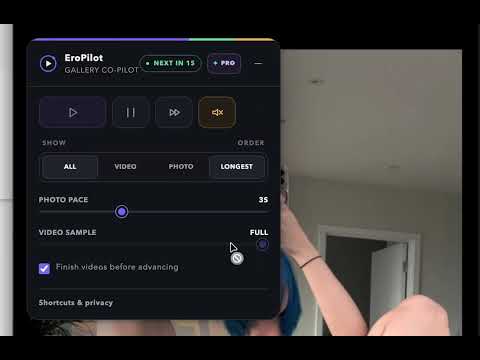
EroPilot Turn Erome album pages into calm, hands-free viewing sessions. Open EroPilot, choose your playback mode and timing, then press Start on this tab. EroPilot works exclusively with Erome.com. Free features Photo countdown before automatically moving to the next item Full-length or timed video playback Play, pause, resume, previous and next controls Persistent session mute control Image-only, video-only or mixed playback modes Keyboard shortcuts: Space, Arrow keys and Escape Screen blur mode with a quick reveal — press B to toggle Local processing with no browsing-history collection Private Vault for saving selected items locally EroPilot Pro Unlock advanced tools for larger and more automated sessions: Unlimited Vault — up to 5,000 items instead of 40 Bulk tools for managing your saved items Pilot Queue — queue multiple albums for automatic playback Scene Map — jump directly to any point in a gallery Cinema preset for a hands-free viewing experience Quick Scan preset for faster browsing Video Focus preset for video-heavy galleries Payments are handled securely by Stripe Checkout. Payment information is never stored or processed by the extension. Privacy, plainly EroPilot is designed to keep your data on your device. Your settings, Vault contents and license status are stored locally. EroPilot may optionally collect anonymous feature-usage counts to help improve the extension. These statistics do not include URLs, browsing history, gallery contents or personal information, and usage statistics can be disabled at any time from the extension panel. EroPilot does not: Download or store media from Erome Bypass access controls Inject third-party advertisements Use affiliate links Execute remote code Collect browsing history Collect URLs or gallery contents Permissions EroPilot requests only the permissions required for its functionality. Storage is used to save your settings, local Vault contents and Pro license information on your device. EroPilot does not request broad host permissions or permanent access to every website. When you start a session on Erome, the extension operates on the current tab to provide its slideshow and playback controls. What's new in 1.0.3 Screen Blur — instantly blur the page and click anywhere to reveal it again; press B to toggle Private Vault overhaul — safer deletion confirmations, bulk selection and deletion, and drag-to-reorder collections Redesigned Pro panel with a cleaner, more compact interface Save to Vault while paused — save items without resuming playback 9 languages — English, Français, Português, Deutsch, 日本語, 中文, Русский, 한국어 and Español What's new in 1.0.2 Slim progress bar — session status is now displayed as a smooth animated progress bar Compact mode refresh — collapsed mode shows only the EroPilot logo and title Language picker — switch languages directly from the extension header Active button states — play and pause controls now clearly indicate their current state Wider control panel — improved spacing and alignment for the control header
5 out of 51 rating
Details
- Version1.0.3
- UpdatedAugust 23, 2026
- FeaturesOffers in-app purchases
- Offered byEromeDev
- Size159KiB
- Languages7 languages
- Developer
Email
heromedev@gmail.com - Non-traderThis developer has not identified itself as a trader. For consumers in the European Union, please note that consumer rights do not apply to contracts between you and this developer.
Privacy

This developer declares that your data is
- Not being sold to third parties, outside of the approved use cases
- Not being used or transferred for purposes that are unrelated to the item's core functionality
- Not being used or transferred to determine creditworthiness or for lending purposes
Support
For help with questions, suggestions, or problems, visit the developer's support site