Item logo image for Gallery Sync - SmugMug Automation

Gallery Sync - SmugMug Automation

5.0(

1 rating

)
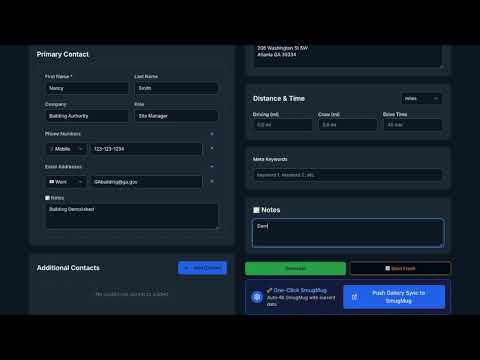
Item media 6 (screenshot) for Gallery Sync - SmugMug Automation
Item video thumbnail
Item media 2 (screenshot) for Gallery Sync - SmugMug Automation
Item media 3 (screenshot) for Gallery Sync - SmugMug Automation
Item media 4 (screenshot) for Gallery Sync - SmugMug Automation
Item media 5 (screenshot) for Gallery Sync - SmugMug Automation
Item media 6 (screenshot) for Gallery Sync - SmugMug Automation
Item video thumbnail
Item media 2 (screenshot) for Gallery Sync - SmugMug Automation
Item media 3 (screenshot) for Gallery Sync - SmugMug Automation
Item media 4 (screenshot) for Gallery Sync - SmugMug Automation
Item media 5 (screenshot) for Gallery Sync - SmugMug Automation
Item media 6 (screenshot) for Gallery Sync - SmugMug Automation

Overview

Automate filling SmugMug gallery forms with data from Gallery Sync Formatter

Gallery Sync Is a smart Chrome extension built for photographers Event Planner, Scouts, and location teams who use SmugMug and other photo sharing sites. It automatically attaches your pre-formatted metadata — titles, notes, GPS coordinates, and keywords — to each SmugMug Gallery or image upload. No more copy-pasting. Key Features: • Auto-populate SmugMug gallery fields from your saved Gallery Sync data • Sync geotags, location notes, and owner contact info directly into each upload • Integrates with Mapbox for fast location matching • Connects seamlessly with the GallerySync.io dashboard for data management • Saves hours of manual input during upload sessions Perfect for: • Location scouts • Real-estate photographers • Event Planner • Film & TV location teams • Archivists and gallery managers Gallery Sync helps you stay organized, accurate, and fast — so you can focus on the creative work while your metadata syncs automatically.

Details

  • Version
    2.0.1
  • Updated
    December 4, 2025
  • Features
    Offers in-app purchases
  • Offered by
    saharekc
  • Size
    2.98MiB
  • Languages
    English (United States)
  • Developer
    CSProdcutionsLLC
    5414 Woodberry Cir Marietta, GA 30068-1838 US
    Email
    saharekc@gmail.com
  • Non-trader
    This developer has not identified itself as a trader. For consumers in the European Union, please note that consumer rights do not apply to contracts between you and this developer.

Privacy

Gallery Sync - SmugMug Automation has disclosed the following information regarding the collection and usage of your data. More detailed information can be found in the developer's privacy policy.

Gallery Sync - SmugMug Automation handles the following:

Personally identifiable information
Location

This developer declares that your data is

  • Not being sold to third parties, outside of the approved use cases
  • Not being used or transferred for purposes that are unrelated to the item's core functionality
  • Not being used or transferred to determine creditworthiness or for lending purposes

Support

For help with questions, suggestions, or problems, visit the developer's support site

Related

smartfill.ai

0.0

Use AI to auto fill forms from a RAG powered knowledge store.

EasyFiller - Automatic Form Filler

3.2

Automatically complete forms with multiple data sets

Google Form Auto Filler

0.0

Auto-fill Google Forms with saved data

Job Form Auto-Filler

0.0

Automatically fills job application forms including resume upload.

Auto BCC for Gmail™

3.5

Set up automatic BCC or CC rules in Gmail™ for free. Sync rules across devices. Auto-fill recipients for outgoing emails.

GQueues for Google Calendar

5.0

Mark GQueues tasks complete directly in Google Calendar

Canvas to Notion

5.0

Seamlessly sync your Canvas assignments to Notion

Photo Collage for Google Chrome™

3.1

Create your photo collage and save image to Google Drive or local computer.

Google Photos Bulk Downloader & Deleter

4.6

Automatically downloads and/or deletes all photos and videos from Google Photos.

Save Image As...

5.0

Save Images in your desired format

Save Images to Google Photos™

4.1

Save Images to Google Photos with right click

ChronoMark - Tag & Sync Bookmarks

5.0

Save, tag, and sync bookmarks with Google Drive.

smartfill.ai

0.0

Use AI to auto fill forms from a RAG powered knowledge store.

EasyFiller - Automatic Form Filler

3.2

Automatically complete forms with multiple data sets

Google Form Auto Filler

0.0

Auto-fill Google Forms with saved data

Job Form Auto-Filler

0.0

Automatically fills job application forms including resume upload.

Auto BCC for Gmail™

3.5

Set up automatic BCC or CC rules in Gmail™ for free. Sync rules across devices. Auto-fill recipients for outgoing emails.

GQueues for Google Calendar

5.0

Mark GQueues tasks complete directly in Google Calendar

Canvas to Notion

5.0

Seamlessly sync your Canvas assignments to Notion

Photo Collage for Google Chrome™

3.1

Create your photo collage and save image to Google Drive or local computer.

Google apps