

Page Capture Pro

Overview
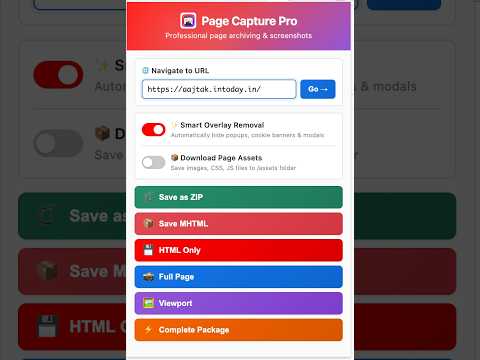
Save pages as MHTML (with CSS/images) or HTML, plus full-page screenshots, asset bundles, and side-by-side URL comparison reports.
Page Capture Pro lets you archive any web page in one click — as a single self-contained file, a pixel-perfect screenshot, or a complete bundle. What you can save • MHTML – one file containing the page's HTML, CSS, images, and scripts, viewable offline in Chrome or Edge. • HTML – the raw page markup. • Full-page screenshot – the entire scrollable page stitched into a single PNG (HiDPI-aware). • Viewport screenshot – just the visible area. • ZIP bundle – MHTML + full-page screenshot + the page's images, stylesheets, and scripts in one archive. Useful extras • Hide overlays – optionally suppress cookie banners, modals, and pop-ups before capturing, for clean screenshots. • Smart filenames – output is named after the page title and timestamped automatically; A/B-test preview indices are detected and included. • Quick navigation – type a URL in the popup to load it in the active tab before capturing. Everything runs locally in your browser. No accounts, no uploads, no tracking.
0 out of 5No ratings
Details
- Version2.1.5
- UpdatedSeptember 20, 2026
- Offered byRaghunandan
- Size184KiB
- LanguagesEnglish (United States)
- Developer
Email
raghunitb@gmail.com - Non-traderThis developer has not identified itself as a trader. For consumers in the European Union, please note that consumer rights do not apply to contracts between you and this developer.
Privacy

This developer declares that your data is
- Not being sold to third parties, outside of the approved use cases
- Not being used or transferred for purposes that are unrelated to the item's core functionality
- Not being used or transferred to determine creditworthiness or for lending purposes