Item logo image for Fuzzy Find

Fuzzy Find

Item video thumbnail

Overview

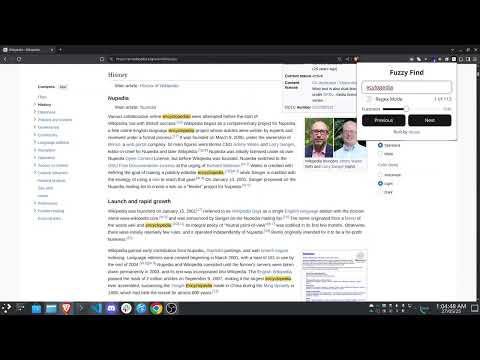
A browser extension to fuzzy search for text on a web page.

This Chrome extension helps you to fuzzy search in the web page. Meaning, it can find the text you are looking for even if you don't know the exact spelling. Also supports regex search. 💡 Usage Either click the extension icon in the browser toolbar or use the shortcut Ctrl+Shift+F (or Cmd+Shift+F on Mac) to open the search popup. ✨ Features - Fuzzy Find goes beyond basic string matching to provide a more intuitive and powerful search experience: - Intelligent Fuzzy Search: Find matches even with typos, misspellings, or slight variations. Eg: Searching for "recive" will highlight "receive". - Whole Word Highlighting: Unlike some fuzzy search tools that highlight only the matched characters, Fuzzy Find intelligently highlights the entire word that contains your fuzzy match, making results clear and easy to spot. - Adjustable Fuzziness: You can control the fuzziness level through the slider in the Popup. - Regex Search: Just toggle the Regex switch. (This would disable fuzzy search).

Details

  • Version
    1.0
  • Updated
    May 30, 2025
  • Offered by
    Appaji
  • Size
    279KiB
  • Languages
    English
  • Developer
    Email
    appaji12368@gmail.com
  • Non-trader
    This developer has not identified itself as a trader. For consumers in the European Union, please note that consumer rights do not apply to contracts between you and this developer.

Privacy

The developer has disclosed that it will not collect or use your data.

This developer declares that your data is

  • Not being sold to third parties, outside of the approved use cases
  • Not being used or transferred for purposes that are unrelated to the item's core functionality
  • Not being used or transferred to determine creditworthiness or for lending purposes

Support

For help with questions, suggestions, or problems, visit the developer's support site

Related

Search and Replace

3.1

Search for text on a webpage and replace it with different text.

Website spell checker

4.0

An extension to automatically highlight misspelled words on web pages.

Find Words in Page

0.0

An extension to find and highlight words on a webpage.

Word Replacer

4.8

An extension that replaces specific words on webpages.

letmefix browser - Tab manager, Search bookmarks, Search history

5.0

Spotlight search for browser - streamlined browser extension for power users

TextTranslator - Double Click(Select) to Translate

1.0

Get 'TextTranslator Plus' Chrome extension for seamless text translation on webpages. Break language barriers while browsing!

Advanced Find Extension

0.0

Advanced text finding, highlighting, and export extension

Regex Search and Extract

3.0

Our extension provides a seamless way to search, extract, and format data from webpages using regular expressions.

Type2Learn

5.0

Learn by typing the webpage text in the browser itself!

Bookmark Search

4.7

Search bookmarks using input text.

Keywords Highlighter

3.8

a chrome extension that highlights keywords on web pages, making it easy to find or skip information

MultiTab Search

5.0

複数のタブから指定した単語をWebページ内で検索する

Search and Replace

3.1

Search for text on a webpage and replace it with different text.

Website spell checker

4.0

An extension to automatically highlight misspelled words on web pages.

Find Words in Page

0.0

An extension to find and highlight words on a webpage.

Word Replacer

4.8

An extension that replaces specific words on webpages.

letmefix browser - Tab manager, Search bookmarks, Search history

5.0

Spotlight search for browser - streamlined browser extension for power users

TextTranslator - Double Click(Select) to Translate

1.0

Get 'TextTranslator Plus' Chrome extension for seamless text translation on webpages. Break language barriers while browsing!

Advanced Find Extension

0.0

Advanced text finding, highlighting, and export extension

Regex Search and Extract

3.0

Our extension provides a seamless way to search, extract, and format data from webpages using regular expressions.

Google apps