

Fun Cursors — Custom Cursor & Cursor Trails
58 个评分
)
概述
Cute custom cursors and sparkle cursor trails. Upload your own, resize, and keep every link clickable.
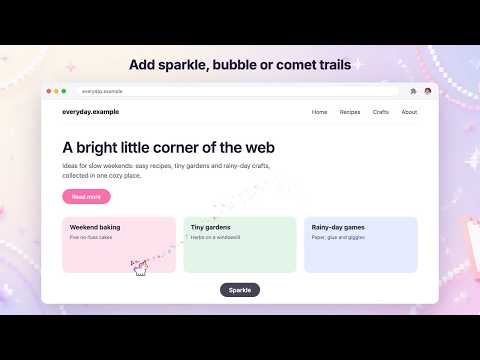
Give every page a cursor you actually like — a classic arrow, a cute character, or one you draw yourself — plus optional sparkle trails that follow your mouse. LINKS STILL LOOK CLICKABLE Every link and button on the web sets its own pointer, which normally makes a custom arrow disappear the moment you hover something clickable. Fun Cursors gives each design a matching pointer state, so buttons and links still feel clickable. Text fields, drag handles and disabled buttons are deliberately left alone, because those shapes tell you something useful. WHAT YOU GET • A big, growing collection, organised into themed packs • Many designs click with their own tip, so you always know exactly where you're pointing • See your pick straight away: the popup switches to it the moment you click • Upload your own image and click to place its tip • Sparkle, Bubbles and Comet trails, with adjustable amount and length • Three sizes • Search by name or tag • Favourites that stay at the top • Switch it off for one site without switching it off everywhere • Your choice follows you to your other computers through your browser profile SHARP ON HIGH-RESOLUTION SCREENS Every design is rendered at double resolution for Retina and other HiDPI displays, so it stays crisp instead of turning into a blurry smudge. NO TRACKING. NO ACCOUNT. NO SERVERS. Fun Cursors makes no network requests at all. There is no analytics, no sign-up, and nothing is ever uploaded. Your choice and any image you add stay on your own computer, synced only through your own browser profile — the same way your bookmarks are. HOW TO TURN IT OFF Click the Fun Cursors icon and press "Default cursor". Your normal arrow comes straight back, in every open tab, immediately. To keep it everywhere except one site, open that site and press the site button instead. GOOD TO KNOW Chrome does not allow any extension to change the pointer on the browser's own interface — tabs, the address bar and bookmarks — or on the New Tab page, the Chrome Web Store, or chrome:// settings pages. That restriction applies to every extension; it is not a bug in this one. Trails are off until you turn them on, and respect your system's "reduce motion" setting.
2.9 星(5 星制)58 个评分
详情
- 版本3.0.2
- 上次更新日期2026年11月16日
- 提供方Fun Cursors
- 大小170KiB
- 语言5 种语言
- 开发者
邮箱
naywa007@gmail.com - 非交易者该开发者尚未将自己标识为交易者。欧盟地区消费者须知:消费者权利可能不适用于您与该开发者达成的合约。
隐私权

该开发者已声明,您的数据:
- 不会因未获批准的用途出售给第三方
- 不会为实现与产品核心功能无关的目的而使用或转移
- 不会为确定信用度或放贷目的而使用或转移
支持
若有任何疑问、建议或问题,请在桌面浏览器中打开此页面