

Fullshot — Free Full Page Screenshot & Editor

Overview
Full-page screenshots and 30-second videos of a tab, window or screen. Mark up, export, or share a link that collects notes.
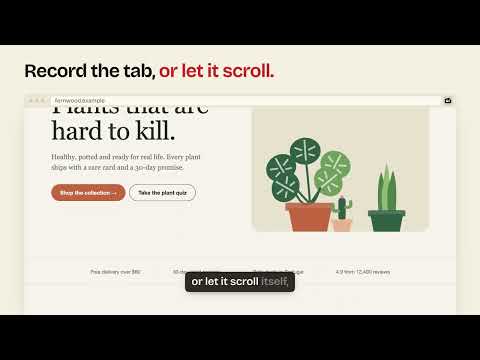
Capture the whole web page in one click: top to bottom, in one sharp image. Record the tab, another app's window or your whole screen for up to 30 seconds. Mark it up, and share it as a link that collects notes. Fullshot is free, needs no account, and keeps every capture on your computer unless you choose to share it. SCREENSHOTS • Full page: the entire page, stitched without repeated headers or sticky bars • Visible area, a region you drag (scroll to extend it), or a single element. Scrollable panels come out whole. • Every capture is copied to your clipboard at full resolution • Responsive set (Premium): mobile, tablet and desktop widths in one go SCREEN VIDEOS • Record the tab for up to 30 seconds, with the tab's sound and your microphone • Auto-scroll: Fullshot scrolls the page smoothly while it records, which is ideal for showing a whole site • Trim it in the browser, then save it as MP4 or GIF OUTSIDE CHROME (Premium) • Screenshot another app's window, like Figma, a terminal or a phone simulator, or your whole screen • Record a window or your whole screen for up to 30 seconds, with your microphone • Chrome's own picker shows what you can choose, so Fullshot only sees what you pick • Then mark it up, save it or share it like any other capture EDITOR • Pen, brush, highlighter, text, arrows, lines, shapes and numbered steps • Pixelate or black out anything private • Hide sensitive data: one click finds emails, phone, card and bank numbers, keys and IP addresses in the page's text and pixelates them, on your computer. With Chrome's built-in AI it also finds names and street addresses. It can miss things, so check before you share. • Crop and round the corners • Window frames and backgrounds (Premium) • Capture details (Premium): the page address, the time and a fingerprint of the original, added under the image SHARE AS A LINK • One click uploads a screenshot or video and copies a link • Anyone with the link can leave notes pinned to a spot or a moment, without signing up • Edit and update the link; it stays the same and the notes stay with it • Free links last 24 hours, and one video link can be live at a time PREMIUM • Links that last 7 or 30 days, password-protected links, and your logo on share pages • As many video links as you need, and no daily link limit (within fair use) • Window and screen capture, Responsive set, Batch capture, frames and backgrounds, capture details, and smarter PDFs • Try it free for 7 days, then $4 a month billed yearly or $4.99 monthly, or pay once with the launch lifetime offer • Unlocked with the license key from your receipt, on up to 2 of your computers. No account. ALSO • A library of everything you captured, searchable by title, address or text on the page • Export PNG, JPG, WebP or PDF. With Premium, PDFs get smart page breaks, working links and searchable text. • Shortcuts: Alt+Shift+F full page, Alt+Shift+V visible area, Alt+Shift+S region, Alt+Shift+E element (Option+Shift on Mac) PRIVACY Fullshot only works on the tab you use it on, and only when you use it. It sees another window or your screen only when you pick it in Chrome's picker. Captures stay in your browser. Nothing is uploaded unless you click Get link, and shared links are deleted when they end. No account, no ads, no tracking.
0 out of 5No ratings
Details
- Version1.3.0
- UpdatedNovember 10, 2026
- Size184KiB
- LanguagesEnglish
- Developer
Email
info@practical.tools - Non-traderThis developer has not identified itself as a trader. For consumers in the European Union, please note that consumer rights do not apply to contracts between you and this developer.
Privacy

Fullshot — Free Full Page Screenshot & Editor has disclosed the following information regarding the collection and usage of your data. More detailed information can be found in the developer's privacy policy.
Fullshot — Free Full Page Screenshot & Editor handles the following:
This developer declares that your data is
- Not being sold to third parties, outside of the approved use cases
- Not being used or transferred for purposes that are unrelated to the item's core functionality
- Not being used or transferred to determine creditworthiness or for lending purposes
Support
For help with questions, suggestions, or problems, visit the developer's support site