


Overview
Capture any long post or article as one sharp image, even when it scrolls off screen. Works on Facebook, X, Instagram & more.
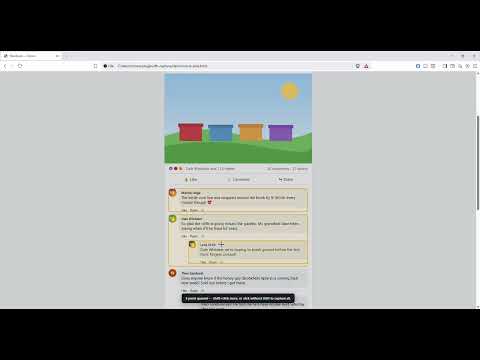
Full Post Capture turns a long on-page post or article into a single, sharp image or PDF — even when it's far too tall to fit on your screen. Most "fit to screen" tricks force you to zoom out until the text is unreadable. Full Post Capture does the opposite: it keeps the page at 100% zoom, captures the post one screen at a time, and seamlessly stitches the pieces into one full-resolution image. Your text stays crisp. HOW IT WORKS 1. Click the Full Post Capture icon in your toolbar. 2. Hover the post you want — it highlights automatically. 3. Press the Up / Down arrow keys to grow or shrink the selection to frame exactly what you want. 4. Click to capture. The extension expands "See more", waits for images to load, and stitches everything together. 5. In the preview, save as PNG or PDF, or copy straight to your clipboard. FEATURES • One sharp image of an entire post, no matter how long. • Click-to-select with arrow-key fine-tuning. • Export to PNG or PDF (long posts auto-paginate into a multi-page PDF). • Copy to clipboard to paste anywhere. • Automatically expands truncated "See more" text. • Hides floating bars and chat bubbles so they don't smear the capture. • Works on Facebook, X (Twitter), Instagram, and most other websites. PRIVACY FIRST Full Post Capture collects no data. There are no servers, no analytics, and no tracking. Everything happens locally in your browser, and nothing you capture ever leaves your device unless you choose to save or share it. The extension asks for only the minimum permissions needed to capture the page you're on, and only when you click the icon. Full Post Capture is an independent tool and is not affiliated with, endorsed by, or sponsored by Meta, Facebook, Instagram, X, or any other platform.
0 out of 5No ratings
Details
- Version1.0.0
- UpdatedJune 22, 2026
- Size46.48KiB
- LanguagesEnglish (United States)
- DeveloperCharles Lee EakinsWebsite
1901 W Madison St Apt 1029 Phoenix, AZ 85009-9533 USEmail
charles.eakins@gamedaemondeck.comPhone
+1 602-775-1762 - TraderThis developer has identified itself as a trader per the definition from the European Union and committed to only offer products or services that comply with EU laws.
Privacy

Full Post Capture has disclosed the following information regarding the collection and usage of your data. More detailed information can be found in the developer's privacy policy.
Full Post Capture handles the following:
This developer declares that your data is
- Not being sold to third parties, outside of the approved use cases
- Not being used or transferred for purposes that are unrelated to the item's core functionality
- Not being used or transferred to determine creditworthiness or for lending purposes
Support
For help with questions, suggestions, or problems, visit the developer's support site