

Full Page & Scrollable Areas Screenshot – Capture X
139 ratings
)
Overview
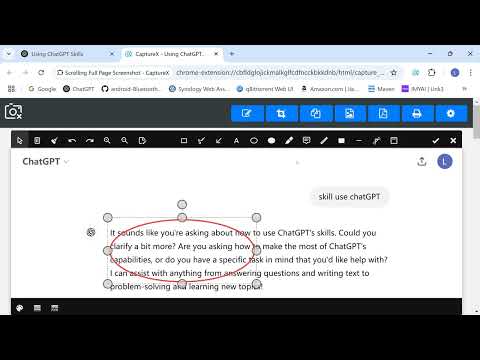
Capture full webpages, scrollable areas, or selected areas. Annotate, copy, print, or save as PDF/JPG/PNG.
This extension only runs when you click the extension icon, with minimum permissions required. Capture full webpage screenshots by scrolling, support image editing and annotation features, convert to PDF or JPEG/PNG files, and download for local saving. Why Install CaptureX? Key Features: 1️⃣ Capture full-page scrolling screenshots seamlessly merged into one single image for superior user experience🔥 2️⃣ Exclusive feature: Scroll-capture designated scrollable sub-regions🔥 3️⃣ Exclusive feature: 2× HD full-page scrolling screenshots🔥 4️⃣ Free screenshot editing including cropping, markup, mosaic blur and other common tools🔥 5️⃣ Free screenshot-to-PDF conversion for download and storage🔥 6️⃣ Save screenshots locally as JPEG or PNG for free 7️⃣ Copy screenshots directly to clipboard 8️⃣ One-click upload screenshots to Google Drive 9️⃣ Auto split extra-long webpages into multiple parts for screenshot processing 🔟 Start scrolling capture from your current screen position; manually take segmented screenshots for extra-long webpages Privacy & Security: This extension only requests minimum permissions and does not run by default. It only activates when the user clicks the extension icon. This design ensures users' privacy is protected and avoids any unauthorized automatic actions or data collection. Users always have full control over when to enable extension features, enhancing security and privacy protection during use.
4.9 out of 5139 ratings
Details
- Version4.1.3
- UpdatedJune 4, 2026
- Offered byJohnny
- Size7.24MiB
- Languages31 languages
- Developer
Email
webman.ling@gmail.com - Non-traderThis developer has not identified itself as a trader. For consumers in the European Union, please note that consumer rights do not apply to contracts between you and this developer.
Privacy

This developer declares that your data is
- Not being sold to third parties, outside of the approved use cases
- Not being used or transferred for purposes that are unrelated to the item's core functionality
- Not being used or transferred to determine creditworthiness or for lending purposes
Support
For help with questions, suggestions, or problems, visit the developer's support site