


Overview
Capture full page screenshots, record your screen with webcam & mic, and snap any area — all in one click. Free.
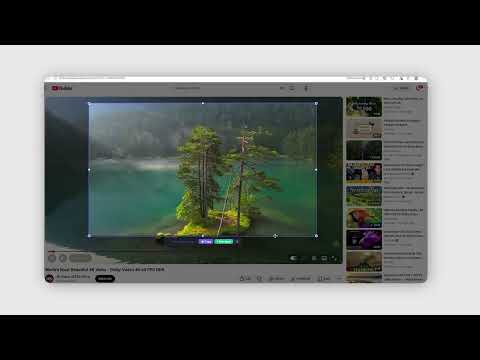
🎬 Free Screenshot & Screen Recorder for Chrome — Capture Anything in One Click Quick Shots is the all-in-one Chrome extension for screenshots AND screen recording. Take full page screenshots, record your screen with webcam and microphone, or snap any custom area — all in seconds, without leaving your browser. ⚡ Built for creators, developers, students, marketers, and support teams who need fast, high-quality screen capture without watermarks, signups, or upload limits. ━━━━━━━━━━━━━━━━━━━━━━━━━ 🖼 SCREENSHOT FEATURES ━━━━━━━━━━━━━━━━━━━━━━━━━ ✅ Capture Visible Screen — one-click snapshot of your current tab ✅ Full Page Screenshot — scroll-stitched capture of long pages, articles, dashboards ✅ Custom Area Selection — drag to select any region with pixel-perfect cropping ✅ High-Resolution PNG Output — no compression, no quality loss ✅ Instant Preview, Copy & Download — paste into Slack, Notion, Figma, Docs, anywhere ✅ Works on YouTube, TikTok, Instagram, Twitter, and every major site ━━━━━━━━━━━━━━━━━━━━━━━━━ 🎥 SCREEN RECORDING FEATURES ━━━━━━━━━━━━━━━━━━━━━━━━━ ✅ Record Screen with Audio in WebM / MP4 format ✅ Webcam Overlay — circular picture-in-picture, perfect for tutorials and Loom-style videos ✅ Microphone Capture — narrate demos, walkthroughs, and bug reports ✅ Tab, Window, or Full Desktop capture ✅ Pause, Resume, Stop — full control during recording ✅ Instant Download — no upload, no signup, no watermark, ever ━━━━━━━━━━━━━━━━━━━━━━━━━ 💡 PERFECT FOR ━━━━━━━━━━━━━━━━━━━━━━━━━ 🎬 YouTube Creators — capture video frames, thumbnails, reaction screenshots 📱 TikTok & Reels — grab any moment from a video instantly 👨💻 Developers — bug reports, code snippets, UI documentation 🎓 Students & Teachers — research notes, online lectures, study materials 🎨 Designers — moodboards, inspiration grabs, client feedback 🛠 Support Teams — quick visual replies, error reports, knowledge base articles 📊 Marketers — competitor research, social proof, ad mockups, presentations 💼 Remote Workers — async video updates, screen-share alternatives, walkthroughs ━━━━━━━━━━━━━━━━━━━━━━━━━ 🔒 WHY QUICK SHOTS? ━━━━━━━━━━━━━━━━━━━━━━━━━ ✔ Free Forever — no paywall, no hidden premium tier ✔ No Signup Required — install and start capturing immediately ✔ Privacy First — everything runs locally, zero tracking, zero data collection ✔ Lightweight — under 100KB, won't slow down Chrome ✔ No Watermark — your screenshots and recordings stay 100% yours ✔ Open Source Spirit — clean code, no ads, no upsells ━━━━━━━━━━━━━━━━━━━━━━━━━ 🚀 HOW TO USE ━━━━━━━━━━━━━━━━━━━━━━━━━ 1. Click the Quick Shots icon in your toolbar 2. Pick a mode: Capture Visible, Custom Selection, Full Page, or Start Recording 3. Save, copy, or download your screenshot or video — done! No learning curve. No cloud accounts. No setup wizard. ━━━━━━━━━━━━━━━━━━━━━━━━━ 🌟 WHAT YOU CAN DO ━━━━━━━━━━━━━━━━━━━━━━━━━ • Take a YouTube video screenshot in one click • Capture a full scrolling webpage as a single image • Record a screencast with your face in the corner • Make a quick tutorial with voiceover for your team • Snap a TikTok frame, an Instagram story, or a tweet • Document a bug with annotated screenshots • Create training videos, product demos, and how-to content Whether you need a screenshot tool, a screen recorder, a webcam recorder, a scrolling screenshot extension, or a free Loom alternative — Quick Shots does it all in one tiny, fast Chrome extension. 📌 Install now and start capturing smarter — it's free, it's fast, and it just works.
5 out of 52 ratings
Details
- Version1.8.2
- UpdatedJune 24, 2026
- Size58.54KiB
- LanguagesEnglish
- DeveloperOptimaGeeks LLCWebsite
548 Market St San Francisco, CA 94104-5401 USEmail
arslbbt@gmail.comPhone
+1 406-964-6201 - TraderThis developer has identified itself as a trader per the definition from the European Union and committed to only offer products or services that comply with EU laws.
- D-U-N-S129997640
Privacy

This developer declares that your data is
- Not being sold to third parties, outside of the approved use cases
- Not being used or transferred for purposes that are unrelated to the item's core functionality
- Not being used or transferred to determine creditworthiness or for lending purposes
Support
For help with questions, suggestions, or problems, visit the developer's support site