Item logo image for Full Page Screenshot & Screen Recorder - OpenScreenShot

Full Page Screenshot & Screen Recorder - OpenScreenShot

openscreenshot.app
5.0(

9 ratings

)
ExtensionTools1,000 users
Item media 5 (screenshot) for Full Page Screenshot & Screen Recorder - OpenScreenShot
Item media 6 (screenshot) for Full Page Screenshot & Screen Recorder - OpenScreenShot
Item video thumbnail
Item media 2 (screenshot) for Full Page Screenshot & Screen Recorder - OpenScreenShot
Item media 3 (screenshot) for Full Page Screenshot & Screen Recorder - OpenScreenShot
Item media 4 (screenshot) for Full Page Screenshot & Screen Recorder - OpenScreenShot
Item media 5 (screenshot) for Full Page Screenshot & Screen Recorder - OpenScreenShot
Item media 6 (screenshot) for Full Page Screenshot & Screen Recorder - OpenScreenShot
Item video thumbnail
Item media 2 (screenshot) for Full Page Screenshot & Screen Recorder - OpenScreenShot
Item video thumbnail
Item media 2 (screenshot) for Full Page Screenshot & Screen Recorder - OpenScreenShot
Item media 3 (screenshot) for Full Page Screenshot & Screen Recorder - OpenScreenShot
Item media 4 (screenshot) for Full Page Screenshot & Screen Recorder - OpenScreenShot
Item media 5 (screenshot) for Full Page Screenshot & Screen Recorder - OpenScreenShot
Item media 6 (screenshot) for Full Page Screenshot & Screen Recorder - OpenScreenShot

Overview

Full page screenshot in one click. Open source, 100% private, no account, no uploads.

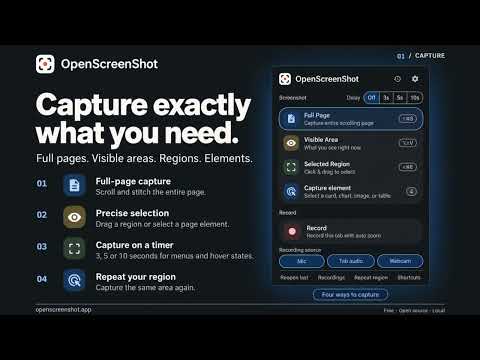
Full Page Screenshot and video recording with OpenScreenShot.APP Free, open-source screenshot and screen recording for Chrome. Capture full pages, selected regions, or your visible screen. Annotate, edit, record, and export without leaving your browser. 🔒 Everything stays on your device. No account, uploads, telemetry, or cloud processing. 🖼️ CAPTURE 📜 Full page — automatically scroll and stitch even very long webpages ✂️ Selected region — drag to select, fine-tune with arrow keys, and repeat your last region 🪟 Visible area — capture exactly what’s on screen ⏱️ Delayed capture — wait 3, 5, or 10 seconds for menus, hover states, and popovers ⚡ Quick mode — copy or save without opening the editor ⌨️ Keyboard shortcuts — available for every capture mode 🕘 Capture history — reopen any of your last 12 captures 🎨 ANNOTATE & EDIT Turn a raw screenshot into something ready to share. ➡️ Arrows, shapes, lines, text, and highlighter 🔢 Sequential step-number badges 🖱️ Multi-select, duplicate, and keyboard nudging 🌫️ Blur or redact sensitive information 🔦 Spotlight important areas by dimming everything else ✂️ Crop with eight adjustable handles 📐 Resize and zoom to cursor ↩️ Full undo and redo history 🪚 Remove horizontal sections from long screenshots ✨ Add padding, rounded corners, shadows, and gradients 🎯 Sample colors with the eyedropper 🖼️ Drag, drop, or paste another image into the editor 📌 Pin captures in an always-on-top floating window 💾 Reopen crash-safe drafts and continue editing 🎬 RECORD Record your browser tab and turn it into a polished walkthrough. 🔴 One-click recording — record the current tab 🔍 Automatic 2× zoom — smoothly zoom in when you click 🎞️ Timeline zooms — add your own zoom blocks anywhere ✂️ Trim — remove any part of the recording ↩️ Undo & redo — edit the timeline without fear 🎙️ Microphone narration — record your voice 🔊 Tab audio — control tab and microphone volume independently 📹 Webcam bubble — add and reposition your camera overlay 🛟 Crash-safe recording — recordings are saved locally in 1-second chunks ▶️ Resume recording — continue an interrupted session 🗂️ Recordings library — see date, duration, size, source, and tracks 📦 WebM export — export the finished recording ✨ Beautify — add the same framing used for screenshots 🚀 EXPORT 🖼️ PNG, JPEG, and WebP 🎚️ Adjustable JPEG and WebP quality 📄 Multi-page PDF in A4 or Letter 📋 Copy directly to clipboard 🏷️ Custom filename templates 📐 Export at 25%, 50%, 100%, 200%, or an exact pixel width 🛡️ PRIVATE BY DESIGN Your screenshots and recordings never leave your device. 🚫 No sign-up 👁️‍🗨️ No tracking or telemetry ☁️ No cloud processing 📴 Works fully offline 🔐 Only the minimum permissions required ♿ OpenScreenShot is also fully keyboard-operable with screen reader support throughout. 🛠️ OPEN SOURCE OpenScreenShot is MIT-licensed. 💻 Read the source 🐛 Report issues 🤝 Contribute github.com/pghqdev/OpenScreenShot 🎯 WHO IT’S FOR 👨‍💻 Developers filing bug reports 🧪 QA teams documenting issues 🎨 Designers collecting references and feedback ✍️ Writers creating tutorials and documentation 🎧 Support teams explaining workflows 🌐 Anyone who needs a clean screenshot of an entire webpage Capture. Annotate. Record. Export. All on your device. ✨ MORE FROM PGHQ 🔎 OpenTechCheck.com 🌐 PGHQ.dev

Details

  • Version
    2.4.0
  • Updated
    October 12, 2026
  • Size
    690KiB
  • Languages
    19 languages
  • Developer
    Website
    Email
    support@minimalistprojects.com
  • Non-trader
    This developer has not identified itself as a trader. For consumers in the European Union, please note that consumer rights do not apply to contracts between you and this developer.

Privacy

Manage extensions and learn how they're being used in your organization
The developer has disclosed that it will not collect or use your data. To learn more, see the developer’s privacy policy.

This developer declares that your data is

  • Not being sold to third parties, outside of the approved use cases
  • Not being used or transferred for purposes that are unrelated to the item's core functionality
  • Not being used or transferred to determine creditworthiness or for lending purposes

Support

Related

Full Page & Scrollable Areas Screenshot – Capture X

4.7

Capture full-page, scrollable-area, and 2x HD screenshots. Crop, annotate, pixelate, blur, export PDF/PNG/JPG, and use dark mode.

Lliben – Screenshot & Save as PNG/JPG/PDF

5.0

Take screenshots of the visible area, full page, selected region, or specific element. Save as PNG, JPG, or PDF.

Snap Fullpage — Full Page Screenshot (Free)

5.0

Capture full page, visible area, or selected area screenshots. No login, no paywall, 100% free and privacy-first.

SafeShot — Full Element Screenshot

5.0

Capture a full scrollable element as a single stitched image or pdf.

Full Page Screenshot to PDF - Free Scroll Screen Capture | OpenCapture

5.0

Full page screenshot to PDF or PNG. Capture an entire webpage as one image, crop, annotate and blur. Free, local, open source.

FastScreenshot — Full Page Screen Capture

4.2

Capture full page screenshots instantly. Free, no account needed.

Full Page Screenshot

3.9

Capture, annotate & design with backgrounds! All-in-one tool for full-page screenshots, edits & creative designs. Free & powerful.

Full Page Screenshot & Screen Recorder – No Watermark by SuperchargeBrowser

5.0

Full-page screenshots & screen recorder with annotation. Record tab + webcam, export GIF/MP4. No account, no watermark, no limits.

Prelook

5.0

Preview links on hover — no click needed. Instant-load warmup, reader mode, selection search, risky-link hints

FavBox

4.5

A clean, modern bookmark app — local-first by design.

LockedIn - Remove YouTube Shorts & Distractions

5.0

Stop doomscrolling. Hide YouTube Shorts, feeds, and comments. Block the algorithm and stay LockedIn on what matters.

SnapFold: Full Page & Content Screenshots

0.0

Capture full webpages, scrollable elements, nested panels, chat histories, and iframe content in one high-resolution screenshot.

Full Page & Scrollable Areas Screenshot – Capture X

4.7

Capture full-page, scrollable-area, and 2x HD screenshots. Crop, annotate, pixelate, blur, export PDF/PNG/JPG, and use dark mode.

Lliben – Screenshot & Save as PNG/JPG/PDF

5.0

Take screenshots of the visible area, full page, selected region, or specific element. Save as PNG, JPG, or PDF.

Snap Fullpage — Full Page Screenshot (Free)

5.0

Capture full page, visible area, or selected area screenshots. No login, no paywall, 100% free and privacy-first.

SafeShot — Full Element Screenshot

5.0

Capture a full scrollable element as a single stitched image or pdf.

Full Page Screenshot to PDF - Free Scroll Screen Capture | OpenCapture

5.0

Full page screenshot to PDF or PNG. Capture an entire webpage as one image, crop, annotate and blur. Free, local, open source.

FastScreenshot — Full Page Screen Capture

4.2

Capture full page screenshots instantly. Free, no account needed.

Full Page Screenshot

3.9

Capture, annotate & design with backgrounds! All-in-one tool for full-page screenshots, edits & creative designs. Free & powerful.

Full Page Screenshot & Screen Recorder – No Watermark by SuperchargeBrowser

5.0

Full-page screenshots & screen recorder with annotation. Record tab + webcam, export GIF/MP4. No account, no watermark, no limits.

Google apps