


Übersicht
UI-Belege als Markdown für Codex, Claude Code, Cursor und Claude Design-artige Workflows. Lokal zuerst.
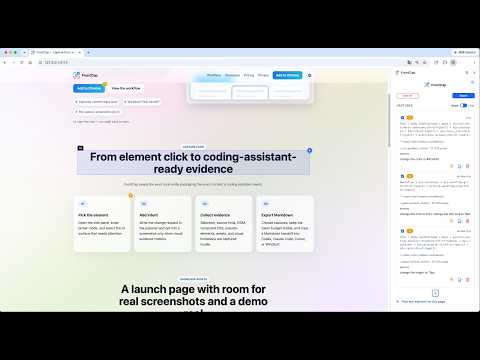
FrontCap helps frontend developers capture the exact UI evidence a coding assistant needs. Select an element on a local build or real webpage, add a short annotation, and export a clean Markdown handoff for tools such as Codex, Claude Code, Cursor, Windsurf, and other assistants that can read Markdown. For each capture, FrontCap can collect: - A selector bundle for the selected element - Source-location hints from the page or framework dev runtime, when available - A sanitized DOM snapshot - Browser-resolved computed CSS - Pseudo-element styles - Visual feature notes and limitations - Asset and media references - An optional element screenshot, saved locally FrontCap is designed for the design-to-code handoff workflow many developers now know from modern tools such as Claude Design, but it is not a Claude Design clone and is not affiliated with Anthropic or Claude. Its job is narrower and more practical: capture precise evidence from the UI already in front of you, then let you paste that evidence into the coding assistant of your choice. Privacy is central to the workflow. FrontCap does not upload captured page content, screenshots, DOM, CSS, or annotations. Captures are processed locally and stored in your browser’s local extension storage; screenshots are saved to your Downloads folder only when you opt in for that capture. Requires Google sign-in. A 14-day free trial is included, with no credit card required to start. After the trial, a paid plan is required to continue using the capture and export features.
0 von 5Keine Bewertungen
Details
- Version1.0.1
- Aktualisiert11. Juni 2026
- FunktionenBietet In-App-Käufe
- Größe687KiB
- Sprachen11 Sprachen
- EntwicklerWenkang LiWebsite
星汇国际大厦西塔11楼, 金穗路8号 广州市, 广东省 510623 CNE-Mail
support@deepblues.appTelefon
+1 304-685-4639 - HändlerDieser Entwickler hat sich gemäß der Definition der Europäischen Union als Händler deklariert und sich verpflichtet, nur Produkte oder Dienstleistungen anzubieten, die den Gesetzen der EU entsprechen.
Datenschutz

FrontCap hat folgende Informationen hinsichtlich der Erhebung und Nutzung deiner Daten offengelegt. Weitere Details findest du im privacy policy des Entwicklers.
FrontCap verarbeitet Folgendes:
Dieser Entwickler erklärt, dass deine Daten
- nicht an Dritte verkauft werden, außer in den genehmigten Anwendungsfällen
- nicht für Zwecke genutzt oder übertragen werden, die nichts mit der Hauptfunktionalität des Artikels zu tun haben
- nicht zur Ermittlung der Kreditwürdigkeit oder für Darlehenszwecke verwendet oder übertragen werden
Support
Wenn du Probleme, Fragen oder Vorschläge hast, rufe die Supportwebsite des Entwicklers auf