Item logo image for FrontCap

FrontCap

frontcap.net
Item media 6 (screenshot) for FrontCap
Item video thumbnail
Item media 2 (screenshot) for FrontCap
Item media 3 (screenshot) for FrontCap
Item media 4 (screenshot) for FrontCap
Item media 5 (screenshot) for FrontCap
Item media 6 (screenshot) for FrontCap
Item video thumbnail
Item media 2 (screenshot) for FrontCap
Item media 3 (screenshot) for FrontCap
Item media 4 (screenshot) for FrontCap
Item media 5 (screenshot) for FrontCap
Item media 6 (screenshot) for FrontCap

Overview

Capture UI evidence as Markdown for Codex, Claude Code, Cursor, and Claude Design style workflows. Local-first.

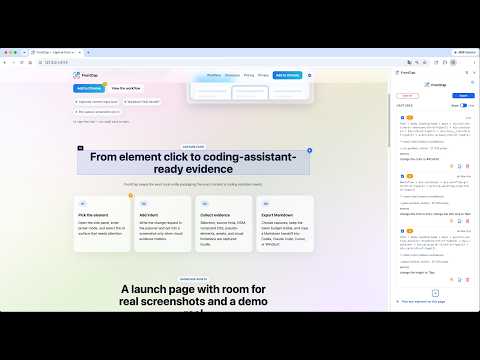
FrontCap is a local-first Chrome extension for Claude Design style and AI-coding workflows. It helps frontend developers capture the exact UI evidence a coding assistant needs: selected elements, annotations, DOM/CSS context, visual details, optional screenshots, and a clean Markdown handoff for tools such as Codex, Claude Code, Cursor, and Windsurf. For each capture, FrontCap can collect: - A selector bundle for the selected element - Source-location hints from the page or framework dev runtime, when available - A sanitized DOM snapshot - Browser-resolved computed CSS - Pseudo-element styles - Visual feature notes and limitations - Asset and media references - An optional element screenshot, saved locally FrontCap is designed for the design-to-code handoff workflow many developers now know from modern tools such as Claude Design, but it is not a Claude Design clone and is not affiliated with Anthropic or Claude. Its job is narrower and more practical: capture precise evidence from the UI already in front of you, then let you paste that evidence into the coding assistant of your choice. Privacy is central to the workflow. FrontCap does not upload captured page content, screenshots, DOM, CSS, or annotations. Captures are processed locally and stored in your browser’s local extension storage; screenshots are saved to your Downloads folder only when you opt in for that capture. Requires Google sign-in. A 14-day free trial is included, with no credit card required to start. After the trial, a paid plan is required to continue using the capture and export features.

Details

  • Version
    1.0.1
  • Updated
    June 11, 2026
  • Features
    Offers in-app purchases
  • Size
    687KiB
  • Languages
    11 languages
  • Developer
    Wenkang Li
    星汇国际大厦西塔11楼, 金穗路8号 广州市, 广东省 510623 CN
    Website
    Email
    support@deepblues.app
    Phone
    +1 304-685-4639
  • Trader
    This developer has identified itself as a trader per the definition from the European Union and committed to only offer products or services that comply with EU laws.

Privacy

Manage extensions and learn how they're being used in your organization

FrontCap has disclosed the following information regarding the collection and usage of your data. More detailed information can be found in the developer's privacy policy.

FrontCap handles the following:

Personally identifiable information
Authentication information
Website content

This developer declares that your data is

  • Not being sold to third parties, outside of the approved use cases
  • Not being used or transferred for purposes that are unrelated to the item's core functionality
  • Not being used or transferred to determine creditworthiness or for lending purposes

Support

For help with questions, suggestions, or problems, visit the developer's support site

Related

SnapPrompt

0.0

Turn any UI component into an AI-ready prompt for Cursor, Claude Code, and v0.

React Yank

0.0

Yank UI elements & send to AI agents like Cursor, Claude Code, Copilot & more

PikSpec – Build with AI · CSS & Font Finder

5.0

Turn any website's design into a ready kit for Claude, Cursor and Codex. Inspect CSS, fonts and colors; export tokens and DESIGN.md.

AIClips

0.0

Capture code snippets, screenshots, page content and more for pasting into Claude Code and other AI tools.

DESIGN.md extractor by getdesignsystem.io

5.0

Extract design systems from any website. Get tokens for Claude, Cursor, and other AI coding agents.

AI Usage Monitor

0.0

Read Cursor, Codex, Claude, and optionally Devin usage pages and show metrics in the extension popup.

Pico UI Spec & Tailwind Prompt Exporter

0.0

Export a UI spec and Tailwind prompt for Claude Code or Cursor in 1 click.

Web to MCP: Import any website components to Cursor or Claude Code

3.7

A Chrome extension that captures website components and sends them to AI coding assistants like Cursor, Claude Code, Codex, etc

Vibe Annotations - Visual Feedback for AI Coding Agents

5.0

Visual annotations for localhost dev projects. Send feedback to AI coding agents like Claude & Cursor via MCP.

Claude Code Companion

0.0

Essential toolkit for Claude Code developers. CLAUDE.md generator, token counter, prompt templates, and quick reference.

Relay: Capture to Code

0.0

Capture a page, add a note, and prepare a cloud coding task in Claude or Codex.

CSS Class Highlighter: CSS Inspector

0.0

Inspect CSS, highlight classes, compare styles, and explore design tokens. A developer workbench by CodeHorizon.

SnapPrompt

0.0

Turn any UI component into an AI-ready prompt for Cursor, Claude Code, and v0.

React Yank

0.0

Yank UI elements & send to AI agents like Cursor, Claude Code, Copilot & more

PikSpec – Build with AI · CSS & Font Finder

5.0

Turn any website's design into a ready kit for Claude, Cursor and Codex. Inspect CSS, fonts and colors; export tokens and DESIGN.md.

AIClips

0.0

Capture code snippets, screenshots, page content and more for pasting into Claude Code and other AI tools.

DESIGN.md extractor by getdesignsystem.io

5.0

Extract design systems from any website. Get tokens for Claude, Cursor, and other AI coding agents.

AI Usage Monitor

0.0

Read Cursor, Codex, Claude, and optionally Devin usage pages and show metrics in the extension popup.

Pico UI Spec & Tailwind Prompt Exporter

0.0

Export a UI spec and Tailwind prompt for Claude Code or Cursor in 1 click.

Web to MCP: Import any website components to Cursor or Claude Code

3.7

A Chrome extension that captures website components and sends them to AI coding assistants like Cursor, Claude Code, Codex, etc

Google apps