

Freshdesk Contact Center - Click to Call
2 rating
)
Pangkalahatang-ideya
Click to call your prospects or phone numbers on a webpage with this extension.
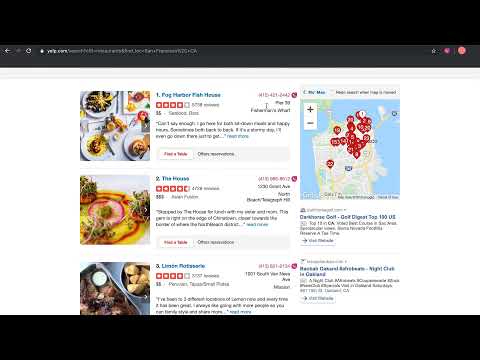
Click to call from anywhere Hate copy-pasting numbers every single time while making a call from a webpage? Here is a little something that can help you! “Click to Call” any phone number listed on a website you are browsing with Freshcaller. This Chrome extension highlights (in Fuchsia) the phone numbers on a website and displays the Freshcaller logo right there for you to place the call. How do you Click to Call? Install the chrome extension by clicking the Add to Chrome button listed on this page. Sign in to your Freshcaller account from the overlay that opens up. After a successful login, you will see the lock symbol disappear from the extension logo. Now, you will see the phone number(s) on your web page highlighted(in Fuschia). Click on the highlighted number to place the call. The Freshcaller dial pad pops up for you to place the call right within the website. And, there you go. You can click and call instantly via Freshcaller. Feature capabilities Instant communication: Every highlighted number on a website is dialable without having to switch tabs Custom preferences: Exclude websites or pages on which you don’t want the phone numbers to be highlighted Choose to hide or show the Freshcaller logo to appear beside the highlighted numbers End to end coverage: Identifies and highlights all the phone numbers listed on a webpage to make it convenient for you to dial the phone number that’s most relevant to you.
5 sa 52 rating
Mga Detalye
- Bersyon1.51
- Na-updateHulyo 12, 2022
- Iniaalok ngctc---internal
- Laki167KiB
- Mga WikaEnglish (United Kingdom)
- Developer
Email
riyazdeen.abdulrazak@freshworks.com - Hindi traderHindi tinukoy ng developer na ito ang sarili bilang trader. Para sa mga consumer sa European Union, pakitandaang hindi naaangkop ang mga karapatan ng consumer sa mga kontrata sa pagitan mo at ng developer na ito.
Privacy
Ipinapahayag ng developer na ito na ang iyong data ay
- Hindi ibinebenta sa mga third party na hindi kabilang sa mga naaprubahang sitwasyon ng paggamit
- Hindi ginagamit o inililipat para sa mga layuning hindi nauugnay sa pangunahing functionality ng item
- Hindi ginagamit o inililipat para tukuyin ang pagiging creditworthy o para sa mga layunin ng pagpapautang