


Overview
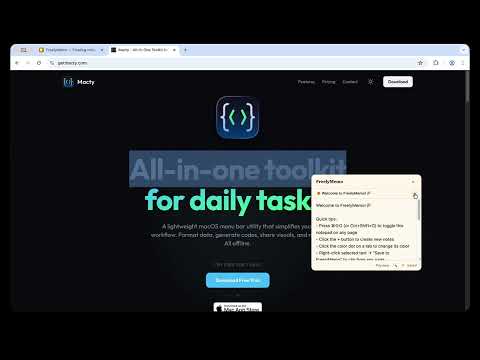
A floating notepad on every tab. Press ⌘⇧O, jot your thought, keep browsing. Free trial available, no account needed.
FreelyMemo is a floating notepad that lives on every browser tab. Press ⌘⇧O from anywhere to open it, type a thought or clip selected text, and close it without leaving the page. Key Features: • One shortcut, anywhere — Press ⌘⇧O on any tab to toggle your notepad • Multiple notes — Create, switch, and organize with color-coded tabs • Tag system — Add tags to categorize and find notes quickly • Clip from any page — Right-click selected text → "Save to FreelyMemo" • Auto-save — Notes save automatically as you type • Cross-device sync — Sync notes across browsers with end-to-end encryption (Pro) • 100% private — All data stays in your browser by default. Sync is optional and fully encrypted • Works offline — No internet needed for core features 7-Day Free Trial: Try everything free for 7 days — unlimited notes, full-text search, export, and more. No credit card required. Pro ($2.99 one-time): • Unlimited notes and tabs • Cross-device sync with end-to-end encryption • Full-text search across all notes • Export to Markdown or JSON • Priority support and updates • Lifetime access — pay once, use forever Your notes are stored locally using your browser's built-in storage. Pro users can optionally enable cross-device sync — notes are encrypted on your device before transmission, so we never see your content. Works across Chrome and Firefox.
5 out of 56 ratings
Details
- Version1.6.0
- UpdatedAugust 3, 2026
- FeaturesOffers in-app purchases
- Size437KiB
- LanguagesEnglish (United States)
- Developer
- Non-traderThis developer has not identified itself as a trader. For consumers in the European Union, please note that consumer rights do not apply to contracts between you and this developer.
Privacy

This developer declares that your data is
- Not being sold to third parties, outside of the approved use cases
- Not being used or transferred for purposes that are unrelated to the item's core functionality
- Not being used or transferred to determine creditworthiness or for lending purposes
Support
For help with questions, suggestions, or problems, visit the developer's support site