


Overview
View employer profile, project filtering by country, AI bid generation, and productivity enhancements for freelancer.com.
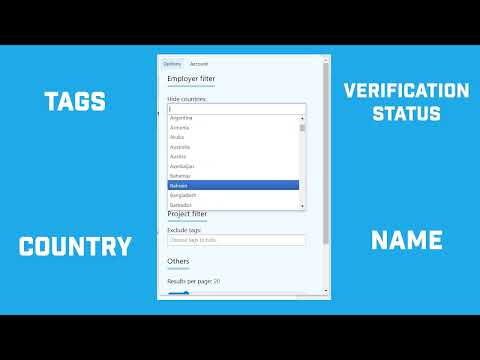
This extension makes using freelancer.com an easier and less frustrating experience. Hopefully it will save you lots of time and stress. View employer name, link to their profile, statistics about projects awarded. This helps you find out who the owner of the project is, what their reviews are, in order to make a better decision before you place a bid. This feature is available on a free tier with usage limits. If you need an unlimited amount of employer name checks, please purchase the Basic tier in the Account tab in the extension's popup. Project Feed - Monitor the project feed for new projects posted on the site - Set up filters for your employer preferences, country, project budget, skills and others - Receive a desktop notification what a project that meets your criteria is posted - Be the first bidder and increase your chances of being awarded the project Project Filters - Hide projects from employers basing on what country they are from. Unfortunately we all know there are some countries with an ungodly amount of spam projects. - Hide projects basing on what tags the project has or on employer verifications. - Increase the amount of projects shown on the search page from the default of 10. This is especially useful if your other filters remove many projects and you are often left with none. - Open the project attachments in the browser - Only show projects with a maximum of some bids - Show employer country flag on the search page. AI Bids (A limited number of AI bid generations on Free tier, and no limit on the Unlimited tier): - Speed up your bidding process with AI-generated proposals - You don't have to spend time and effort writing a convincing bid for the project. Our tool will deliver a personalized bid for you in seconds. - The bid will be customized to the project's description - If you choose, you can also attach your Profile Description + Profile Tagline. This will make the bid more personal, it will include your own experiences and skills. - The 'Create bid' button will appear on the bidding page, above the bid text area. We do everything we can to make the extension work great. But the UI of the website changes sometimes without our control, that's why we cannot guarantee that all the features will always work. FAQ Q: I'm not seeing any results in the project search. Why? A: The Filters feature removes projects which don't meet your criteria from view. But it doesn't show projects from next pages. What you can do is increase the number of projects shown on the page up to 100. If you still don't see any results, please contact support. Q: I'm not seeing the employer profile on project page. Why? A: Please make sure that you have the latest extension version installed, and that you haven't reached your daily limit if you are a free user. Also, in rare cases, the extension may not be able to find the employer profile, then it will show a "Employer unknown" text. Q: I'm not seeing the "Create bid" button or the Employer profile. Why? A: Please make sure that you are on the "freelancer.com" domain, not e.g. "freelancer.in". We only support that domain for now. Neither this extension nor its author are in any way affiliated with freelancer.com
4.1 out of 526 ratings
Details
- Version2.7.5
- UpdatedOctober 17, 2026
- FeaturesOffers in-app purchases
- Size310KiB
- LanguagesEnglish
- Developer
- Non-traderThis developer has not identified itself as a trader. For consumers in the European Union, please note that consumer rights do not apply to contracts between you and this developer.
Privacy

Freelancer Helper has disclosed the following information regarding the collection and usage of your data. More detailed information can be found in the developer's privacy policy.
Freelancer Helper handles the following:
This developer declares that your data is
- Not being sold to third parties, outside of the approved use cases
- Not being used or transferred for purposes that are unrelated to the item's core functionality
- Not being used or transferred to determine creditworthiness or for lending purposes
Support
For help with questions, suggestions, or problems, please open this page on your desktop browser