


概述
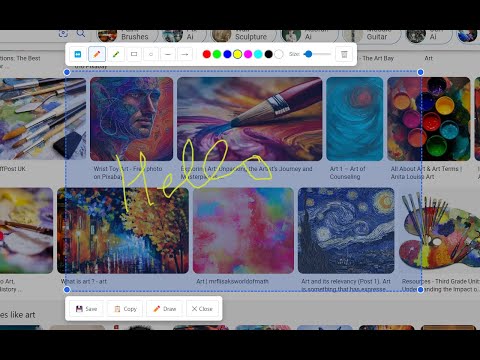
Professional snipping tool with full page, selection, and scrolling capture capabilities
Free Snipping Tool - Screenshot & Screen Capture Powerful screenshot tool and screen capture extension for Chrome. Take full page screenshots, snip selected areas, capture scrolling pages, and annotate images instantly. Perfect for web developers, designers, and professionals who need quick, high-quality screen captures. ✅ Key Features: Full page screenshot - capture entire webpages including content below the fold Snipping tool - select and capture specific areas with precision Scrolling screenshot - automatically capture long pages and infinite scroll content Desktop app integration - seamlessly connect with advanced editing features No registration required - start capturing immediately after installation ✅ Perfect for: Creating tutorials and documentation Bug reporting and feedback Web design and development Research and content creation Social media and presentation materials ✅ Advanced Capabilities: Multiple capture modes (visible area, selected region, full page) Direct integration with cloud storage (Google Drive, Dropbox) Professional annotation and editing tools Instant sharing and collaboration features High-resolution image export (PNG) Join thousands of users who trust Free Snipping Tool for professional screenshot needs. Install now and experience the most comprehensive screen capture solution for Chrome!
3.9 星(5 星制)7 个评分
详情
隐私权

该开发者已声明,您的数据:
- 不会因未获批准的用途出售给第三方
- 不会为实现与产品核心功能无关的目的而使用或转移
- 不会为确定信用度或放贷目的而使用或转移