

Free Snipping Tool

Overview
Professional snipping tool with full page, selection, and scrolling capture capabilities
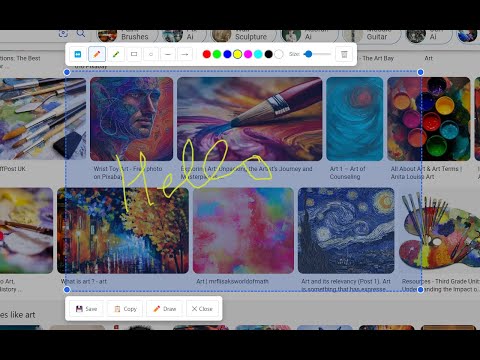
Free Snipping Tool - Screenshot & Screen Capture Powerful screenshot tool and screen capture extension for Chrome. Take full page screenshots, snip selected areas, capture scrolling pages, and annotate images instantly. Perfect for web developers, designers, and professionals who need quick, high-quality screen captures. ✅ Key Features: Full page screenshot - capture entire webpages including content below the fold Snipping tool - select and capture specific areas with precision Scrolling screenshot - automatically capture long pages and infinite scroll content Desktop app integration - seamlessly connect with advanced editing features No registration required - start capturing immediately after installation ✅ Perfect for: Creating tutorials and documentation Bug reporting and feedback Web design and development Research and content creation Social media and presentation materials ✅ Advanced Capabilities: Multiple capture modes (visible area, selected region, full page) Direct integration with cloud storage (Google Drive, Dropbox) Professional annotation and editing tools Instant sharing and collaboration features High-resolution image export (PNG) Join thousands of users who trust Free Snipping Tool for professional screenshot needs. Install now and experience the most comprehensive screen capture solution for Chrome!
3.9 out of 57 ratings
Details
- Version7.8
- UpdatedJuly 25, 2025
- Size1.09MiB
- LanguagesEnglish
- DeveloperWebsite
Email
m.qayyum@live.com - Non-traderThis developer has not identified itself as a trader. For consumers in the European Union, please note that consumer rights do not apply to contracts between you and this developer.
Privacy

This developer declares that your data is
- Not being sold to third parties, outside of the approved use cases
- Not being used or transferred for purposes that are unrelated to the item's core functionality
- Not being used or transferred to determine creditworthiness or for lending purposes